
GoG Sky
A Botania Garden of Glass Skybox Port for Fabric
Screenshots
About this Mod
GoG Sky
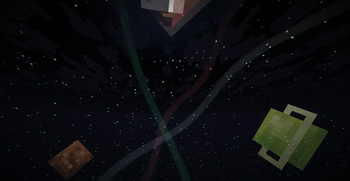
GoG Sky is a standalone port of the beautiful and dynamic skybox from the "Garden of Glass" mode in Vazkii's Botania mod.
This mod brings the breathtaking celestial visuals—including vibrant planets, auroras, and extra stars—to Fabric 1.21.8 without needing the full Botania mod installed.
✨ Features
- Enhanced Starfield: A multi-layered, rotating starfield that adds incredible depth to the night sky.
- Visible Planets: Six unique planets become visible as the sun sets, each with its own orbit and appearance.
- Celestial Auroras: Ethereal rays of light dance across the sky during the night.
- Rainbows: A rare and beautiful rainbow may appear in the sky.
- Enlarged Celestials: A larger, more impressive sun and moon.
- Standalone & Lightweight: No dependencies other than the Fabric API.
📜 Credits & License
This mod is an unofficial port and would not be possible without the incredible work of the original creator.
- Original Mod: Botania
- Original Author: Vazkii
- License: The code and assets are used under the terms of the Botania License. You can read the full license here: http://botaniamod.net/license.php
In accordance with the Botania License's Copyleft Clause, this project is open source and free to share.
- Source Code: https://github.com/bsfdsagfadg/gog-sky
🐛 Issues
If you encounter any bugs or visual glitches, please report them on the Issue Tracker.
This is a fan-made port and is not affiliated with or endorsed by Vazkii.
Available Versions
How to Install GoG Sky on Your Server
Order Server
Order a Minecraft Java server with at least 3 GB RAM (4 GB recommended).
Set fabric Loader
In the panel under "Egg", select the fabric loader and matching Minecraft version (1.21.11).
Install Mod
Open the mod browser in the dashboard and search for "GoG Sky". Click "Install" – done! Alternatively, upload the .jar via SFTP to the /mods folder.
Compatibility
Mod Loaders
Minecraft Versions
1.21.11, 1.21.10, 1.21.9 (+1 more)
Server-side
✗ UnsupportedRecommended RAM
4 GB(min. 3 GB)Frequently Asked Questions
GoG Sky server crashes on startup – what to do?
Most common cause: wrong fabric version or insufficient RAM. Check the server log (latest.log) for "OutOfMemoryError" or "Mixin" errors. With Mado Hosting: ensure at least 3 GB RAM is allocated and the loader matches the mod version (1.21.11). You can switch loaders with one click in the panel.
Is GoG Sky compatible with fabric?
GoG Sky officially supports fabric for Minecraft 1.21.11, 1.21.10, 1.21.9. The Mado dashboard automatically detects incompatible loader combinations.
Server lagging with GoG Sky – how to optimize performance?
Recommended RAM: 4 GB (per 8 players). Use /spark profiler to check if GoG Sky consumes the most tick time. Common fixes: reduce server view-distance to 8-10, install "performant" or "starlight" as supplementary mods on Forge. With Mado Hosting, your server runs on NVMe SSDs with dedicated CPU cores for minimal latency.
Similar Mods

![[ETF] Entity Texture Features](https://cdn.modrinth.com/data/BVzZfTc1/af683d206d50b05258d865b0d6e4aa2f2cee12f2_96.webp)
![[EMF] Entity Model Features](https://cdn.modrinth.com/data/4I1XuqiY/6e5bbd0d06b1741bfdab6c0cfab6de8fdaf0064c_96.webp)



Rent Modded Server
Install GoG Sky with just one click on your server.