
Good Compression
Beta 1.7.3 mod that adds compressed blocks such as Stone Bricks, Hay Bales, Coal Blocks, and Redstone Blocks.
Screenshots


About this Mod
Good Compression



Beta 1.7.3 mod to add compressed blocks such as Stone Bricks, Hay Bales, Coal Blocks, and Redstone Blocks.
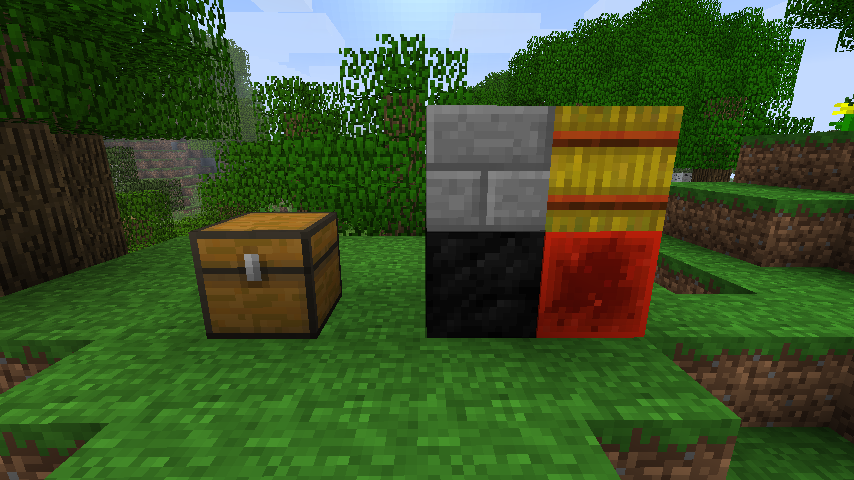
Blocks
Stone Bricks
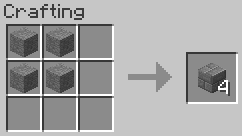
4x Stone → 4x Stone Bricks. Stacks to 64x.
Hay Bale
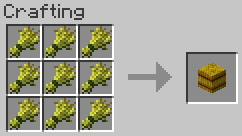
9x Wheat → 1x Hay Bale. Stacks to 64x.
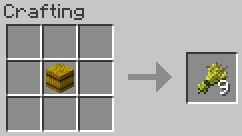
1x Hay Bale → 9x Wheat.
Coal Block
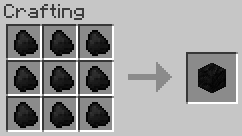
9x Coal → 1x Coal Block. Stacks to 64x.
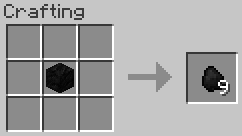
1x Coal Block → 9x Coal.
Redstone Block
The redstone blocks function properly as redstone blocks, though behaviour may differ slightly to newer versions of the
game. See technical notes below for more details.
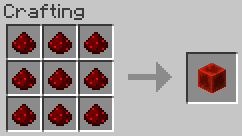
9x Redstone → 1x Redstone Block. Stacks to 64x.
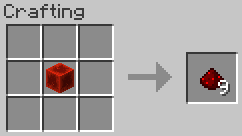
1x Redstone Block → 9x Redstone.
Requirements
- Minecraft Beta 1.7.3
- Babric
- StationAPI
- Fabric Language Kotlin
- Glass Config API
- Good Asset Fetcher
Recommended
- Mod Menu Babric (for in-game configuration)
Configuration
The mod's configuration can be configured in-game (if Mod Menu Babric is
installed) or in .minecraft/config/good-compression/good-compression.yml. The redstone dust tweak can be disabled
without having to uninstall the mod:
redstoneDustOnTopOfBlocks: false
Technical notes
Assets
The mod obtains assets from Minecraft 1.12.2 dynamically on startup, thanks to
Good Asset Fetcher. This allows the mod to utilise textures from other
versions of the game without having to include them in its own source code or jar, avoiding licensing risks.
To replace the assets with your own texture pack or resource pack, they must be placed in:assets/good-compression/stationapi/textures/block
Redstone Blocks
The Redstone Blocks have a material of 'Glass'. The reason for this is that, in this version, the game's redstone logic
prevents solid blocks from transmitting redstone. Furthermore, some mods, such as
NyaLib, make tweaks to the game's redstone logic which bypasses this material
check. To maintain maximum compatibility without affecting the game's redstone code (modded or not), we chose to go with
making the block transparent as it originally was in the first few post-release versions.
In order to allow placing redstone dust on top of the transparent Redstone Block, a tag has been added:good-compression/redstone_dust_placeable. Blocks with this tag will allow redstone dust to be placed on top of them,
even if they otherwise fail the placement test.
License
This mod is licensed under the MIT license. Assets are obtained dynamically at runtime in compliance with
Minecraft's license.
Available Versions
How to Install Good Compression on Your Server
Order Server
Order a Minecraft Java server with at least 3 GB RAM (4 GB recommended).
Set babric Loader
In the panel under "Egg", select the babric loader and matching Minecraft version (b1.7.3).
Install Mod
Open the mod browser in the dashboard and search for "Good Compression". Click "Install" – done! Alternatively, upload the .jar via SFTP to the /mods folder.
Compatibility
Mod Loaders
Minecraft Versions
b1.7.3
Server-side
✓ RequiredRecommended RAM
4 GB(min. 3 GB)Frequently Asked Questions
Good Compression server crashes on startup – what to do?
Most common cause: wrong babric version or insufficient RAM. Check the server log (latest.log) for "OutOfMemoryError" or "Mixin" errors. With Mado Hosting: ensure at least 3 GB RAM is allocated and the loader matches the mod version (b1.7.3). You can switch loaders with one click in the panel.
Is Good Compression compatible with babric and fabric?
Good Compression officially supports babric, fabric for Minecraft b1.7.3. The Mado dashboard automatically detects incompatible loader combinations.
Server lagging with Good Compression – how to optimize performance?
Recommended RAM: 4 GB (per 8 players). Use /spark profiler to check if Good Compression consumes the most tick time. Common fixes: reduce server view-distance to 8-10, install "performant" or "starlight" as supplementary mods on Forge. With Mado Hosting, your server runs on NVMe SSDs with dedicated CPU cores for minimal latency.
Similar Mods

![[ETF] Entity Texture Features](https://cdn.modrinth.com/data/BVzZfTc1/af683d206d50b05258d865b0d6e4aa2f2cee12f2_96.webp)
![[EMF] Entity Model Features](https://cdn.modrinth.com/data/4I1XuqiY/6e5bbd0d06b1741bfdab6c0cfab6de8fdaf0064c_96.webp)



Rent Modded Server
Install Good Compression with just one click on your server.