
Good Death Messages
Beta 1.7.3 mod that adds death messages faithful to newer versions of Minecraft.
Screenshots

About this Mod
Good Death Messages



Beta 1.7.3 mod that adds death messages faithful to newer versions of Minecraft. Works in both singleplayer and
multiplayer.
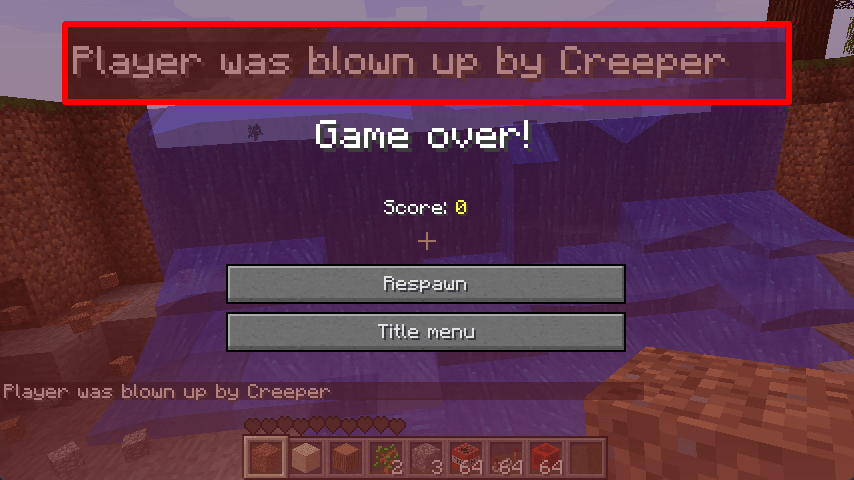
Adds the following death messages:
<player> died<player> fell out of the world<player> hit the ground too hard<player> fell from a high place<player> fell off a ladder<player> was slain by <entity><player> was shot by <player><player> was pummeled by <entity><player> was blown up by <entity><player> was blew up<player> was fireballed by <entity><player> was pricked to death<player> was struck by lightning<player> was killed by [Intentional Game Design]<player> drowned<player> burned to death<player> suffocated in a wall
And includes some additional non-standard messages, which can be disabled:
<player> was mauled to bits by <player>'s <wolf><player> was mauled to bits by <wolf><player> belly flopped into a puddle<player> drowned to a crisp
Compatibility
MoreChatMessages v1.4 and higher will automatically disable its own death
messages feature if Good Death Messages is installed, regardless of either mod's config.
Requirements
- Minecraft Beta 1.7.3
- Babric
- StationAPI
- Fabric Language Kotlin
- Glass Config API
Recommended
- Mod Menu Babric (for in-game configuration)
Configuration
The mod's configuration can be configured in-game (if Mod Menu Babric is
installed) or in .minecraft/config/good-death-messages/good-death-messages.yml.
deathMessagesEnabled: true

# Enables Good Death Messages' own additional death messages.
# Does not affect any other mods adding their own death messages.
customDeathMessagesEnabled: true
Translations
Currently, messages are only in en_US. If you would like to provide localization for a language, contribute
here.
License
This mod is licensed under the MIT license.
Available Versions
How to Install Good Death Messages on Your Server
Order Server
Order a Minecraft Java server with at least 3 GB RAM (4 GB recommended).
Set babric Loader
In the panel under "Egg", select the babric loader and matching Minecraft version (b1.7.3).
Install Mod
Open the mod browser in the dashboard and search for "Good Death Messages". Click "Install" – done! Alternatively, upload the .jar via SFTP to the /mods folder.
Compatibility
Mod Loaders
Minecraft Versions
b1.7.3
Server-side
✓ RequiredRecommended RAM
4 GB(min. 3 GB)Frequently Asked Questions
Good Death Messages server crashes on startup – what to do?
Most common cause: wrong babric version or insufficient RAM. Check the server log (latest.log) for "OutOfMemoryError" or "Mixin" errors. With Mado Hosting: ensure at least 3 GB RAM is allocated and the loader matches the mod version (b1.7.3). You can switch loaders with one click in the panel.
Is Good Death Messages compatible with babric and fabric?
Good Death Messages officially supports babric, fabric for Minecraft b1.7.3. The Mado dashboard automatically detects incompatible loader combinations.
Server lagging with Good Death Messages – how to optimize performance?
Recommended RAM: 4 GB (per 8 players). Use /spark profiler to check if Good Death Messages consumes the most tick time. Common fixes: reduce server view-distance to 8-10, install "performant" or "starlight" as supplementary mods on Forge. With Mado Hosting, your server runs on NVMe SSDs with dedicated CPU cores for minimal latency.
Similar Mods




Rent Modded Server
Install Good Death Messages with just one click on your server.