
GPP
A Minecraft interpretation of the Pokemon GO Plus+ accessory.
Screenshots
About this Mod
GPP
This is a data pack that adds an item called a GPP.
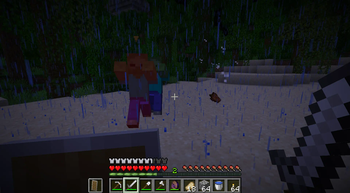
The GPP interacts with the world on behalf of the player. While active, it attacks mobs that are targeting the player and grants experience orbs for sleeping. Only one GPP can be active for each player at a time.
Using
To activate or deactivate a GPP, hold it in your hand and press the use key (right-click by default). The GPP item will appear enchanted while it is active.
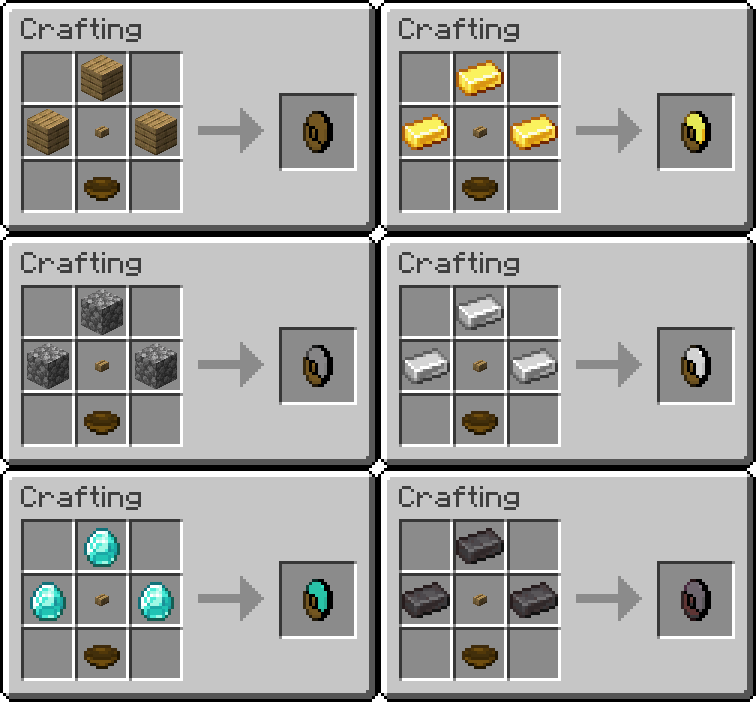
Crafting

(Netherite is crafted instead of smithed due to current smithing limitations.)
*Copper not listed yet
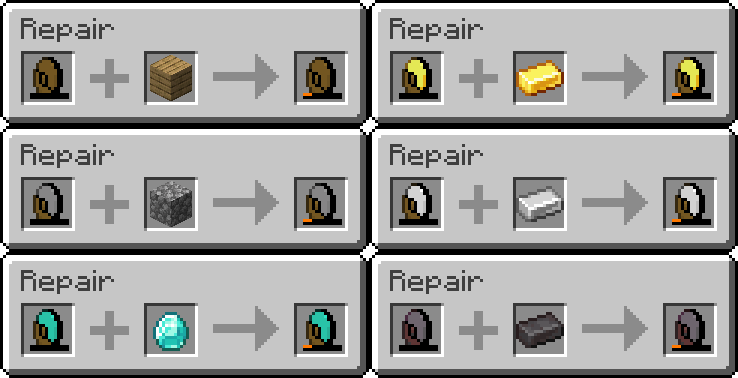
Durability
Each GPP has a different durability, relative to its material. Durability will reduce by 1 per successful mob hit. All tiers become unusable when they reach 0 durability. They must be repaired in an anvil using the associated material.

Targeting
A GPP can target only one mob at a time. The target is the nearest mob that is targeting the player, excluding certain mobs that you may not want to damage (certain neutral mobs, and mobs that are nametagged).
The GPP uses a 0.6s (12t) attack speed cooldown, as vanilla swords have. After a GPP has damaged a mob 10 times, it forgets its target and seeks a new one. It can rediscover the same target.
Sleep Experience
Whenever a player helps skip nighttime by sleeping, that player receives experience orbs upon waking. The experience received is relative to the player's active GPP tier (exp = tier2).
Stats
GPPs use the following values. They can't be enchanted and ignore any effects the player has.
| Stat | Golden | Wooden | Stone | Iron | Diamond | Netherite | Copper |
|---|---|---|---|---|---|---|---|
| Attack Damage | ♥♥ | ♥♥ | ♥♥½ | ♥♥♥ | ♥♥♥½ | ♥♥♥♥ | ♥♥½ |
| Durability | 32 | 59 | 131 | 250 | 1561 | 2031 | 190 |
| Sleep Exp | 36 | 1 | 4 | 9 | 16 | 25 | 4 |
Gold has been given the highest tier for experience drop calculation, due to its lacking power and toughness. Values are subject to change with additional functionality.
Available Versions
How to Install GPP on Your Server
Order Server
Order a Minecraft Java server with at least 3 GB RAM (4 GB recommended).
Set datapack Loader
In the panel under "Egg", select the datapack loader and matching Minecraft version (1.21.10).
Install Mod
Open the mod browser in the dashboard and search for "GPP". Click "Install" – done! Alternatively, upload the .jar via SFTP to the /mods folder.
Compatibility
Mod Loaders
Minecraft Versions
1.21.10, 1.21.9, 1.21.8 (+3 more)
Server-side
✓ RequiredRecommended RAM
4 GB(min. 3 GB)Frequently Asked Questions
GPP server crashes on startup – what to do?
Most common cause: wrong datapack version or insufficient RAM. Check the server log (latest.log) for "OutOfMemoryError" or "Mixin" errors. With Mado Hosting: ensure at least 3 GB RAM is allocated and the loader matches the mod version (1.21.10). You can switch loaders with one click in the panel.
Is GPP compatible with datapack and fabric and forge and neoforge and quilt?
GPP officially supports datapack, fabric, forge, neoforge, quilt for Minecraft 1.21.10, 1.21.9, 1.21.8. Note: Forge and Fabric mods are NOT cross-compatible – pick one loader and stick with it. The Mado dashboard automatically detects incompatible loader combinations.
Server lagging with GPP – how to optimize performance?
Recommended RAM: 4 GB (per 8 players). Use /spark profiler to check if GPP consumes the most tick time. Common fixes: reduce server view-distance to 8-10, install "performant" or "starlight" as supplementary mods on Forge. With Mado Hosting, your server runs on NVMe SSDs with dedicated CPU cores for minimal latency.
Similar Mods




![[ETF] Entity Texture Features](https://cdn.modrinth.com/data/BVzZfTc1/af683d206d50b05258d865b0d6e4aa2f2cee12f2_96.webp)
![[EMF] Entity Model Features](https://cdn.modrinth.com/data/4I1XuqiY/6e5bbd0d06b1741bfdab6c0cfab6de8fdaf0064c_96.webp)
Rent Modded Server
Install GPP with just one click on your server.