
GrabAndGo
Grab, carry, and travel! Seamlessly lift and transport mobs and blocks with this lightweight, immersive mod. หยิบ ยก ย้าย! Mod ที่ช่วยให้คุณอุ้ม Mob และบล็อกต่างๆ ได้อย่างสมจริงและราบรื่นที่สุด
Screenshots
About this Mod
GrabAndGo: ยกทุกสิ่ง ไปทุกที่!
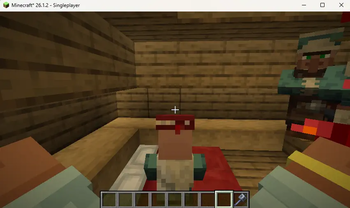
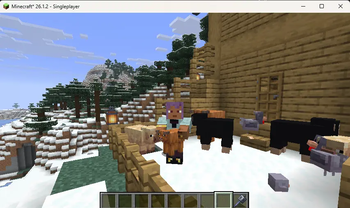
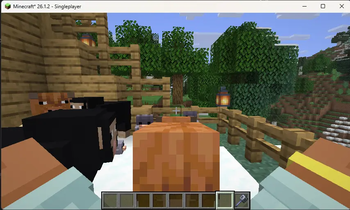
เบื่อไหมกับการลากจูง Mob หรือขนของแบบเดิมๆ? GrabAndGo จะเปลี่ยนประสบการณ์การเล่น Minecraft ของคุณไปตลอดกาล! ด้วย Mod นี้ คุณสามารถ "อุ้ม" เอนทิตี้และบล็อกต่างๆ ขึ้นมาถือไว้ในมือได้อย่างสมจริง พร้อมมุมมอง First-Person สุดล้ำที่ให้คุณเห็นมือตัวเองกำลังโอบประคองน้อง Mob หรือบล็อกชิ้นโปรดไว้อย่างใกล้ชิด
ฟีเจอร์เด็ด:
Immersive Carrying: ยก Mob และบล็อกได้ทุกประเภทด้วยท่าทางที่สมจริง
First-Person View: ดื่มด่ำกับการผจญภัยผ่านมุมมองที่เห็นมือตัวละครของคุณอุ้มของไว้จริงๆ
Smooth & Lightweight: ทำงานลื่นไหล ไม่กินสเปก เหมาะสำหรับทุกการเล่น!
วิธีการใช้งาน (How to Use)
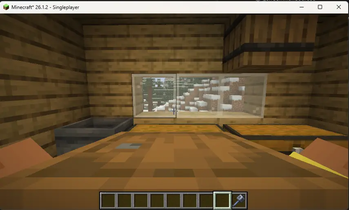
การหยิบใช้งาน: เพียงแค่ ย่อตัว (Sneak/Shift) ค้างไว้ และตรวจสอบให้แน่ใจว่า มือข้างที่จะใช้งานนั้นว่างอยู่ จากนั้นเล็งเป้าหมายไปที่บล็อกที่ต้องการ (เช่น หีบหรือถัง) แล้วทำการคลิกเพื่อยกขึ้นมาครับ
คำแนะนำเพิ่มเติม: เพื่อความสะดวกในการใช้งาน โปรดตรวจสอบให้แน่ใจว่ามือของคุณไม่ได้ถือไอเทมใดๆ อยู่ ก่อนทำการหยิบบล็อกขึ้นมาครับ
GrabAndGo: Carry anything, anywhere!
Tired of the same old dragging mechanics? Elevate your Minecraft journey with GrabAndGo! This mod lets you pick up and transport mobs and blocks with unparalleled realism. Experience an immersive First-Person view where you can see your own hands cradling your favorite mobs or precious blocks.
Key Features:
Immersive Carrying: Seamlessly lift and carry various entities and blocks.
First-Person View: See your character's hands in action for a truly immersive experience.
Smooth & Lightweight: Designed for seamless performance without compromising your gameplay.
How to Use
Picking up: Simply Sneak (Shift) and ensure your hand is empty. Then, aim at the target block (e.g., Chest or Barrel) and interact to lift it.
Important Note: Please make sure your hand is completely free before attempting to grab; you cannot lift blocks while holding another item.
Available Versions
How to Install GrabAndGo on Your Server
Order Server
Order a Minecraft Java server with at least 3 GB RAM (4 GB recommended).
Set fabric Loader
In the panel under "Egg", select the fabric loader and matching Minecraft version (26.2).
Install Mod
Open the mod browser in the dashboard and search for "GrabAndGo". Click "Install" – done! Alternatively, upload the .jar via SFTP to the /mods folder.
Compatibility
Mod Loaders
Minecraft Versions
26.2, 26.1.2
Server-side
✓ RequiredRecommended RAM
4 GB(min. 3 GB)Frequently Asked Questions
GrabAndGo server crashes on startup – what to do?
Most common cause: wrong fabric version or insufficient RAM. Check the server log (latest.log) for "OutOfMemoryError" or "Mixin" errors. With Mado Hosting: ensure at least 3 GB RAM is allocated and the loader matches the mod version (26.2). You can switch loaders with one click in the panel.
Is GrabAndGo compatible with fabric?
GrabAndGo officially supports fabric for Minecraft 26.2, 26.1.2. The Mado dashboard automatically detects incompatible loader combinations.
Server lagging with GrabAndGo – how to optimize performance?
Recommended RAM: 4 GB (per 8 players). Use /spark profiler to check if GrabAndGo consumes the most tick time. Common fixes: reduce server view-distance to 8-10, install "performant" or "starlight" as supplementary mods on Forge. With Mado Hosting, your server runs on NVMe SSDs with dedicated CPU cores for minimal latency.
Similar Mods
![[EMF] Entity Model Features](https://cdn.modrinth.com/data/4I1XuqiY/6e5bbd0d06b1741bfdab6c0cfab6de8fdaf0064c_96.webp)


Rent Modded Server
Install GrabAndGo with just one click on your server.