
About this Mod
Graffiti started as a mod made for the MMD Birthday Jam - and it won! :D
This mod is all about art. You can freely write and draw on the walls, and share your creations with the world!
What you can do right now!
You can write and draw freely on the walls, floor, and ceiling! Right-click anywhere with your pen to make a drawable area, then right-click it again to open the text editor. Alternatively, shift-right click air to switch to free drawing mode, where you can right-click to directly draw on the block. Bonus points; if you set a second pen in your offhand, you can write and draw with that pen using left-click! This only works in Survival mode unfortunately!
Each blockspace supports up to 6 Canvases, so you can draw in corners without limiting your creativity!
Additionally, you can use the Canvas Editor to, as the name suggests, modify your drawn-on block! Ok, it's not really a canvas, but to a graffiti artist the whole city is a canvas, so it's a canvas!
This is what truly opens up the mod, allowing you to rescale the canvas (between 16x16 up to 128x128), modify the already-written text, and import or export your art to share with friends!
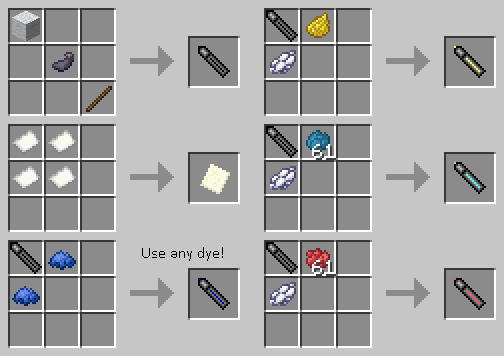
Recipes are pretty simple! Make a Black pen to start, then recolour it by placing two of the same colour dye beside it. There is a pen for each of the 16 dyes, plus three additionals for Minecraft text colour codes which don't exist in dye form.
Import & Export
All your art can be exported at any time to a .json file, placed in your Minecraft directory. This json file contains everything about your art, such as pixels, texts and a bit of additional info.
Likewise, you can import art by dropping a valid .json file into that same directory! I advise against trying to edit the .json file itself (although if people want it, I am considering making an external editor outside of the game for it. Let me know!)
Caveats/Known issues
Performance with a lot of graffiti blocks in one area hasn't been extensively tested. Especially if you use lots of 128x canvases on a server, expect at least a bit of a hit when loading an area - possibly even FPS drops overall.
Please report back what issues you encounter!
Finally, some example art!
These were drawn by Rdishong03 using Version 1.2!
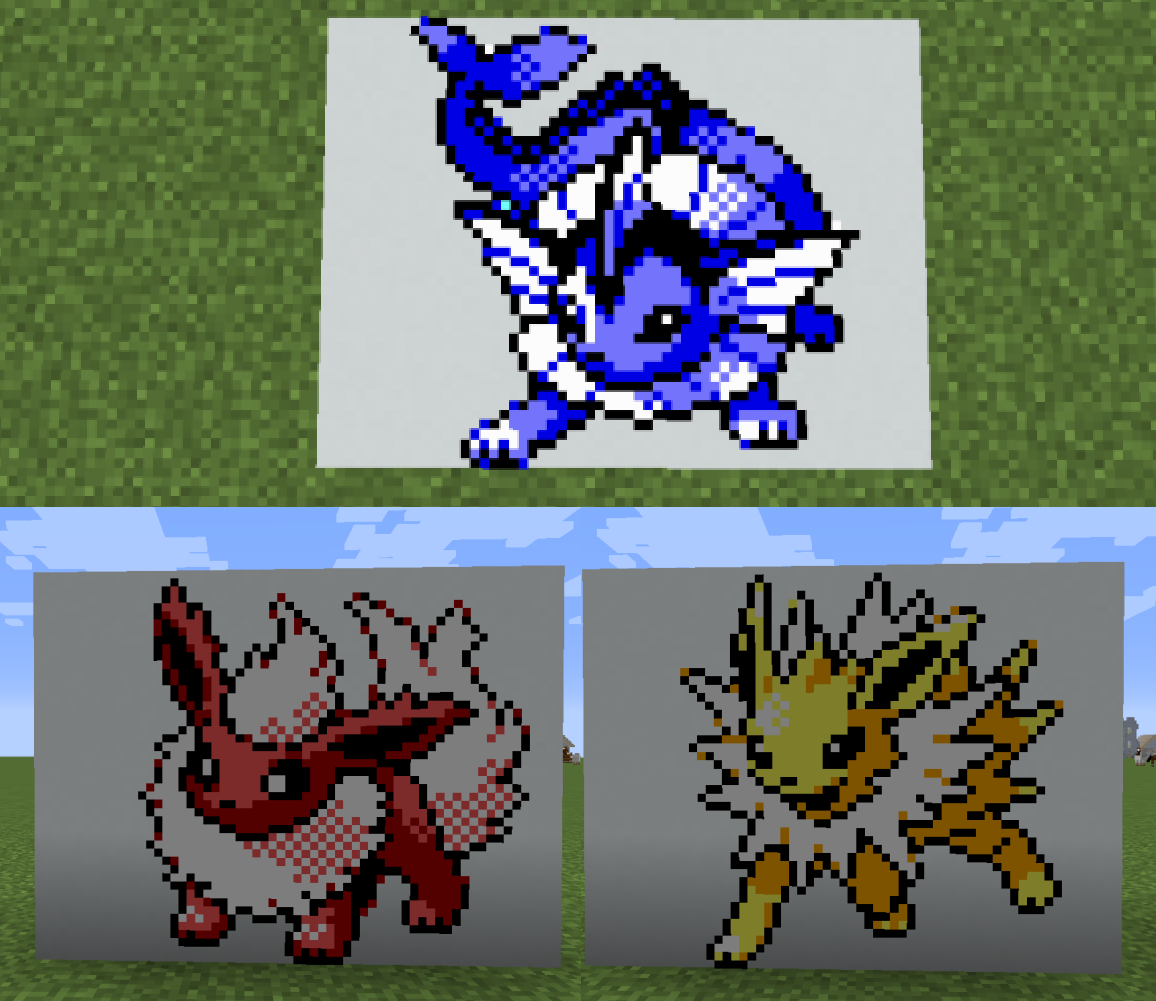
Want your art here? Post it in my Discord!
The Small Print
Graffiti is art. However, graffiti as an act of vandalism is a crime. Every state/province has vandalism laws that apply to graffiti, and local entities such as cities and counties have anti-graffiti ordinances. Violation of these laws can result in a fine, probation, or a jail sentence. SEGA Fureniku does not condone the real life act of vandalism in any form.
Additionally, I am not responsible for any user-generated content created with this mod. People will draw rude and offensive images, I am aware of that and there is nothing I can do to prevent it beyond the tools offered within the mod. Any server running this mod should be aware of that and take precautions they deem necessary. And yes, that first part was totally stolen from Jet Set Radio. Awesome game, check it out.

Available Versions
How to Install Graffiti on Your Server
Order Server
Order a Minecraft Java server with at least 3 GB RAM (4 GB recommended).
Set forge Loader
In the panel under "Egg", select the forge loader and matching Minecraft version (1.15.2).
Install Mod
Open the mod browser in the dashboard and search for "Graffiti". Click "Install" – done! Alternatively, upload the .jar via SFTP to the /mods folder.
Compatibility
Mod Loaders
Minecraft Versions
1.15.2
Server-side
✓ RequiredRecommended RAM
4 GB(min. 3 GB)Frequently Asked Questions
Graffiti server crashes on startup – what to do?
Most common cause: wrong forge version or insufficient RAM. Check the server log (latest.log) for "OutOfMemoryError" or "Mixin" errors. With Mado Hosting: ensure at least 3 GB RAM is allocated and the loader matches the mod version (1.15.2). You can switch loaders with one click in the panel.
Is Graffiti compatible with forge?
Graffiti officially supports forge for Minecraft 1.15.2. The Mado dashboard automatically detects incompatible loader combinations.
Server lagging with Graffiti – how to optimize performance?
Recommended RAM: 4 GB (per 8 players). Use /spark profiler to check if Graffiti consumes the most tick time. Common fixes: reduce server view-distance to 8-10, install "performant" or "starlight" as supplementary mods on Forge. With Mado Hosting, your server runs on NVMe SSDs with dedicated CPU cores for minimal latency.
Similar Mods

![[ETF] Entity Texture Features](https://cdn.modrinth.com/data/BVzZfTc1/af683d206d50b05258d865b0d6e4aa2f2cee12f2_96.webp)
![[EMF] Entity Model Features](https://cdn.modrinth.com/data/4I1XuqiY/6e5bbd0d06b1741bfdab6c0cfab6de8fdaf0064c_96.webp)



Rent Modded Server
Install Graffiti with just one click on your server.