
Greedy Meshing Mod
Optimizes chunk rendering by merging identical adjacent block faces into larger quads, reducing the total number of quads the GPU needs to render.
Screenshots
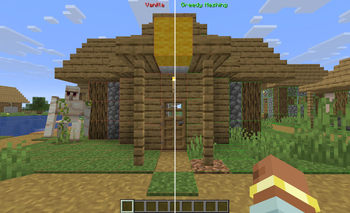
About this Mod
Greedy Meshing Mod
A client-side Fabric optimization mod that merges identical adjacent block faces into larger quads, reducing the total vertex count for better GPU performance.
Features
- Automatic merging of opaque full-cube block faces
- Custom terrain shaders for correct texture tiling on merged faces
- Sodium compatible
- Debug wireframe and split-screen comparison mode
- In-game config screen (requires Cloth Config + Mod Menu)
Supported Versions
| Minecraft | Loader |
|---|---|
| 1.21 - 1.21.11 | Fabric |
| 26.1 - 26.1.2 | Fabric |
Performance
Performance gains vary depending on your hardware and world. If your GPU is already underutilized (high FPS), the improvement may be minimal. The mod might benefits most on lower-end GPUs, higher render distances, and worlds with large flat surfaces of the same block type (e.g. superflat, underground caves, large builds).
Known Limitations
- Experimental — some mods that modify chunk rendering or terrain shaders may be incompatible. Disable via config if issues occur.
- Shader packs (Iris/OptiFine) are not fully supported — the mod falls back to face-culling-only mode.
- Lighting on large merged surfaces may look slightly different from vanilla.
Credits
Fork of Greedy Meshing by BuggiestStudios, with significant modifications including multi-version support (via Stonecutter), binary meshing.
Available Versions
How to Install Greedy Meshing Mod on Your Server
Order Server
Order a Minecraft Java server with at least 3 GB RAM (4 GB recommended).
Set fabric Loader
In the panel under "Egg", select the fabric loader and matching Minecraft version (26.1.2).
Install Mod
Open the mod browser in the dashboard and search for "Greedy Meshing Mod". Click "Install" – done! Alternatively, upload the .jar via SFTP to the /mods folder.
Compatibility
Mod Loaders
Minecraft Versions
26.1.2, 26.1.1, 26.1 (+12 more)
Server-side
✗ UnsupportedRecommended RAM
4 GB(min. 3 GB)Frequently Asked Questions
Greedy Meshing Mod server crashes on startup – what to do?
Most common cause: wrong fabric version or insufficient RAM. Check the server log (latest.log) for "OutOfMemoryError" or "Mixin" errors. With Mado Hosting: ensure at least 3 GB RAM is allocated and the loader matches the mod version (26.1.2). You can switch loaders with one click in the panel.
Is Greedy Meshing Mod compatible with fabric?
Greedy Meshing Mod officially supports fabric for Minecraft 26.1.2, 26.1.1, 26.1. The Mado dashboard automatically detects incompatible loader combinations.
Server lagging with Greedy Meshing Mod – how to optimize performance?
Recommended RAM: 4 GB (per 8 players). Use /spark profiler to check if Greedy Meshing Mod consumes the most tick time. Common fixes: reduce server view-distance to 8-10, install "performant" or "starlight" as supplementary mods on Forge. With Mado Hosting, your server runs on NVMe SSDs with dedicated CPU cores for minimal latency.
Similar Mods


Rent Modded Server
Install Greedy Meshing Mod with just one click on your server.