
Greeneries
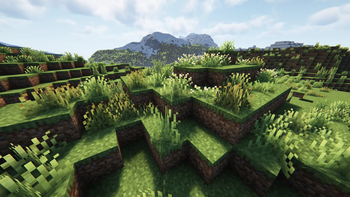
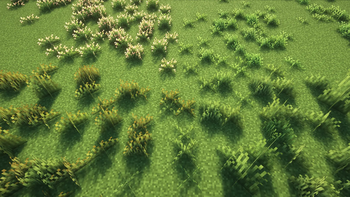
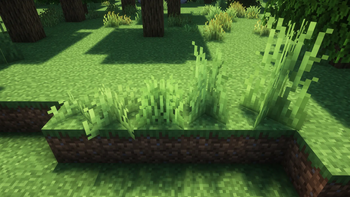
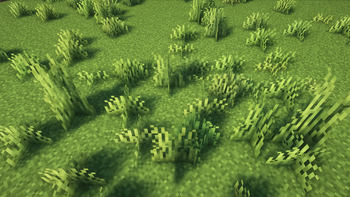
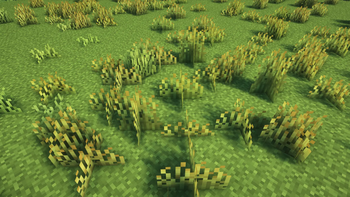
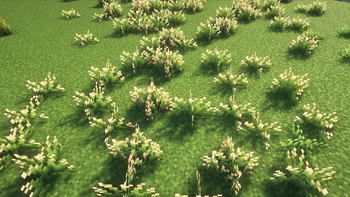
Improves Variety in Minecraft's flora by adding grass and fern variants, while staying true to vanilla's style.
Screenshots
About this Mod

Greeneries is a mod that enhances Minecraft’s flora, while staying true to vanilla’s aesthetic.
About
Ever felt like Minecraft’s landscapes were just a little too... bland? Perhaps you’re of the opinion that these landscapes could use a little splash of color? Or did you ever think your gardens deserved more than the same old greenery? Well, your search might just be over!
We’re introducing new variations of existing plants, along with commonly found wild foliage, to bring greater depth and diversity to your once-uniform Minecraft world! Many of our new plants follow vanilla grass mechanics, so our mod won’t unnecessarily clutter your inventory, keeping gameplay smooth and unobtrusive whilst adding that extra touch of life to your landscapes.
Showcase video:
Current Features
- Grass
- Red Fescue
- Common Bent Grass
- Blue Grass
- Grass size variants
- very short
- short
- medium
- tall
- bushy
- Fern
- Royal Fern
- Eagle Fern
- Fern size variants
- short
- medium
- tall
- Reeds
- Cattail
- Reed
- Flower variants
- Multiple new variants for each vanilla flower
See the Gallery for showcase images of all features!
Compatibility
This mod aims to be as compatible as possible with any other world generation mods, including Terralith, Biomes O' Plenty, Terra, Tectonic and similar mods.
If you find incompatibilities/weird behavior when greeneries is used with world generation mods like these, please let us know!
Contact
If you find any bugs, incompatibilities or have any questions, always feel free to open an issue on GitHub, or contact us on discord (player.005 and sterbendes).
Available Versions
How to Install Greeneries on Your Server
Order Server
Order a Minecraft Java server with at least 4 GB RAM (6 GB recommended).
Set fabric Loader
In the panel under "Egg", select the fabric loader and matching Minecraft version (1.21.8).
Install Mod
Open the mod browser in the dashboard and search for "Greeneries". Click "Install" – done! Alternatively, upload the .jar via SFTP to the /mods folder.
Compatibility
Mod Loaders
Minecraft Versions
1.21.8, 1.21.1
Server-side
✓ RequiredRecommended RAM
6 GB(min. 4 GB)Frequently Asked Questions
Greeneries server crashes on startup – what to do?
Most common cause: wrong fabric version or insufficient RAM. Check the server log (latest.log) for "OutOfMemoryError" or "Mixin" errors. With Mado Hosting: ensure at least 4 GB RAM is allocated and the loader matches the mod version (1.21.8). You can switch loaders with one click in the panel.
Is Greeneries compatible with fabric and neoforge?
Greeneries officially supports fabric, neoforge for Minecraft 1.21.8, 1.21.1. The Mado dashboard automatically detects incompatible loader combinations.
Server lagging with Greeneries – how to optimize performance?
Recommended RAM: 6 GB (per 5 players). Use /spark profiler to check if Greeneries consumes the most tick time. Common fixes: reduce server view-distance to 8-10, install "performant" or "starlight" as supplementary mods on Forge. With Mado Hosting, your server runs on NVMe SSDs with dedicated CPU cores for minimal latency.
Similar Mods

![[ETF] Entity Texture Features](https://cdn.modrinth.com/data/BVzZfTc1/af683d206d50b05258d865b0d6e4aa2f2cee12f2_96.webp)
![[EMF] Entity Model Features](https://cdn.modrinth.com/data/4I1XuqiY/6e5bbd0d06b1741bfdab6c0cfab6de8fdaf0064c_96.webp)



Rent Modded Server
Install Greeneries with just one click on your server.
Details
- License
- Creative Commons Attribution Non Commercial Share Alike 4.0 International
- Server-side
- Required