
GroqCraft AI
This project adds the way to chat with the groq ai in minecraft chat.
Screenshots
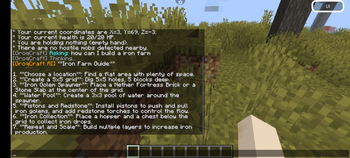
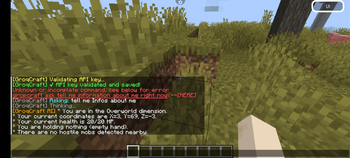
About this Mod
Welcome to GroqCraft
The ultimate AI-powered assistant mod for your Minecraft world! Powered by the ultra-fast Groq API, GroqCraft brings advanced AI directly into your in-game chat — fully asynchronous, lag-free, and context-aware.
Whether you need building advice or emergency survival help while surrounded by mobs, GroqCraft is your intelligent Minecraft companion.
✨ Features
- ⚡ Fast & Lag-Free: Uses the Groq API to generate answers in milliseconds with fully asynchronous requests and zero TPS impact.
- 🧠 Smart Context Analysis: The AI analyzes your real-time situation including health, dimension, coordinates, held items, and nearby hostile mobs.
- 💬 Conversation Memory: Supports natural follow-up questions and ongoing chat sessions.
- 🛠️ Simple Setup: Easy configuration with quick in-game commands.
🛠️ Commands & Permissions
Main command: /groqcraft
Permission: groqcraft.use
| Command | Description |
|---|---|
/groqcraft help |
Displays the help menu and API instructions. |
/groqcraft api <your_key> |
Saves and validates your Groq API key. |
/groqcraft model |
Select your preferred AI model. |
/groqcraft temperature <0.0 - 1.0> |
Adjust AI creativity and response style. |
/groqcraft ask <your question> |
Chat directly with the AI using live player context. |
🚀 Setup
- Place
GroqCraft.jarinto your minecraftmodsfolder. - Restart or reopen your minecraft.
- Generate a free API key from the Groq Console.
- Run:
/groqcraft api gsk_your_secret_key_here - Configure your model and temperature settings if desired.
💡 Examples
🌋 Survival Help
You ask:
/groqcraft ask What should I do right now?!
GroqCraft responds:
"You are in the Nether with only 2 hearts remaining and multiple hostile mobs nearby. Block line of sight immediately, eat food, and move into cover before engaging."
🏗️ Building & Mechanics
You ask:
/groqcraft ask How do I build an efficient iron farm?
GroqCraft responds:
Provides a detailed guide with villager mechanics, spawning rules, and optimization tips.
⚙️ Configuration (config.yml)
# GroqCraft Configuration
api-key: "gsk_..."
model: "llama3-8b-8192"
temperature: 0.7

system-prompt: "You are a highly knowledgeable and helpful Minecraft assistant. Analyze player context and provide accurate survival and gameplay advice."
Available Versions
How to Install GroqCraft AI on Your Server
Order Server
Order a Minecraft Java server with at least 3 GB RAM (4 GB recommended).
Set fabric Loader
In the panel under "Egg", select the fabric loader and matching Minecraft version (1.21.11).
Install Mod
Open the mod browser in the dashboard and search for "GroqCraft AI". Click "Install" – done! Alternatively, upload the .jar via SFTP to the /mods folder.
Compatibility
Mod Loaders
Minecraft Versions
1.21.11, 1.21.10, 1.21.9 (+9 more)
Server-side
✓ RequiredRecommended RAM
4 GB(min. 3 GB)Frequently Asked Questions
GroqCraft AI server crashes on startup – what to do?
Most common cause: wrong fabric version or insufficient RAM. Check the server log (latest.log) for "OutOfMemoryError" or "Mixin" errors. With Mado Hosting: ensure at least 3 GB RAM is allocated and the loader matches the mod version (1.21.11). You can switch loaders with one click in the panel.
Is GroqCraft AI compatible with fabric?
GroqCraft AI officially supports fabric for Minecraft 1.21.11, 1.21.10, 1.21.9. The Mado dashboard automatically detects incompatible loader combinations.
Server lagging with GroqCraft AI – how to optimize performance?
Recommended RAM: 4 GB (per 8 players). Use /spark profiler to check if GroqCraft AI consumes the most tick time. Common fixes: reduce server view-distance to 8-10, install "performant" or "starlight" as supplementary mods on Forge. With Mado Hosting, your server runs on NVMe SSDs with dedicated CPU cores for minimal latency.
Similar Mods




Rent Modded Server
Install GroqCraft AI with just one click on your server.