
Screenshots


About this Mod




 О моде / About the Mod
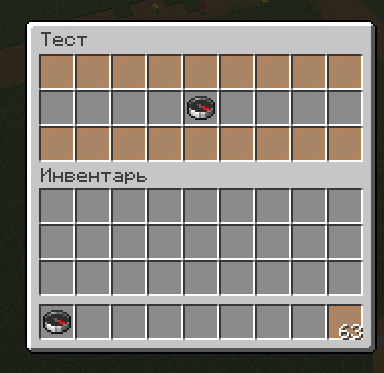
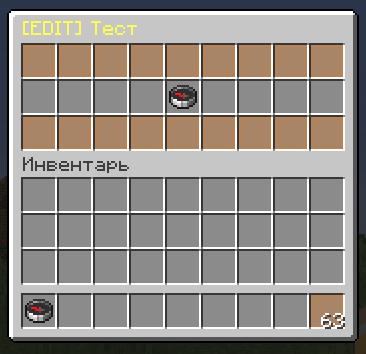
GuiMod — локальный мод для Fabric, добавляющий систему виртуальных меню-сундуков без единого реального блока в мире. Администраторы создают интерактивные GUI прямо через команды: расставляют предметы, назначают команды на слоты и открывают меню игрокам по правому клику на предмет с NBT-тегом GUI.
Подходит для: хабов, варпов, выдачи китов, магазинов, диалогов с NPC, админ-панелей и любых других интерактивных меню.
GuiMod is a local-side Fabric mod that adds a virtual chest GUI system — no real blocks required. Admins build interactive menus via commands: place items into slots, assign commands, and trigger menus by right-clicking any item with a GUI NBT tag.
Use cases: server hubs, warps, kit dispensers, shops, NPC dialogues, admin panels, and any other interactive menu you can imagine.
Ключевые возможности / Key Features
[ RU ]
- Создавай меню прямо в игре — открывается реальный сундук, расставляй предметы по слотам
- Правый клик по предмету в редакторе — чат предложит ввести команду для этого слота
- Команды выполняются от лица игрока, который кликнул
- Три типа сундуков: стандартный (27 слотов), двойной (54 слота), эндер-сундук
- Кастомные заголовки с поддержкой цветовых кодов (
§a,§6и т.д.) - Слоты «взятия» — игрок забирает предмет в инвентарь вместо запуска команды
- Меню сохраняются как JSON-файлы — можно редактировать вручную без перезагрузки
- Открытие меню правым кликом по любому предмету с тегом
GUIв NBT
[ EN ]
- Build menus in-game — a real chest opens, place items into any slots
- Right-click an item in the editor — chat prompts you to type a command for that slot
- Commands run as the player who clicks
- Three chest types: standard (27 slots), double (54 slots), ender chest appearance
- Custom titles with full color code support (
§a,§6, etc.) - Take-item slots — the player receives the item into their inventory instead of triggering a command
- Menus saved as JSON files — edit manually without reloading
- Trigger menus by right-clicking any item with a
GUINBT tag
Команды / Commands
Все команды требуют права оператора (уровень 2). / All commands require operator permission (level 2).
| Команда / Command | Описание / Description |
|---|---|
/guimod create <id> |
Создать новое меню / Create a new menu |
/guimod edit <id> |
Редактировать существующее меню / Edit an existing menu |
/guimod delete <id> |
Удалить меню / Delete a menu |
/guimod show <id> |
Открыть меню в режиме просмотра / Open menu as preview |
/guimod open <id> |
Открыть меню как игрок / Open menu as a player |
/guimod list |
Список всех меню / List all menus |
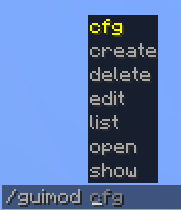
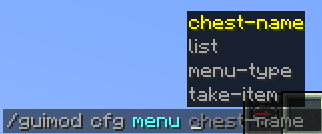
/guimod cfg <id> menu-type <type> |
Тип сундука: chest, double, enderchest / Set chest type |
/guimod cfg <id> chest-name <name> |
Заголовок меню / Set menu title |
/guimod cfg <id> take-item <from> <to> |
Диапазон слотов взятия / Set take-item slot range |
/guimod cfg <id> list |
Текущий конфиг меню / Show current menu config |
Пример использования / Example Workflow
[ RU ]
- Создай меню:
/guimod create kits_menu - Расставь предметы по слотам, закрой сундук
- Правый клик по предмету → введи команду, например
function pvpmap:give_kit_sword - Задай заголовок:
/guimod cfg kits_menu chest-name §6Choose a Kit - Выдай себе триггер-предмет:
/give @s minecraft:compass[custom_data={GUI:"kits_menu"}] - Правый клик компасом → меню открывается, клик по предмету → кит выдан
[ EN ]
- Create a menu:
/guimod create kits_menu - Place items into slots, close the chest
- Right-click an item → type a command, e.g.
function pvpmap:give_kit_sword - Set a title:
/guimod cfg kits_menu chest-name §6Choose a Kit - Give yourself a trigger item:
/give @s minecraft:compass[custom_data={GUI:"kits_menu"}] - Right-click the compass → menu opens, click the item → kit given
Поддерживаемые версии / Supported Versions
| Версия / Version | Поддержка / Support |
|---|---|
| 1.21 — 1.21.8 | Supported |
Fabric only — Requires Fabric API
Язык / Language
Русский • English
Available Versions
How to Install GuiMod on Your Server
Order Server
Order a Minecraft Java server with at least 3 GB RAM (4 GB recommended).
Set fabric Loader
In the panel under "Egg", select the fabric loader and matching Minecraft version (1.21.8).
Install Mod
Open the mod browser in the dashboard and search for "GuiMod". Click "Install" – done! Alternatively, upload the .jar via SFTP to the /mods folder.
Compatibility
Mod Loaders
Minecraft Versions
1.21.8, 1.21.7, 1.21.6 (+6 more)
Server-side
✗ UnsupportedRecommended RAM
4 GB(min. 3 GB)Frequently Asked Questions
GuiMod server crashes on startup – what to do?
Most common cause: wrong fabric version or insufficient RAM. Check the server log (latest.log) for "OutOfMemoryError" or "Mixin" errors. With Mado Hosting: ensure at least 3 GB RAM is allocated and the loader matches the mod version (1.21.8). You can switch loaders with one click in the panel.
Is GuiMod compatible with fabric?
GuiMod officially supports fabric for Minecraft 1.21.8, 1.21.7, 1.21.6. The Mado dashboard automatically detects incompatible loader combinations.
Server lagging with GuiMod – how to optimize performance?
Recommended RAM: 4 GB (per 8 players). Use /spark profiler to check if GuiMod consumes the most tick time. Common fixes: reduce server view-distance to 8-10, install "performant" or "starlight" as supplementary mods on Forge. With Mado Hosting, your server runs on NVMe SSDs with dedicated CPU cores for minimal latency.
Similar Mods




![[ETF] Entity Texture Features](https://cdn.modrinth.com/data/BVzZfTc1/af683d206d50b05258d865b0d6e4aa2f2cee12f2_96.webp)
![[EMF] Entity Model Features](https://cdn.modrinth.com/data/4I1XuqiY/6e5bbd0d06b1741bfdab6c0cfab6de8fdaf0064c_96.webp)
Rent Modded Server
Install GuiMod with just one click on your server.