
Hardcore Revival Co-Op
Adds a revival system for Hardcore mode. When players die, they leave behind a gravestone that teammates can use to bring the player back with a Amulet of Resurrection.
About this Mod
Hardcore Revival Co-Op
A mod for those who don’t want to say goodbye to friends in hardcore.
What This Mod Does
When players die, instead of losing their world, they become spectators and leave behind a gravestone. Other players can interact with this gravestone to revive them, bringing them back to life with partial health and hunger.
Features
Revival System
- Dead players enter spectator mode instead of game over
- Gravestone spawn at death locations
- Other players can revive the dead by interacting with gravestone
- Revived players return with 25% health and hunger
Two Revival Methods
- Amulet of Resurrection: Craft and use a special item to revive players
- Right-click revival: Simply right-click the gravestone (configurable)
Configuration Options
- Choose between amulet-required or free revival
- Toggle death coordinate broadcasting
- Enable for hardcore mode only or all game modes
- Adjust settings with in-game commands
Advancements
- Craft your first amulet
- Get revived from death
- Revive another player
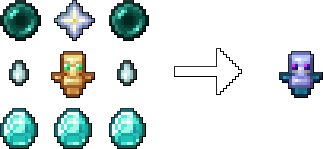
Crafting the Amulet
To craft the Amulet of Resurrection, combine the following items in a crafting table:
- 1 Totem of Undying
- 1 Nether Star
- 2 Ender Pearls
- 2 Ghast Tears
- 3 Diamonds
How It Works
- Player dies from any cause
- They become a spectator instead of losing the game
- A gravestone appears at their death location
- Other players can revive them using the configured method
- Revived player returns to survival mode with reduced stats
Commands
Requires operator permissions:
/hardcorerevival config useitem [true/false] - Toggle amulet requirement/hardcorerevival config broadcast [true/false] - Toggle coordinate broadcasting
Installation
- Install Minecraft Forge 47.4.0+
- Put the mod file in your mods folder
- Start the game
- Configure settings via commands or config files /config/hardcorerevivalcoop-common.toml
undefined
Best For
- Multiplayer hardcore servers
- Cooperative hardcore gameplay
- Groups who want death to encourage teamwork rather than end the game
This mod gives players extra chances instead of permanent death.
Available Versions
How to Install Hardcore Revival Co-Op on Your Server
Order Server
Order a Minecraft Java server with at least 3 GB RAM (4 GB recommended).
Set forge Loader
In the panel under "Egg", select the forge loader and matching Minecraft version (1.20.1).
Install Mod
Open the mod browser in the dashboard and search for "Hardcore Revival Co-Op". Click "Install" – done! Alternatively, upload the .jar via SFTP to the /mods folder.
Compatibility
Mod Loaders
Minecraft Versions
1.20.1
Server-side
✓ RequiredRecommended RAM
4 GB(min. 3 GB)Frequently Asked Questions
Hardcore Revival Co-Op server crashes on startup – what to do?
Most common cause: wrong forge version or insufficient RAM. Check the server log (latest.log) for "OutOfMemoryError" or "Mixin" errors. With Mado Hosting: ensure at least 3 GB RAM is allocated and the loader matches the mod version (1.20.1). You can switch loaders with one click in the panel.
Is Hardcore Revival Co-Op compatible with forge?
Hardcore Revival Co-Op officially supports forge for Minecraft 1.20.1. The Mado dashboard automatically detects incompatible loader combinations.
Server lagging with Hardcore Revival Co-Op – how to optimize performance?
Recommended RAM: 4 GB (per 8 players). Use /spark profiler to check if Hardcore Revival Co-Op consumes the most tick time. Common fixes: reduce server view-distance to 8-10, install "performant" or "starlight" as supplementary mods on Forge. With Mado Hosting, your server runs on NVMe SSDs with dedicated CPU cores for minimal latency.
Similar Mods




Rent Modded Server
Install Hardcore Revival Co-Op with just one click on your server.