
Harder Bed Crafting
A Minecraft 1.12.2 mod that replaces the vanilla bed crafting recipe with a custom method for creating beds.
Screenshots
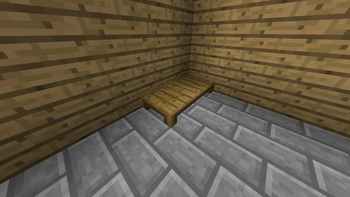
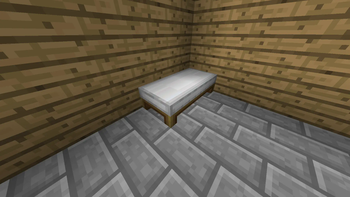
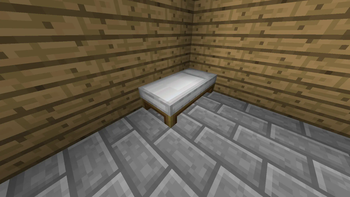
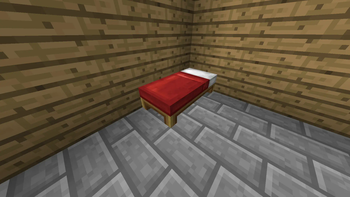
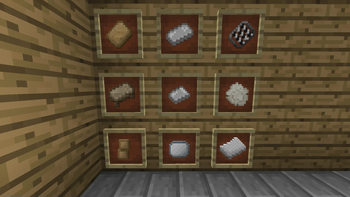
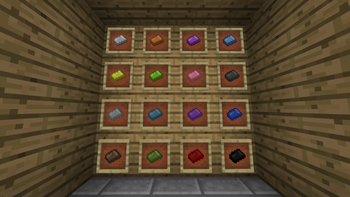
About this Mod
Harder Bed Crafting (Minecraft 1.12.2 Mod)
Harder Bed Crafting is a Minecraft 1.12.2 mod that replaces the vanilla bed crafting recipe with a custom method for creating beds. This mod changes how players interact with bed crafting, adding a new level of challenge and complexity to the process.
Features
- New bed ingredients (items)
- New bed components (blocks)
- An alternative, maybe exclusive, way to make beds
How to craft a bed
To craft a bed in this mod, follow these steps:
- Craft a Bed Frame and place it somewhere.
- Craft a Bed Mattress and place it on top of the Bed Frame.
- Craft a Bed Pillow and place it on top of the Bed Frame with the Mattress.
- Craft any Bed Blanket and place it on top of everything else.
- Enjoy your bed after having wasted a lot of resources; you might need to rest!
Contributing
The mod is open source and you can find all the code on GitHub, if you find any bug or issue you can report it there.
Credits
I want to thank:
- My friend Wither Ita for making all the item and block textures and the logo.
- Harry Talks and TurtyWurty for their YouTube tutorials.
- The Minecraft Pack Development community for helping me keep my sanity intact.
- My mind for enduring all the pain this has brought me.
License & Usage
This project is licensed under the MIT License. Other specific things:
Please do not upload this mod to CurseForge, Modrinth, or any other mod-hosting platforms, as I will handle that myself.
If you include this mod in a modpack, I would appreciate it if you could credit me, though it's not mandatory.
Available Versions
How to Install Harder Bed Crafting on Your Server
Order Server
Order a Minecraft Java server with at least 3 GB RAM (4 GB recommended).
Set forge Loader
In the panel under "Egg", select the forge loader and matching Minecraft version (1.12.2).
Install Mod
Open the mod browser in the dashboard and search for "Harder Bed Crafting". Click "Install" – done! Alternatively, upload the .jar via SFTP to the /mods folder.
Compatibility
Mod Loaders
Minecraft Versions
1.12.2
Server-side
✓ RequiredRecommended RAM
4 GB(min. 3 GB)Frequently Asked Questions
Harder Bed Crafting server crashes on startup – what to do?
Most common cause: wrong forge version or insufficient RAM. Check the server log (latest.log) for "OutOfMemoryError" or "Mixin" errors. With Mado Hosting: ensure at least 3 GB RAM is allocated and the loader matches the mod version (1.12.2). You can switch loaders with one click in the panel.
Is Harder Bed Crafting compatible with forge?
Harder Bed Crafting officially supports forge for Minecraft 1.12.2. The Mado dashboard automatically detects incompatible loader combinations.
Server lagging with Harder Bed Crafting – how to optimize performance?
Recommended RAM: 4 GB (per 8 players). Use /spark profiler to check if Harder Bed Crafting consumes the most tick time. Common fixes: reduce server view-distance to 8-10, install "performant" or "starlight" as supplementary mods on Forge. With Mado Hosting, your server runs on NVMe SSDs with dedicated CPU cores for minimal latency.
Similar Mods

![[ETF] Entity Texture Features](https://cdn.modrinth.com/data/BVzZfTc1/af683d206d50b05258d865b0d6e4aa2f2cee12f2_96.webp)
![[EMF] Entity Model Features](https://cdn.modrinth.com/data/4I1XuqiY/6e5bbd0d06b1741bfdab6c0cfab6de8fdaf0064c_96.webp)



Rent Modded Server
Install Harder Bed Crafting with just one click on your server.