
Hatate
A NeoForge mod to embed the normal and area-based AI interaction into Minecraft server.
Screenshots
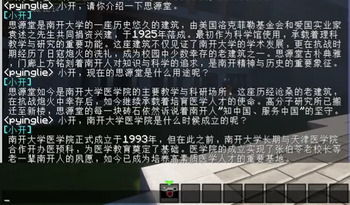
About this Mod
Hatate - A NeoForge Mod to Embed AI Interaction into Minecraft Server
Usage
For Admin:
- Get the area-selection tool with
/airegion tool. Left-click to set the first position and right-click to set the
second position. Then use/airegion set <name>to create a region. - Use
/airegion bind <name> <question>to bind the region with a question which will be sent to LLM when triggered. - Use
/airegion delete <name>to delete a region. - Use
/airegion listto list all regions. - Use
/airegion info <name>to get information about a specific region. - The plugin currently supports OpenAI-compatible API and Coze API.
For Player:
- The welcome message generated by AI will be triggered when a player joins the server.
- Get the camera with command
/airegion camera. Right-click to zoom in and left-click to shoot. The information of a
region will be returned when the crosshair is in. - The AI response will be triggered when a player enters the region or shoots while the crosshair is in the region.
- Use
/publicmodeto toggle public mode. In public mode, all players can see the AI responses but AI will respond only
when player's message includes specific keyword. Otherwise, only the player who triggered the response can see it.
Notes
- The photo generation is not implemented due to limitation of Spigot API.
- The zoom function of camera is now limited to 4 levels by modifying the player's FOV.
- The plugin is now designed for NeoForge 1.21.1.
Available Versions
How to Install Hatate on Your Server
Order Server
Order a Minecraft Java server with at least 3 GB RAM (4 GB recommended).
Set neoforge Loader
In the panel under "Egg", select the neoforge loader and matching Minecraft version (1.21.1).
Install Mod
Open the mod browser in the dashboard and search for "Hatate". Click "Install" – done! Alternatively, upload the .jar via SFTP to the /mods folder.
Compatibility
Mod Loaders
Minecraft Versions
1.21.1
Server-side
✓ RequiredRecommended RAM
4 GB(min. 3 GB)Frequently Asked Questions
Hatate server crashes on startup – what to do?
Most common cause: wrong neoforge version or insufficient RAM. Check the server log (latest.log) for "OutOfMemoryError" or "Mixin" errors. With Mado Hosting: ensure at least 3 GB RAM is allocated and the loader matches the mod version (1.21.1). You can switch loaders with one click in the panel.
Is Hatate compatible with neoforge?
Hatate officially supports neoforge for Minecraft 1.21.1. The Mado dashboard automatically detects incompatible loader combinations.
Server lagging with Hatate – how to optimize performance?
Recommended RAM: 4 GB (per 8 players). Use /spark profiler to check if Hatate consumes the most tick time. Common fixes: reduce server view-distance to 8-10, install "performant" or "starlight" as supplementary mods on Forge. With Mado Hosting, your server runs on NVMe SSDs with dedicated CPU cores for minimal latency.
Similar Mods




Rent Modded Server
Install Hatate with just one click on your server.
Details
- License
- Creative Commons Attribution Non Commercial 4.0 International
- Server-side
- Required