
Have Another Pretty Particle. Yayyyyyyyy
A collection of custom-made particles for use at BlanketCon 2025!
Screenshots



About this Mod
Have Another Pretty Particle. Yayyyyyyyy!!!
A collection of custom-made particles for use at BlanketCon 2025!
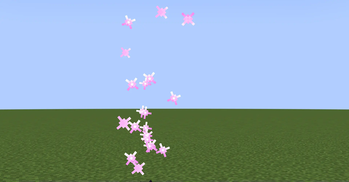
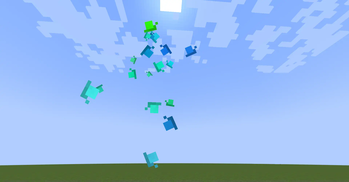
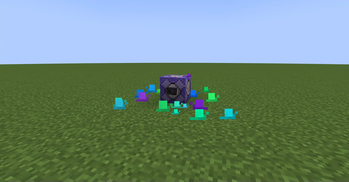
Yippee particles!* Current particles include a colorable jellyfish, colorable snails, simple clouds which disappear upon hitting a block, colored bubbles, and a WIP sparkle particle!
*Yippee creature not included (for now).
Particle How-To's
Various how-to's for vanilla particle commands.
Custom Parameters
Add a {<param name>:<param value>} after the particle id.
Example with param. name of max_age with an integer of 50.
/particle happy:jellyfish{max_age:50} ~ ~1 ~
For multiple parameters, add a comma between each parameter.
Example with an extra param. name of scale with a float value of 5.0f
/particle happy:jellyfish{max_age:50, scale:5.0f} ~ ~1 ~
Floats can be specified with a decimal point added(e.g. 1.0 or 1.56), or an "f' added (e.g. 1f, 1.56f).
Vector3f Paremeter
Vector3f parameters can be added with the value of [<float>, <float>, <float>]
Example with param. name of velocity_after_hit with a value of [0.2, 0.3, 0.6].
/particle happy:cloud{velocity_after_hit:[0.2, 0.3, 0.6]} ~ ~1 ~
For colors using Vector3f's, it is expected that the values are between 0f and 1f.
Particle Docs:
Unless specified otherwise, all parameters can be assumed to be optional, using a default value if not added.
Note: This only applies to HAPPY's particles. Minecraft's particles almost always require their parameters to be given.
Jellyfish
happy:jellyfish
scale(float): Determines the size of the particle.max_age(int): Determines the max amount of ticks the particle will last.bounces(int): Determines the amount of bounces the jellyfish will preform throughout its max age. This affects the animation speed, and distance traveled.color_mode(int): ID of how to handle the start/end colors.- 0: Default - Transitions between 2 colors, as given from the start/end colors.
- 1: Random color - If start/end colors are left as default, a random color from a preset list(mostly pastel colors) is chosen. If not default, the start/end colors are used as a range of where to pick the random color(e.g. white through black will choose any random color).
- 2: Random transition colors - If start/end colors are left as default, 2 random colors from a preset list(mostly pastel colors) will be chosen as the transition colors. If not default, the start/end colors are used as a range of where to pick the random colors.
start_color(Vector3f): The start RGB color of a 2 color transition (Note: usage changes based on color mode - see above).end_color(Vector3f): The end RGB color of a 2 color transition (Note: usage changes based on color mode - see above).
Cloud
happy:cloud
scale(float): Determines the size of the particle.max_age(int): Determines the max amount of ticks the particle will last.max_age_random(int): The max number of extra ticks the particle may last. A random number from 0 to this number will be picked and added to the max age.hits_until_fade(int): The max number of times the particle can make contact with a block until it begins to fade out. There is a 10 tick delay between hits, meaning that if it is in a corner, it will count as hitting many blocks.fade_amount(float): The amount of alpha/opacity to remove each tick while fading out. Alpha is between 0 and 1, meaning that uses "0" will result in no fade out, and "1" will result in instant fadeout.velocity_after_hit(Vector3f): The amount of velocity to add after the particles comes in contact with a block. Note: This velocity is added after EVERY block hit, not just once!
Bubble
happy:bubble
scale(float): If added, sets the size of the particle. Otherwise, a random triangular with mode 0, deviation 1 is chosen.max_age(int): Determines the max amount of ticks the particle will last.max_age_random(int): The max number of extra ticks the particle may last, chosen randomly from 0 to that number.
Snail
happy:snail
scale(float): If added, sets the size of the particle. Otherwise, 0.15 + a small amount is chosen.max_age(int): Determines the max amount of ticks the particle will last.gravity_strength(float): The strength of gravity for the particle (A 20th of this value is subtracted from the Y velocity every tick)speed(float): The speed of the particle after landing on the ground. Set to "0" to not move and immediately start shrinking upon landing.min_color(Vector3f): The min RGB color when choosing a random color between "min_color" and "max_color".max_color(Vector3f): The max RGB color when choosing a random color between "min_color" and "max_color".- If both
min_colorandmax_colorare not added, a random color(most of the time a nice blue, but sometimes a random saturated color) is chosen instead. - It doesn't actually matter if
min_coloris greater thanmax_color.
- If both
Sparkle(WIP)
Colored Presets:
Pink sparkle(ID could change!):
happy:pink_sparkle
Available Versions
How to Install Have Another Pretty Particle. Yayyyyyyyy on Your Server
Order Server
Order a Minecraft Java server with at least 3 GB RAM (4 GB recommended).
Set fabric Loader
In the panel under "Egg", select the fabric loader and matching Minecraft version (1.21.1).
Install Mod
Open the mod browser in the dashboard and search for "Have Another Pretty Particle. Yayyyyyyyy". Click "Install" – done! Alternatively, upload the .jar via SFTP to the /mods folder.
Compatibility
Mod Loaders
Minecraft Versions
1.21.1
Server-side
✓ RequiredRecommended RAM
4 GB(min. 3 GB)Frequently Asked Questions
Have Another Pretty Particle. Yayyyyyyyy server crashes on startup – what to do?
Most common cause: wrong fabric version or insufficient RAM. Check the server log (latest.log) for "OutOfMemoryError" or "Mixin" errors. With Mado Hosting: ensure at least 3 GB RAM is allocated and the loader matches the mod version (1.21.1). You can switch loaders with one click in the panel.
Is Have Another Pretty Particle. Yayyyyyyyy compatible with fabric?
Have Another Pretty Particle. Yayyyyyyyy officially supports fabric for Minecraft 1.21.1. The Mado dashboard automatically detects incompatible loader combinations.
Server lagging with Have Another Pretty Particle. Yayyyyyyyy – how to optimize performance?
Recommended RAM: 4 GB (per 8 players). Use /spark profiler to check if Have Another Pretty Particle. Yayyyyyyyy consumes the most tick time. Common fixes: reduce server view-distance to 8-10, install "performant" or "starlight" as supplementary mods on Forge. With Mado Hosting, your server runs on NVMe SSDs with dedicated CPU cores for minimal latency.
Similar Mods

![[ETF] Entity Texture Features](https://cdn.modrinth.com/data/BVzZfTc1/af683d206d50b05258d865b0d6e4aa2f2cee12f2_96.webp)
![[EMF] Entity Model Features](https://cdn.modrinth.com/data/4I1XuqiY/6e5bbd0d06b1741bfdab6c0cfab6de8fdaf0064c_96.webp)



Rent Modded Server
Install Have Another Pretty Particle. Yayyyyyyyy with just one click on your server.