
HavenBags - Backpack Preview
HavenBagsPreview is a lightweight Fabric mod that allows you to view the contents of your HavenBags plugin backpacks directly in the inventory tooltip, just like a bundle or shulker preview. Save time and manage your bags more efficiently!
Screenshots
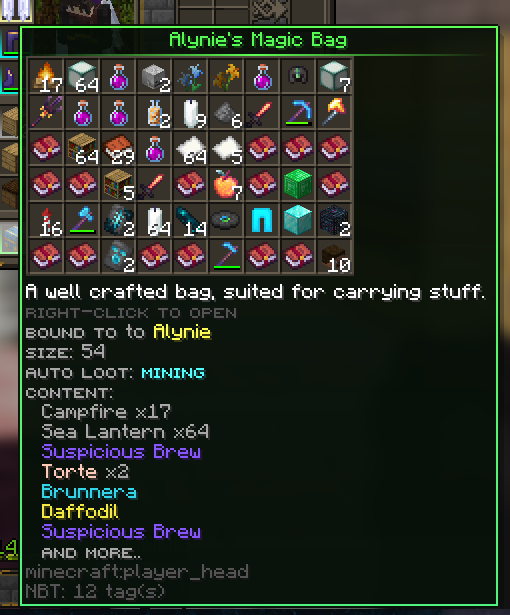
About this Mod
Description:
This lightweight and convenient client-side mod, designed specifically for use with the HavenBags plugin, enables you to view the contents of any HavenBags bag directly in the tooltip when hovering over the item in your inventory. Eliminate uncertainty and avoid repeatedly opening bags to inspect their contents. This mod facilitates swift and efficient inventory management, conserving time and resources.
Features:
- Instant Preview: View the contents of HavenBags bags without needing to open them.
- User-Friendly Interface: Hover over a HavenBags item in your inventory to display its contents in the tooltip.
- Efficiency: Optimize your inventory management by reducing unnecessary actions.
Installation:
- Ensure you have Minecraft Fabric Loader installed.
- Download the HavenBagsPreview mod file and Fabric API.
- Place the mod file in your mods folder within the .minecraft directory.
- Launch Minecraft and enjoy the enhanced inventory management!
Compatibility:
- Requires Fabric Loader
- Compatible with Minecraft versions 1.17 and above
- Requires the server to have the HavenBags plugin installed for functionality
Acknowledgements:
This mod is a fork of MTBackpacksPreview, and special thanks go to the original creators, ZtereoHYPE and masecla22, for their foundational work.
Support:
For any issues or suggestions, please visit our GitHub page or join our Discord community
If you are looking for a server to test the mod and play, we invite you to join us on Ravencrest
For more information about the HavenBags plugin, visit the SpigotMC page
Available Versions
How to Install HavenBags - Backpack Preview on Your Server
Order Server
Order a Minecraft Java server with at least 3 GB RAM (4 GB recommended).
Set fabric Loader
In the panel under "Egg", select the fabric loader and matching Minecraft version (1.21.11).
Install Mod
Open the mod browser in the dashboard and search for "HavenBags - Backpack Preview". Click "Install" – done! Alternatively, upload the .jar via SFTP to the /mods folder.
Compatibility
Mod Loaders
Minecraft Versions
1.21.11, 1.21.10, 1.21.9 (+26 more)
Server-side
✗ UnsupportedRecommended RAM
4 GB(min. 3 GB)Frequently Asked Questions
HavenBags - Backpack Preview server crashes on startup – what to do?
Most common cause: wrong fabric version or insufficient RAM. Check the server log (latest.log) for "OutOfMemoryError" or "Mixin" errors. With Mado Hosting: ensure at least 3 GB RAM is allocated and the loader matches the mod version (1.21.11). You can switch loaders with one click in the panel.
Is HavenBags - Backpack Preview compatible with fabric?
HavenBags - Backpack Preview officially supports fabric for Minecraft 1.21.11, 1.21.10, 1.21.9. The Mado dashboard automatically detects incompatible loader combinations.
Server lagging with HavenBags - Backpack Preview – how to optimize performance?
Recommended RAM: 4 GB (per 8 players). Use /spark profiler to check if HavenBags - Backpack Preview consumes the most tick time. Common fixes: reduce server view-distance to 8-10, install "performant" or "starlight" as supplementary mods on Forge. With Mado Hosting, your server runs on NVMe SSDs with dedicated CPU cores for minimal latency.
Similar Mods




Rent Modded Server
Install HavenBags - Backpack Preview with just one click on your server.