
Hazars Head Library
A modern, Kotlin-powered Minecraft mod for collecting and giving custom heads!
Screenshots
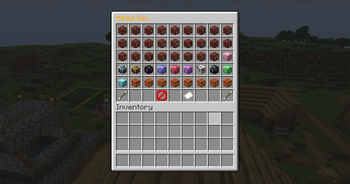
About this Mod
🤯 Hazar's Head Library
A modern, Kotlin-powered Minecraft mod for collecting and giving custom heads!
See bottom of desc for api version updates
📦 Features
- 🔍 In-game searchable head index (Dex style!)
- 👥 Supports:
- Vanilla player heads (via player name or UUID)
- Custom texture heads (via base64
textureValue) - Custom player heads (via Player Entities)
- ⚡ Async profile fetching (non-blocking, smooth AF)
- 🛠️ Extensible data format (add your own heads via JSON) for devs
🧠 In-Game Commands
/heads
You must be in Creative mode to access the head menu!
📚 Submitting New Heads
Wanna contribute a cool head texture? click the source code link and follow the read me in the main branch
Side
This mod is fully Client and Server Friendly
API
If youd like to use this as an api, refrence it via the Modrinth Maven
- A full tutorial can be found on the source code branch for your chosen version
V1.1.0
- Added Config:
requiresCreative - BooluseCurrency - BoolitemCurrencyJson - StringcurrencyAmount - IntpermissionLevelCommandReload - IntpermissionLevelCommandInfo - IntpermissionLevelCommandUI - Int
itemCurrencyJsonandcurrencyAmountare optional ifuseCurrency = false - Added luckperm support
hhl.headdex.reload - reload config commandhhl.headdex.info - info command (outputs mod version)hhl.headdex.ui - open head ui
Available Versions
How to Install Hazars Head Library on Your Server
Order Server
Order a Minecraft Java server with at least 3 GB RAM (4 GB recommended).
Set fabric Loader
In the panel under "Egg", select the fabric loader and matching Minecraft version (1.21.7).
Install Mod
Open the mod browser in the dashboard and search for "Hazars Head Library". Click "Install" – done! Alternatively, upload the .jar via SFTP to the /mods folder.
Compatibility
Mod Loaders
Minecraft Versions
1.21.7, 1.21.6, 1.21.4 (+1 more)
Server-side
✓ RequiredRecommended RAM
4 GB(min. 3 GB)Frequently Asked Questions
Hazars Head Library server crashes on startup – what to do?
Most common cause: wrong fabric version or insufficient RAM. Check the server log (latest.log) for "OutOfMemoryError" or "Mixin" errors. With Mado Hosting: ensure at least 3 GB RAM is allocated and the loader matches the mod version (1.21.7). You can switch loaders with one click in the panel.
Is Hazars Head Library compatible with fabric?
Hazars Head Library officially supports fabric for Minecraft 1.21.7, 1.21.6, 1.21.4. The Mado dashboard automatically detects incompatible loader combinations.
Server lagging with Hazars Head Library – how to optimize performance?
Recommended RAM: 4 GB (per 8 players). Use /spark profiler to check if Hazars Head Library consumes the most tick time. Common fixes: reduce server view-distance to 8-10, install "performant" or "starlight" as supplementary mods on Forge. With Mado Hosting, your server runs on NVMe SSDs with dedicated CPU cores for minimal latency.
Similar Mods

![[ETF] Entity Texture Features](https://cdn.modrinth.com/data/BVzZfTc1/af683d206d50b05258d865b0d6e4aa2f2cee12f2_96.webp)
![[EMF] Entity Model Features](https://cdn.modrinth.com/data/4I1XuqiY/6e5bbd0d06b1741bfdab6c0cfab6de8fdaf0064c_96.webp)



Rent Modded Server
Install Hazars Head Library with just one click on your server.
Details
- License
- Creative Commons Attribution Non Commercial Share Alike 4.0 International
- Server-side
- Required