
Healthy Eye (Chat Mod)
Client-only Forge mod that strips all chat colors/formatting for easier reading. Toggle on/off with the /toggleChatColor client command.
Screenshots
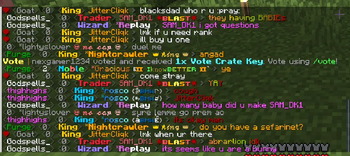
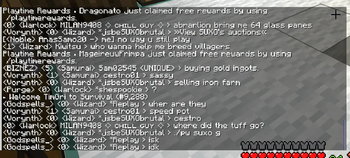
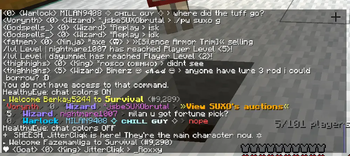
About this Mod
Healthy Eye — Readable Chat for Minecraft (Forge)
Summary — What it is
Healthy Eye is a tiny, client-only Forge mod that removes all colors and styling from in-game chat so messages are clean, high-contrast, and easy to read. It works on any server; only you see the change.
Minecraft: 1.21.8 (1.21.x build for them)
Loader: Forge 58+
Scope: Client-only (no server install)
Why use it
Accessibility & comfort: Color spam, gradients, and rainbow text become plain text.
Focus: System messages and team chat are easier to scan during combat or events.
No server requirements: Works everywhere since it only changes how your client renders chat.
Zero setup: No configs. One command to toggle.
How to control it
The mod starts enabled each time you launch the game (colors are stripped by default).
Toggle on/off at any time with the command below.
The setting is not persisted between launches (keeps things simple and lightweight).
Commands & usage
Command Effect
/toggleChatColor Toggles stripping of chat formatting. Shows a confirmation message (OFF means colors are being stripped).
Notes
Affects both player chat and system chat messages.
Does not change titles, boss bars, scoreboards, sign text, or item tooltips.
Purely client-side: it doesn’t modify packets or send anything to the server.
How to install
Install Forge 58+ for Minecraft 1.21.8.
Download the Healthy Eye jar that matches your MC version.
Place the jar in your mods folder:
Windows: %APPDATA%.minecraft\mods
Linux: ~/.minecraft/mods
macOS: ~/Library/Application Support/minecraft/mods
Launch Minecraft with the Forge profile.
Join any world/server and use /toggleChatColor if you want to switch the behavior.
Uninstall: Close the game, remove the jar from mods, relaunch.
FAQ
Q: Is it allowed on servers?
A: Yes. It’s client-only and only alters rendering on your side. It does not give gameplay advantages or send modified packets.
Q: Does it improve FPS?
A: It’s designed for readability, not performance. Overhead is negligible.
Q: Will this break other chat mods?
A: It’s compatible with most. If another mod fully replaces the chat UI or intentionally relies on color codes, load order/configuration may affect which result you see.
Q: Can I keep it disabled by default?
A: Currently the default is enabled every launch. Use /toggleChatColor after starting the game if you prefer colored chat that session.
Q: Does it remove emojis or text content?
A: No. It only strips formatting (colors/styles). The actual message text is preserved.
Q: Server needs to install it too?
A: No—client-only. Safe to join any vanilla or modded server.
Known limitations
-Only affects chat messages (player & system). It does not touch titles, action bar, boss bars, scoreboards, or GUIs.
-Some chat-overhaul mods may override the effect.
Support & licensing
License: All Rights Reserved.
Issues/feedback: include your Forge/Minecraft versions and a mod list when reporting conflicts.
Available Versions
How to Install Healthy Eye (Chat Mod) on Your Server
Order Server
Order a Minecraft Java server with at least 3 GB RAM (4 GB recommended).
Set forge Loader
In the panel under "Egg", select the forge loader and matching Minecraft version (1.21.8).
Install Mod
Open the mod browser in the dashboard and search for "Healthy Eye (Chat Mod)". Click "Install" – done! Alternatively, upload the .jar via SFTP to the /mods folder.
Compatibility
Mod Loaders
Minecraft Versions
1.21.8, 1.21.7, 1.21.6 (+6 more)
Server-side
✗ UnsupportedRecommended RAM
4 GB(min. 3 GB)Frequently Asked Questions
Healthy Eye (Chat Mod) server crashes on startup – what to do?
Most common cause: wrong forge version or insufficient RAM. Check the server log (latest.log) for "OutOfMemoryError" or "Mixin" errors. With Mado Hosting: ensure at least 3 GB RAM is allocated and the loader matches the mod version (1.21.8). You can switch loaders with one click in the panel.
Is Healthy Eye (Chat Mod) compatible with forge?
Healthy Eye (Chat Mod) officially supports forge for Minecraft 1.21.8, 1.21.7, 1.21.6. The Mado dashboard automatically detects incompatible loader combinations.
Server lagging with Healthy Eye (Chat Mod) – how to optimize performance?
Recommended RAM: 4 GB (per 8 players). Use /spark profiler to check if Healthy Eye (Chat Mod) consumes the most tick time. Common fixes: reduce server view-distance to 8-10, install "performant" or "starlight" as supplementary mods on Forge. With Mado Hosting, your server runs on NVMe SSDs with dedicated CPU cores for minimal latency.
Similar Mods




Rent Modded Server
Install Healthy Eye (Chat Mod) with just one click on your server.