
Quite's Hearth Travel
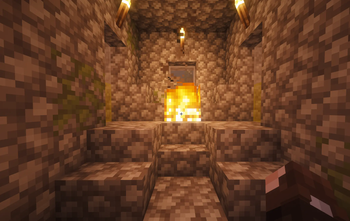
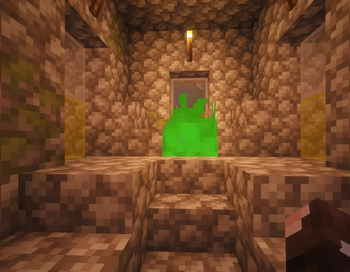
Travel in Minecraft better than ever before. Place powder in a fire burning with a fireplace block and travel through the green flames to your destination.
Screenshots
About this Mod
Quite's Hearth Travel
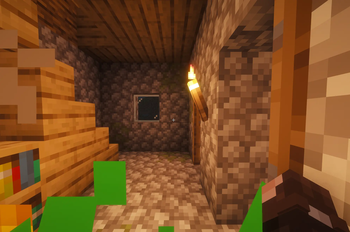
Quite's Hearth Travel adds magical green-fire fireplace travel to Minecraft. Build and register hearths, activate them with Hearth Powder, and travel between your linked locations through a portal-like hearth system.
All required items are craftable in survival.
This mod is still new and actively being tested, so bugs may happen. If you run into any issues or have ideas for future features, feel free to let me know.
Version
Loader: Fabric
Minecraft/Fabric Version: 26.1.2
Make sure you are using the correct Minecraft version, Fabric Loader, and Fabric API version listed for this mod.
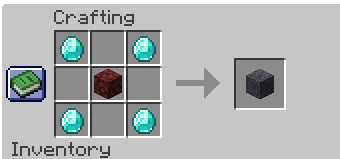
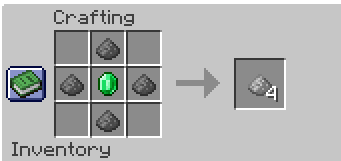
Recipes
Hearth Block
Hearth Powder
Installation
- Make sure you have Fabric installed.
- Download the mod
.jarfile. - Place the
.jarfile into your.minecraft/modsfolder. - If you are playing on a server, both the server and all clients must have the mod installed.
How to Use
- Place down a Hearth Block.
- Right-click the hearth to register it with any name you want.
- You can place multiple hearths, but each one must be registered before it can be used for travel.
- Shift + right-click the hearth with Flint and Steel to light it normally.
- With Hearth Powder in your hand, right-click the lit fire to turn it green.
- Once the fire turns green, you have 15 seconds to step into it.
- When you step into the green fire, a travel UI will appear showing your other registered hearths.
- Select a destination and stay still while teleporting.
- Just like Nether portal travel, moving away before the teleport completes will cancel the teleport.
Congratulations — you just traveled using Hearth Powder.
Notes
- You need at least two registered hearths before the travel UI can show destinations.
- Hearth fires stay lit until the hearth is destroyed.
- This mod is still in testing, so some bugs are expected.
- Feedback, bug reports, and feature ideas are welcome.
Support
This is one of my first public Minecraft mods. It started as a small side project, but I decided to release it for others to try.
If you enjoy the mod and want to support future development, you can check out my Patreon. The mod is free, and support is completely optional.
Even though I am a software dev irl, this was created with the help of AI. If you have anything against that, please feel free to close the tab lol.
Disclaimer
This mod is not affiliated with, endorsed by, or associated with any brands, companies, or official franchises.
Thanks for checking it out.
QuiteMC
Available Versions
How to Install Quite's Hearth Travel on Your Server
Order Server
Order a Minecraft Java server with at least 3 GB RAM (4 GB recommended).
Set fabric Loader
In the panel under "Egg", select the fabric loader and matching Minecraft version (26.1.2).
Install Mod
Open the mod browser in the dashboard and search for "Quite's Hearth Travel". Click "Install" – done! Alternatively, upload the .jar via SFTP to the /mods folder.
Compatibility
Mod Loaders
Minecraft Versions
26.1.2
Server-side
✓ RequiredRecommended RAM
4 GB(min. 3 GB)Frequently Asked Questions
Quite's Hearth Travel server crashes on startup – what to do?
Most common cause: wrong fabric version or insufficient RAM. Check the server log (latest.log) for "OutOfMemoryError" or "Mixin" errors. With Mado Hosting: ensure at least 3 GB RAM is allocated and the loader matches the mod version (26.1.2). You can switch loaders with one click in the panel.
Is Quite's Hearth Travel compatible with fabric?
Quite's Hearth Travel officially supports fabric for Minecraft 26.1.2. The Mado dashboard automatically detects incompatible loader combinations.
Server lagging with Quite's Hearth Travel – how to optimize performance?
Recommended RAM: 4 GB (per 8 players). Use /spark profiler to check if Quite's Hearth Travel consumes the most tick time. Common fixes: reduce server view-distance to 8-10, install "performant" or "starlight" as supplementary mods on Forge. With Mado Hosting, your server runs on NVMe SSDs with dedicated CPU cores for minimal latency.
Similar Mods

![[ETF] Entity Texture Features](https://cdn.modrinth.com/data/BVzZfTc1/af683d206d50b05258d865b0d6e4aa2f2cee12f2_96.webp)
![[EMF] Entity Model Features](https://cdn.modrinth.com/data/4I1XuqiY/6e5bbd0d06b1741bfdab6c0cfab6de8fdaf0064c_96.webp)



Rent Modded Server
Install Quite's Hearth Travel with just one click on your server.