
Helium Client
A Custom Client That Customizes Every Aspect Of The Game Whilst Improving Performance.
Screenshots


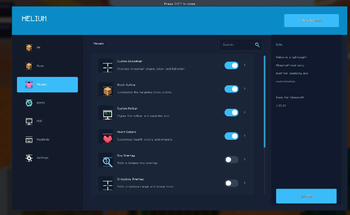

About this Mod
Welcome to Helium Client!
Helium client is a client based minecraft mod that allows you to customize the game in real time.
IMPORTANT NOTE:
ALL SETTINGS MUST BE TURNED ON VIA HELIUM CLIENT SETTINGS.

Summary:
Helium client optimizes the game with settings such as
- Adaptive Scaling
- Culling Behind Camera
- Throttle Particles
- Disable Map Rendering.
Helium client also lets players customize the game!
- Custom Block Outlines
- Complete Color Overhaul of UI / GUI
- Custom Inventory Hotbars.
And Much More!
You can see the Helium Settings by either
- Pressing Right Shift / The Selected Keybind
- Options -> Helium Settings

Tips
- Enable Optimizations!
- Visual Effects Increases FPS!
- Customize Your UI!
In helium client, You can use Profiles to share your Minecraft Settings OR By Using Others.
You can save a profile. Then go into the folder. Then send it to someone. They can import it by clicking "Import JSON" or "Import TXT" depending on what format it was exported on.

Texture Pack Editor / Resource Pack Editor

How it works.
- Create A Pack.
- Rename it to whatever you want.
- Search for any texture and edit it!
- You can import textures if you dont want to edit them with the ingame editor
- You can Change Keybinds for tools Via the Minecraft Keybinds menu.
- Save to pack, Then Apply Changes. Then click Done.
Thanks for Using Helium!
Available Versions
How to Install Helium Client on Your Server
Order Server
Order a Minecraft Java server with at least 3 GB RAM (4 GB recommended).
Set fabric Loader
In the panel under "Egg", select the fabric loader and matching Minecraft version (26.1.2).
Install Mod
Open the mod browser in the dashboard and search for "Helium Client". Click "Install" – done! Alternatively, upload the .jar via SFTP to the /mods folder.
Compatibility
Mod Loaders
Minecraft Versions
26.1.2, 1.21.11, 1.21.10
Server-side
✗ UnsupportedRecommended RAM
4 GB(min. 3 GB)Frequently Asked Questions
Helium Client server crashes on startup – what to do?
Most common cause: wrong fabric version or insufficient RAM. Check the server log (latest.log) for "OutOfMemoryError" or "Mixin" errors. With Mado Hosting: ensure at least 3 GB RAM is allocated and the loader matches the mod version (26.1.2). You can switch loaders with one click in the panel.
Is Helium Client compatible with fabric?
Helium Client officially supports fabric for Minecraft 26.1.2, 1.21.11, 1.21.10. The Mado dashboard automatically detects incompatible loader combinations.
Server lagging with Helium Client – how to optimize performance?
Recommended RAM: 4 GB (per 8 players). Use /spark profiler to check if Helium Client consumes the most tick time. Common fixes: reduce server view-distance to 8-10, install "performant" or "starlight" as supplementary mods on Forge. With Mado Hosting, your server runs on NVMe SSDs with dedicated CPU cores for minimal latency.
Similar Mods




Rent Modded Server
Install Helium Client with just one click on your server.