
HeraclesNetwork
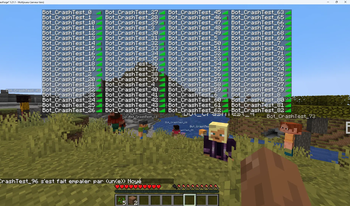
An optimization mod that fixes lag and TPS problems when hundreds of players are in the same place.
Screenshots
About this Mod
Heracles
Technical optimization mod focused on drastically reducing MSPT, alleviating CPU load, and stabilizing memory.

Optimization Features
- Crowd Control: Optimization of collision tests and movement events to reduce lag in dense areas (players/entities).
- AI Throttling: Dynamic regulation of CPU load consumed by mob AI.
- Explosion Caching: Caching of explosion calculations to prevent lag spikes during massive destructions.
- Block Entity Stasis: Puts block entities (furnaces, chests, etc.) into sleep mode when out of player range.
- Multi-threading: Offloading of AI calculations and network management onto Virtual Threads.
Warning! Incompatibilities are possible!
- Network Management (QoS): Packet prioritization system and rate limiting to prevent bandwidth saturation.
- Async Furnace Ticking: Asynchronous processing of furnace smelting to free up the main loop.
Test Environment (Optimization Modpack)
To demonstrate its performance, I conducted tests with optimization modpacks, which proves the mod's usefulness (the most well-known ones).
- Rendering Engine & Graphics: Sodium, Iris, Distant Horizons, ImmediatelyFast, EntityCulling, Dynamic FPS, MoreCulling.
- Logic & Memory: Lithium, ModernFix, FerriteCore, Krypton, Create Better FPS.
Available Versions
How to Install HeraclesNetwork on Your Server
Order Server
Order a Minecraft Java server with at least 3 GB RAM (4 GB recommended).
Set neoforge Loader
In the panel under "Egg", select the neoforge loader and matching Minecraft version (1.21.1).
Install Mod
Open the mod browser in the dashboard and search for "HeraclesNetwork". Click "Install" – done! Alternatively, upload the .jar via SFTP to the /mods folder.
Compatibility
Mod Loaders
Minecraft Versions
1.21.1
Server-side
✓ RequiredRecommended RAM
4 GB(min. 3 GB)Frequently Asked Questions
HeraclesNetwork server crashes on startup – what to do?
Most common cause: wrong neoforge version or insufficient RAM. Check the server log (latest.log) for "OutOfMemoryError" or "Mixin" errors. With Mado Hosting: ensure at least 3 GB RAM is allocated and the loader matches the mod version (1.21.1). You can switch loaders with one click in the panel.
Is HeraclesNetwork compatible with neoforge?
HeraclesNetwork officially supports neoforge for Minecraft 1.21.1. The Mado dashboard automatically detects incompatible loader combinations.
Server lagging with HeraclesNetwork – how to optimize performance?
Recommended RAM: 4 GB (per 8 players). Use /spark profiler to check if HeraclesNetwork consumes the most tick time. Common fixes: reduce server view-distance to 8-10, install "performant" or "starlight" as supplementary mods on Forge. With Mado Hosting, your server runs on NVMe SSDs with dedicated CPU cores for minimal latency.
Similar Mods


Rent Modded Server
Install HeraclesNetwork with just one click on your server.