
Herobrine Experiment
The Herobrine Experiment is a type of horror mod.
Screenshots
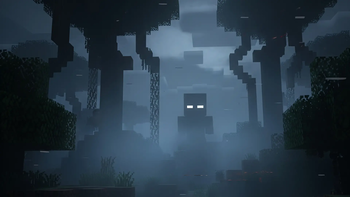
About this Mod
TURKISH
"Herobrine Experiment", Minecraft dünyasına derin bir korku ve paranoya duygusu katmak için tasarlanmış karanlık bir deney modudur. Bu modda oyuncu, görünüşte yalnız olduğu bir dünyada her adımda izlendiğini hissetmeye başlar. Herobrine, artık sadece bir efsane değil. O geri döndü... ve seni izliyor.
Bu modda:
Oyun başladıktan kısa bir süre sonra "Herobrine joined the game" mesajı belirir ve oyuncunun kabusu başlar.
Oyuncu 200 adım attığında “He’s here” adında özel bir başarı kazanır. Bu başarı, ekranı sarsan bir efekt, uğultulu bir ses ve eşsiz bir görsel ile birlikte gelir.
Belirli bir aralıkla kullanıcının genel ağdan aldığı IP ve Şehir bilgisini kullanıcının bulunduğu konuma yıldırım eşliğinde oluşturur
Oyuncu ışığın zayıf olduğu yerlere girdiğinde (light level < 5), Herobrine 2 saniyeliğine ortaya çıkar ve çığlık atar. Bu yalnızca başlangıçtır...
Her 15 dakikada bir, yüksek sesli bir çığlık, ekran sallanması, pencere küçülme efekti ve aniden beliriveren jumpscare görseli ile oyuncuya korku aşılanır.
Tab listesinde Herobrine’in adı görünür, ancak oyuncu onu göremez. Yaklaştığını ise yalnızca hissetmek mümkündür.
Oyuncu konsola “/kill Herobrine” gibi bazı özel komutlar yazarsa, mod tarafından tespit edilir ve "ECELİNE Mİ SUSADIN?" adında yeni bir başarı kazanır.
Herobrine Experiment, Minecraft’ı bir korku oyununa çevirir. Her köşede tüyler ürpertici detaylar ve jumpscareler 2
ENGLİSH
"Herobrine Experiment" is a dark experimental mod designed to instill a deep sense of fear and paranoia in the world of Minecraft. In this mod, the player, seemingly alone in a world, begins to feel watched at every turn. Herobrine is no longer just a legend. He's back... and he's watching you.
In this mod:
Shortly after the game starts, the message "Herobrine has joined the game" appears, and the player's nightmare begins.
When the player takes 200 steps, they earn a special achievement called "He's here." This achievement comes with a screen shaking effect, a humming sound, and a unique visual.
When the player enters an area with poor lighting (light level < 5), Herobrine appears for 2 seconds and screams. This is just the beginning...
The system periodically retrieves the user's IP and city information from the network and displays the user's location on the map with a lightning effect.
Every 15 minutes, the player is treated to a loud scream, a screen shaking, a window shrinking effect, and a sudden, scary visual.
Herobrine's name appears in the tab list, but the player can't see him. They can only sense his approach.
If the player enters special commands like "/kill Herobrine" into the console, they will be detected by the mod and receive a new achievement called "THIRST FOR DEATH?"
The Herobrine Experiment transforms Minecraft into a horror game. Chilling details and sudden scares are around every corner.
Available Versions
How to Install Herobrine Experiment on Your Server
Order Server
Order a Minecraft Java server with at least 4 GB RAM (6 GB recommended).
Set forge Loader
In the panel under "Egg", select the forge loader and matching Minecraft version (1.20.1).
Install Mod
Open the mod browser in the dashboard and search for "Herobrine Experiment". Click "Install" – done! Alternatively, upload the .jar via SFTP to the /mods folder.
Compatibility
Mod Loaders
Minecraft Versions
1.20.1
Server-side
✓ RequiredRecommended RAM
6 GB(min. 4 GB)Frequently Asked Questions
Herobrine Experiment server crashes on startup – what to do?
Most common cause: wrong forge version or insufficient RAM. Check the server log (latest.log) for "OutOfMemoryError" or "Mixin" errors. With Mado Hosting: ensure at least 4 GB RAM is allocated and the loader matches the mod version (1.20.1). You can switch loaders with one click in the panel.
Is Herobrine Experiment compatible with forge?
Herobrine Experiment officially supports forge for Minecraft 1.20.1. The Mado dashboard automatically detects incompatible loader combinations.
Server lagging with Herobrine Experiment – how to optimize performance?
Recommended RAM: 6 GB (per 5 players). Use /spark profiler to check if Herobrine Experiment consumes the most tick time. Common fixes: reduce server view-distance to 8-10, install "performant" or "starlight" as supplementary mods on Forge. With Mado Hosting, your server runs on NVMe SSDs with dedicated CPU cores for minimal latency.
Similar Mods
![[EMF] Entity Model Features](https://cdn.modrinth.com/data/4I1XuqiY/6e5bbd0d06b1741bfdab6c0cfab6de8fdaf0064c_96.webp)


Rent Modded Server
Install Herobrine Experiment with just one click on your server.