
HerobrineHUD
A professional esports observer and broadcasting system designed specifically for Minecraft.
Screenshots
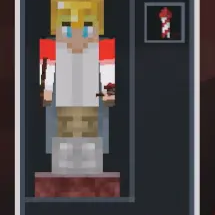
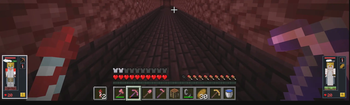
About this Mod
HerobrineHUD - Minecraft E-sports Broadcasting & Spectator System
HerobrineHUD is a mod tailor-made for Minecraft E-sports, live streaming, and professional broadcasting environments.
Whether you are hosting a massive official tournament or casual multiplayer minigames, this mod is designed to deliver a top-tier, system-level spectator interface.
Our philosophy: Minecraft has never been short on incredibly fun games, but it has always lacked a system-level UI tool to make those games visually captivating for the audience.
✨ Core Features
Currently, HerobrineHUD provides a truly out-of-the-box experience (zero config required). Simply install the mod on both the server and the broadcaster's client, and the client will seamlessly display real-time team information and player statuses. Vanilla /team groupings automatically sync directly to the broadcaster's HUD panel!
Broadcaster / Operator Hotkeys:
HKey: Quickly toggle the HUD visibility.KKey: Open the HUD Management & Settings GUI. Here, you can toggle specific UI elements (such as armor slots, potion effects, etc.) and easily manage which players are displayed on the left and right sides of your screen.- Numpad Keys (1~9, 0): Quick Camera Switching. While in Spectator mode, simply press the numpad key corresponding to a player's slot number on your screen, and your camera will instantly and smoothly lock onto that player's POV!
What HerobrineHUD aims to clearly present for broadcasters:
- Team-based player card layouts
- Real-time player health and status changes
- Equipment, potion effects, and in-game information displays
- A high-efficiency control experience tailored for spectating and camera switching
📌 Current Status
The multi-version migration and version-specific architecture for the Fabric side have been completed.
Currently supported Minecraft versions:
26.11.21.11
🚀 Future Plans
This mod is built upon the concept of standard GSI (Game State Integration). Its goal is not just to "display in-game information", but to gradually build a more complete presentation ecosystem for Minecraft E-sports and live broadcasting.
Long-term plans include:
- Extensive GSI State Fields (Future Open API): We will gradually expose more game state data, allowing third-party mods to seamlessly inject their custom gamemode rules or specific extension data directly into the HUD rendering pipeline, eventually evolving into an open API ecosystem.
- Real-time HTTP Broadcasting: The server side will feature an interface to broadcast game data as a real-time HTTP service. This will allow purely external applications to consume live data and utilize Web technologies to build dedicated, third-party overlay interfaces (e.g., directly usable as an OBS Browser Source, eliminating the need for traditional game window capture).
🗺️ Roadmap
- Integrate the AUI framework, bringing native Web technology into the game to flexibly render stunning, highly customizable Web-style UIs.
- Provide a rich UI theme framework alongside full Theme Manager support.
- Support for additional mod loaders, such as NeoForge.
🛠️ Development & Debugging
Windows PowerShell:
.\gradlew.bat build
Run Client:
.\gradlew.bat runDebugClient
.\gradlew.bat runDebugClient "-PdebugVersion=26.1"
.\gradlew.bat runDebugClient "-PdebugVersion=1.21.11"
Run Server:
.\gradlew.bat runDebugServer
.\gradlew.bat runDebugServer "-PdebugVersion=26.1"
.\gradlew.bat runDebugServer "-PdebugVersion=1.21.11"
🧱 Project Structure
common/: Shared data models and common logicfabric/: Shared Fabric implementation and version-specific override codefabric-remap/: Remap build path for1.21.x
Under fabric/src/:
- Shared server / platform logic:
fabric/src/main/ - Shared client logic:
fabric/src/client/ - Version-specific main overrides:
fabric/src/mc<version>/main/ - Version-specific client overrides:
fabric/src/mc<version>/client/
Available Versions
How to Install HerobrineHUD on Your Server
Order Server
Order a Minecraft Java server with at least 3 GB RAM (4 GB recommended).
Set fabric Loader
In the panel under "Egg", select the fabric loader and matching Minecraft version (26.1.2).
Install Mod
Open the mod browser in the dashboard and search for "HerobrineHUD". Click "Install" – done! Alternatively, upload the .jar via SFTP to the /mods folder.
Compatibility
Mod Loaders
Minecraft Versions
26.1.2, 26.1.1, 26.1 (+1 more)
Server-side
✓ RequiredRecommended RAM
4 GB(min. 3 GB)Frequently Asked Questions
HerobrineHUD server crashes on startup – what to do?
Most common cause: wrong fabric version or insufficient RAM. Check the server log (latest.log) for "OutOfMemoryError" or "Mixin" errors. With Mado Hosting: ensure at least 3 GB RAM is allocated and the loader matches the mod version (26.1.2). You can switch loaders with one click in the panel.
Is HerobrineHUD compatible with fabric?
HerobrineHUD officially supports fabric for Minecraft 26.1.2, 26.1.1, 26.1. The Mado dashboard automatically detects incompatible loader combinations.
Server lagging with HerobrineHUD – how to optimize performance?
Recommended RAM: 4 GB (per 8 players). Use /spark profiler to check if HerobrineHUD consumes the most tick time. Common fixes: reduce server view-distance to 8-10, install "performant" or "starlight" as supplementary mods on Forge. With Mado Hosting, your server runs on NVMe SSDs with dedicated CPU cores for minimal latency.
Similar Mods




![[ETF] Entity Texture Features](https://cdn.modrinth.com/data/BVzZfTc1/af683d206d50b05258d865b0d6e4aa2f2cee12f2_96.webp)

Rent Modded Server
Install HerobrineHUD with just one click on your server.