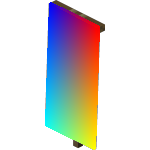
Screenshots
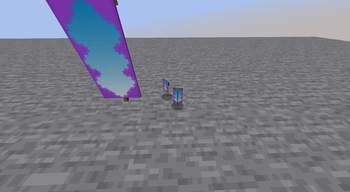
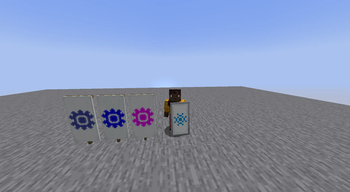
About this Mod
Hex Banners
Adds the ability to use RGB codes for banner colors.
This does not change any gameplay feature, but allows only to render more colors.
Any pattern color ID between 0 and 15 (unless Dye Depot is loaded, in which case up to 32) will still provide the vanilla colors.
Otherwise, replacing the banner data's pattern color for either a hex string or a number bigger (matching the hexadecimal value) will allow to render more detailed colors.
Accepted values are:
- Any number between 16* and 16777215 included
- Any hexadecimal string up to six characters long
- Any hexadecimal string starting with a
#with up to six hexadecimal characters (e.g.#ABC123
*: in vanilla. Mods such as Dye Depot tweak the numbers of dye colors, and in order to not break using them on banners, these are dynamically accepted as well when parsing number values.
The banner rendering is purely client-side, and thus, this mod can be used solely on the clients. However, the data handling logic also is loaded on the server, for mods that do rely on it for additional features.
However, there is no added way to craft banners with more detailed colors. As such, you need to manually create them using commands. Don't hesitate to look up the wiki for more info about how to do that.
Additionally, please note that on 1.20.1, the banner pattern color data key is not color, but Color, with an uppercase C.
Available Versions
How to Install Hex Banners on Your Server
Order Server
Order a Minecraft Java server with at least 3 GB RAM (4 GB recommended).
Set fabric Loader
In the panel under "Egg", select the fabric loader and matching Minecraft version (1.20.4).
Install Mod
Open the mod browser in the dashboard and search for "Hex Banners". Click "Install" – done! Alternatively, upload the .jar via SFTP to the /mods folder.
Compatibility
Mod Loaders
Minecraft Versions
1.20.4, 1.20.3, 1.20.2 (+1 more)
Server-side
✓ RequiredRecommended RAM
4 GB(min. 3 GB)Frequently Asked Questions
Hex Banners server crashes on startup – what to do?
Most common cause: wrong fabric version or insufficient RAM. Check the server log (latest.log) for "OutOfMemoryError" or "Mixin" errors. With Mado Hosting: ensure at least 3 GB RAM is allocated and the loader matches the mod version (1.20.4). You can switch loaders with one click in the panel.
Is Hex Banners compatible with fabric and quilt?
Hex Banners officially supports fabric, quilt for Minecraft 1.20.4, 1.20.3, 1.20.2. The Mado dashboard automatically detects incompatible loader combinations.
Server lagging with Hex Banners – how to optimize performance?
Recommended RAM: 4 GB (per 8 players). Use /spark profiler to check if Hex Banners consumes the most tick time. Common fixes: reduce server view-distance to 8-10, install "performant" or "starlight" as supplementary mods on Forge. With Mado Hosting, your server runs on NVMe SSDs with dedicated CPU cores for minimal latency.
Similar Mods

![[ETF] Entity Texture Features](https://cdn.modrinth.com/data/BVzZfTc1/af683d206d50b05258d865b0d6e4aa2f2cee12f2_96.webp)
![[EMF] Entity Model Features](https://cdn.modrinth.com/data/4I1XuqiY/6e5bbd0d06b1741bfdab6c0cfab6de8fdaf0064c_96.webp)



Rent Modded Server
Install Hex Banners with just one click on your server.