
Hex Research
An addon to Hex Casting that provides alternative ways to accomplish Hexcasting progression.
Screenshots
About this Mod
Hex Research
Status: Abandoned
An addon to Hex Casting that provides alternative ways to accomplish Hexcasting progression.
The general philosophy is that there should be a tedious, but benign way to accomplish any given goal, as well as a faster route, if one is willing to abuse friendly NPCs.
The documentation may be found on the web here.
Requirements
Mandatory
- Minecraft: 1.19.2
- Forge: 1.19.2-43.2.11
- Fabric: 0.14.21
- Hex Casting: 0.10.3
- Architectury: 6.5.85
- Patchouli: 1.19.2-77
- Kotlin for Forge: 1.9.0+kotlin.1.8.0 (Forge Only)
- Fabric Language Kotlin: 3.12.0 (Fabric Only)
Optional
- HexGloop: 1.19.2-0.2.0
Note: Some of the above have dependencies of their own
Content
New Spells
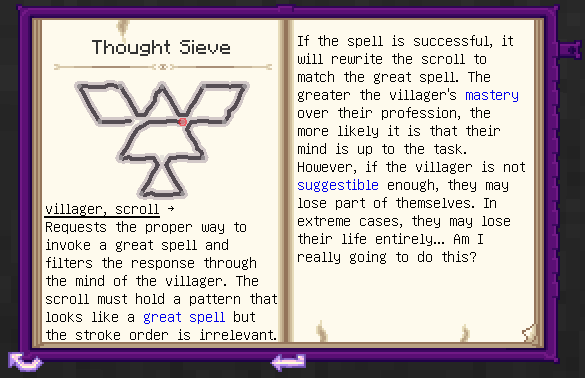
Thought Sieve
Finds the correct stroke order of a Great Spell by filtering possibilities through the mind of a villager. May have adverse effects on the villager.
Imbue Mind (Great)
Imbues a mind formed by a Cognitive Inducer into a block. Follows the Flay Mind recipes.
New Block
Cognitive Inducer
Creates an artificial mind by induction from nearby villagers. Used by the new Imbue Mind spell.
Troubleshooting
- I can't find scrolls or sift for Imbue Mind!
- Adding a great spell to an existing world does not automatically generate the per-world pattern
- As an operator or at the server console, run
/hexcasting recalcPatterns
Available Versions
How to Install Hex Research on Your Server
Order Server
Order a Minecraft Java server with at least 3 GB RAM (4 GB recommended).
Set fabric Loader
In the panel under "Egg", select the fabric loader and matching Minecraft version (1.19.2).
Install Mod
Open the mod browser in the dashboard and search for "Hex Research". Click "Install" – done! Alternatively, upload the .jar via SFTP to the /mods folder.
Compatibility
Mod Loaders
Minecraft Versions
1.19.2
Server-side
✓ RequiredRecommended RAM
4 GB(min. 3 GB)Frequently Asked Questions
Hex Research server crashes on startup – what to do?
Most common cause: wrong fabric version or insufficient RAM. Check the server log (latest.log) for "OutOfMemoryError" or "Mixin" errors. With Mado Hosting: ensure at least 3 GB RAM is allocated and the loader matches the mod version (1.19.2). You can switch loaders with one click in the panel.
Is Hex Research compatible with fabric and forge?
Hex Research officially supports fabric, forge for Minecraft 1.19.2. Note: Forge and Fabric mods are NOT cross-compatible – pick one loader and stick with it. The Mado dashboard automatically detects incompatible loader combinations.
Server lagging with Hex Research – how to optimize performance?
Recommended RAM: 4 GB (per 8 players). Use /spark profiler to check if Hex Research consumes the most tick time. Common fixes: reduce server view-distance to 8-10, install "performant" or "starlight" as supplementary mods on Forge. With Mado Hosting, your server runs on NVMe SSDs with dedicated CPU cores for minimal latency.
Similar Mods





Rent Modded Server
Install Hex Research with just one click on your server.