
HexDebug
A Hex Casting addon for debugging and editing hexes.
Screenshots

About this Mod
HexDebug
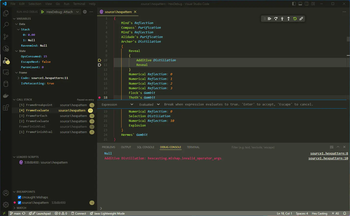
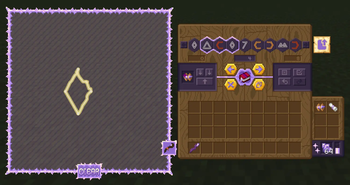
A Hex Casting addon for debugging and editing hexes. The Debugger runs a debug server using the Debug Adapter Protocol, allowing you to use real debugging tools like VSCode to find bugs in your hexes; and the Splicing Table provides an easy-to-use GUI for finding and fixing mistakes.
Features
- Debugging: Step through your hexes pattern-by-pattern with vscode-hex-casting or any other DAP-compatible editor!
- Editing: Use the Splicing Table to edit hexes just like in a text editor, with buttons and keyboard shortcuts to select, move, duplicate, delete, and copy/paste iotas, and even draw patterns in a mini staff grid.
- Step Modes: Use any of the well-known step modes (step in/out/over, continue, restart, stop) with the ingame item and/or through VSCode.
- Variables: See the stack, ravenmind, and even some internal values like the evaluated pattern count.
- Call Stack: Debug complex meta-evaluating hexes with the call stack, generated from the next continuation to be executed. Learn how Hex Casting's internals work!
- Breakpoints: Set breakpoints on specific patterns, or use the Uncaught Mishaps option to pause the debugger when a mishap occurs and see what went wrong.
- Multiplayer: Debug your hexes in multiplayer! The debug client connects to a port opened by the game client (configurable, defaults to 4444), and each player can have up to one active debugger instance at a time.
Attribution


Available Versions
How to Install HexDebug on Your Server
Order Server
Order a Minecraft Java server with at least 3 GB RAM (4 GB recommended).
Set fabric Loader
In the panel under "Egg", select the fabric loader and matching Minecraft version (1.20.1).
Install Mod
Open the mod browser in the dashboard and search for "HexDebug". Click "Install" – done! Alternatively, upload the .jar via SFTP to the /mods folder.
Compatibility
Mod Loaders
Minecraft Versions
1.20.1, 1.19.2
Server-side
✓ RequiredRecommended RAM
4 GB(min. 3 GB)Frequently Asked Questions
HexDebug server crashes on startup – what to do?
Most common cause: wrong fabric version or insufficient RAM. Check the server log (latest.log) for "OutOfMemoryError" or "Mixin" errors. With Mado Hosting: ensure at least 3 GB RAM is allocated and the loader matches the mod version (1.20.1). You can switch loaders with one click in the panel.
Is HexDebug compatible with fabric and forge and quilt?
HexDebug officially supports fabric, forge, quilt for Minecraft 1.20.1, 1.19.2. Note: Forge and Fabric mods are NOT cross-compatible – pick one loader and stick with it. The Mado dashboard automatically detects incompatible loader combinations.
Server lagging with HexDebug – how to optimize performance?
Recommended RAM: 4 GB (per 8 players). Use /spark profiler to check if HexDebug consumes the most tick time. Common fixes: reduce server view-distance to 8-10, install "performant" or "starlight" as supplementary mods on Forge. With Mado Hosting, your server runs on NVMe SSDs with dedicated CPU cores for minimal latency.
Similar Mods





Rent Modded Server
Install HexDebug with just one click on your server.