HexWool
Allows coloring wool and some other blocks using any RGB color value.
Screenshots






About this Mod
I haven't updated this mod in ages, so the last version is for 1.12.2. Not sure when I'll get around to updating it to a more modern version. Even so, I am uploading it here for the sake of archival, since people are jumping ship from a certain other site.
Have you ever been building pixel art and just wish you could get the exact color you need? Or maybe you just want a carpet in deep blue. Whatever you fancy, it can be done with HexWool! This mod allows you to color several blocks any color by inputting a hexadecimal color code (or using the color picker) into the Wool Colorizer, which is crafted like so (wool can be any color):
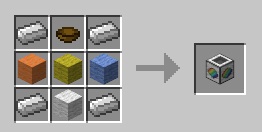
The Wool Colorizer requires cyan, magenta, yellow and black dyes, not unlike a printer. The amounts can be adjusted or dye requirements disabled in the config.
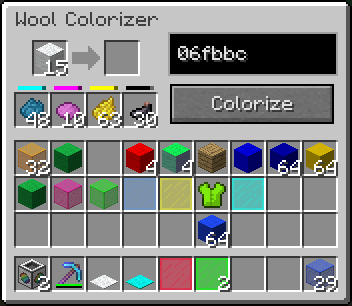
The following blocks/items are supported by default:
- Wool
- Carpet
- Terracotta
- Concrete
- Glass
- Glass Pane
- Leather Armor
Colored blocks should be fully compatible with resource packs as I directly reference the vanilla textures.
Modders can add support for coloring their blocks/items by implementing the IColorizable interface on the Block or Item class.
Yes, you have permission to use this in any mod pack. Credit is appreciated but not required.
Available Versions
How to Install HexWool on Your Server
Order Server
Order a Minecraft Java server with at least 3 GB RAM (4 GB recommended).
Set forge Loader
In the panel under "Egg", select the forge loader and matching Minecraft version (1.12.2).
Install Mod
Open the mod browser in the dashboard and search for "HexWool". Click "Install" – done! Alternatively, upload the .jar via SFTP to the /mods folder.
Compatibility
Mod Loaders
Minecraft Versions
1.12.2
Server-side
✓ RequiredRecommended RAM
4 GB(min. 3 GB)Frequently Asked Questions
HexWool server crashes on startup – what to do?
Most common cause: wrong forge version or insufficient RAM. Check the server log (latest.log) for "OutOfMemoryError" or "Mixin" errors. With Mado Hosting: ensure at least 3 GB RAM is allocated and the loader matches the mod version (1.12.2). You can switch loaders with one click in the panel.
Is HexWool compatible with forge?
HexWool officially supports forge for Minecraft 1.12.2. The Mado dashboard automatically detects incompatible loader combinations.
Server lagging with HexWool – how to optimize performance?
Recommended RAM: 4 GB (per 8 players). Use /spark profiler to check if HexWool consumes the most tick time. Common fixes: reduce server view-distance to 8-10, install "performant" or "starlight" as supplementary mods on Forge. With Mado Hosting, your server runs on NVMe SSDs with dedicated CPU cores for minimal latency.
Similar Mods

![[ETF] Entity Texture Features](https://cdn.modrinth.com/data/BVzZfTc1/af683d206d50b05258d865b0d6e4aa2f2cee12f2_96.webp)
![[EMF] Entity Model Features](https://cdn.modrinth.com/data/4I1XuqiY/6e5bbd0d06b1741bfdab6c0cfab6de8fdaf0064c_96.webp)



Rent Modded Server
Install HexWool with just one click on your server.