
HiddenVision
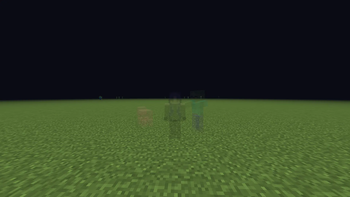
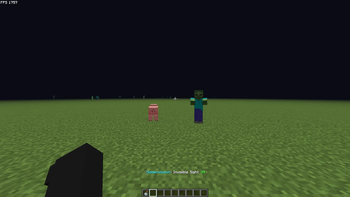
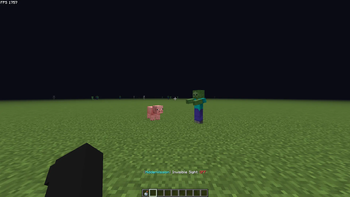
[ENG]This mod allows you to see invisible Mob/Players. [TR]Bu mod, görünmez yaratıkları/oyuncuları görmenizi sağlar.
Screenshots
About this Mod
[ENG]
HiddenVission
A lightweight, high-performance client-side utility mod for Minecraft Fabric that allows you to easily reveal and visualize invisible entities with a single keypress.
🚀 Features
- Toggle Visibility: Press the G key (configurable in control settings) to instantly reveal all invisible players, mobs, and armor stands.
- Server-Friendly: 100% client-side. It does not send any packets to the server or leave logs, making it safe and clean to use.
- Actionbar Alerts: Provides a clean screen overlay notification (ON/OFF) when toggling, so you always know your current state.
- ModMenu Integration: Fully compatible with ModMenu. It will display correctly in your mods list with custom graphics and author info.
🛠️ Requirements & Installation
- Make sure you are using Fabric Loader (version
>=0.16.0). - Put the
hiddenvision-1.0.0.jarinto your.minecraft/modsfolder. - Fabric API is required.
- (Optional) Install ModMenu to view the mod in your mod list.
⚙️ Configuration
Simply go to Minecraft Controls -> Keybinds menu to rebind the toggle key if you don't want to use the default G key.
Developed by Th3Fuzzy. Licensed under the MIT License.
[TR]
HiddenVission
Minecraft Fabric için geliştirilmiş, tek bir tuşla görünmez varlıkları (oyuncular, yaratıklar, zırh askıları) görmenizi sağlayan hafif ve yüksek performanslı bir istemci (client-side) modudur.
🚀 Özellikler
- Görünürlüğü Aç/Kapat: G tuşuna basarak (kontroller menüsünden değiştirilebilir) tüm görünmez oyuncuları ve mobları anında görünür hale getirin.
- Sunucu Dostu: %100 client-side çalışır. Sunucuya paket göndermez veya sunucu tarafında iz bırakmaz.
- Aksiyon Çubuğu Bildirimleri: Modu açıp kapattığınızda ekranın alt kısmında temiz bir ON/OFF bildirimi gösterir.
- ModMenu Entegrasyonu: ModMenu ile tam uyumludur. Özel ikonu ve yapımcı bilgileriyle mod listenizde şık bir şekilde görünür.
🛠️ Gereksinimler & Kurulum
- Fabric Loader (sürüm
>=0.16.0) kullandığınızdan emin olun. hiddenvision-1.0.0.jardosyasını.minecraft/modsklasörüne atın.- Fabric API gereklidir.
- (İsteğe bağlı) Mod listenizde görmek için ModMenu modunu kurabilirsiniz.
⚙️ Tuş Ayarı
Varsayılan G tuşu yerine başka bir tuş kullanmak isterseniz, Minecraft ayarlarından Kontroller -> Tuş Atamaları kısmından kolayca değiştirebilirsiniz.
Th3Fuzzy tarafından geliştirilmiştir. MIT Lisansı ile korunmaktadır.
Available Versions
How to Install HiddenVision on Your Server
Order Server
Order a Minecraft Java server with at least 3 GB RAM (4 GB recommended).
Set fabric Loader
In the panel under "Egg", select the fabric loader and matching Minecraft version (26.1.2).
Install Mod
Open the mod browser in the dashboard and search for "HiddenVision". Click "Install" – done! Alternatively, upload the .jar via SFTP to the /mods folder.
Compatibility
Mod Loaders
Minecraft Versions
26.1.2, 26.1.1, 26.1 (+11 more)
Server-side
✗ UnsupportedRecommended RAM
4 GB(min. 3 GB)Frequently Asked Questions
HiddenVision server crashes on startup – what to do?
Most common cause: wrong fabric version or insufficient RAM. Check the server log (latest.log) for "OutOfMemoryError" or "Mixin" errors. With Mado Hosting: ensure at least 3 GB RAM is allocated and the loader matches the mod version (26.1.2). You can switch loaders with one click in the panel.
Is HiddenVision compatible with fabric?
HiddenVision officially supports fabric for Minecraft 26.1.2, 26.1.1, 26.1. The Mado dashboard automatically detects incompatible loader combinations.
Server lagging with HiddenVision – how to optimize performance?
Recommended RAM: 4 GB (per 8 players). Use /spark profiler to check if HiddenVision consumes the most tick time. Common fixes: reduce server view-distance to 8-10, install "performant" or "starlight" as supplementary mods on Forge. With Mado Hosting, your server runs on NVMe SSDs with dedicated CPU cores for minimal latency.
Similar Mods




Rent Modded Server
Install HiddenVision with just one click on your server.