
Haven't I Seen This Before?
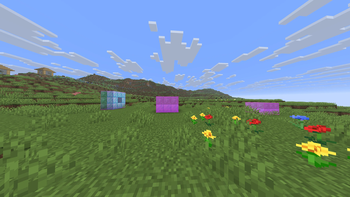
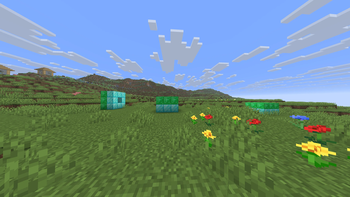
Outlines every copy of your Litematica schematics in the area loaded around you, including rotated and mirrored matches. A lightweight, client-side visual companion for MaLiLib.
Screenshots
About this Mod
👀 Haven't I Seen This Before? (HISTB?)
Find every copy of your saved builds in the world around you — automatically.
Load one of your Litematica schematics and HISTB? outlines every place that build already exists in
the area loaded around you — including rotated and mirrored copies. A lightweight, client-side
companion for MaLiLib / Litematica.
Minecraft 26.1.2 · Fabric · client-side only · a visual overlay that never changes the world
⚡ TL;DR (30 seconds)
- Install HISTB?, Fabric API, and MaLiLib (drop the
.jars in yourmodsfolder). - In Litematica, save the build you want to find as a
.litematic. - In game: open Mod Menu → HISTB? → Schematics tab → click your file.
- Go to the General tab → turn it ON.
- Walk around. Your matching builds light up. ✨
That's it. No setup, no commands, no fiddling.
🎯 What it does
You point it at one of your builds (a schematic). It looks through the chunks already loaded around
you and draws an outline on every copy of that build it finds — even if the copy is rotated or
mirrored.
Great for:
- Locating your own builds across a big base — villager halls, iron farms, shops
- Counting how many copies of a modular build you've placed
- Keeping a large creative or survival project organized
- Re-finding a build you made ages ago and can't remember where you put it
HISTB? only ever reads the world already loaded around you — the same client-side data Litematica
and MiniHUD use. It is a visual overlay: it never reads server-side data, never edits a single
block, and changes nothing for anyone else.
📦 Install (step by step)
You need 3 mods. Put all of them in your .minecraft/mods folder (or your modpack's mods folder):
| Mod | Where |
|---|---|
| HISTB? (this) | Releases / Modrinth |
| Fabric API | modrinth.com/mod/fabric-api |
| MaLiLib | modrinth.com/mod/malilib |
👉 Most people also want Litematica — that's what you use to
make the schematics HISTB? looks for.
Make sure every mod matches Minecraft 26.1.2.
🕹️ How to use it
Step 1 — Make a schematic (in Litematica)
Select an area around a build → save it. You now have a .litematic file in your schematics folder.
(Already have .litematic or .nbt files? Skip this step.)
Step 2 — Load it into HISTB?
Open Mod Menu → HISTB?. You'll see tabs across the top:
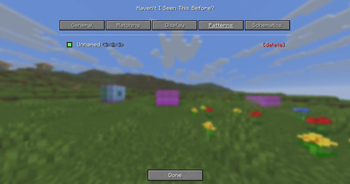
- Schematics → click a file to load it (it turns into a "pattern").
- Patterns → see your loaded patterns, tick/untick which ones to look for.
- General → the ON / OFF switch.
Step 3 — Turn it on
General tab → Enable. Done. It scans automatically and outlines matches live as you move.
Prefer a hotkey? Options → Controls → Haven't I Seen This Before? — bind Toggle and Open menu
to whatever keys you like. (They're unbound by default so they never clash with your other mods.)
⚙️ Settings (all optional)
Everything lives in the Mod Menu tabs — no config files to edit.
- Matching — how strict a match must be, and whether to include rotated / mirrored copies.
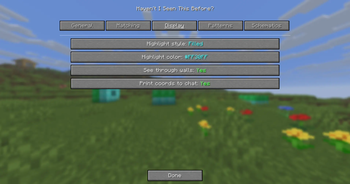
- Display — box style (outline / filled / both), colour, line width, whether outlines draw through
terrain (you can turn that off), and optional chat coordinates.
❓ Quick troubleshooting
| Problem | Fix |
|---|---|
| Nothing lights up | Is it ON (General tab)? Is a pattern ticked (Patterns tab)? Is the build actually near you? |
| Only finds nearby builds | It can only read loaded chunks — increase your render distance to search further. |
| Mod won't load | Make sure Fabric API and MaLiLib are installed, all for 26.1.2. |
| Rotated copies missed | Turn on rotations/mirror in the Matching tab. |
🌐 Multiplayer
HISTB? is a personal, client-side overlay built on the same rendering Litematica uses. It only
outlines copies of the schematics you load, using chunks already loaded on your client — it sends
nothing to the server and changes nothing for other players. As always, follow the rules of any server
you play on.
🧠 How it works (for the curious)
It reads the blocks in your loaded area and looks for spots where they match your schematic's exact
layout. To stay fast it skips chunk sections that can't possibly contain your build (the same trick
Litematica uses), and it scans on a background thread so your game never stutters.
Heads up: HISTB? discovers builds by reading the world around you, so it can only outline things
in loaded chunks (your render distance). Unlike Litematica's placed holograms, it can't show a
match in a chunk that isn't loaded yet — there's simply no data there to read.
🙏 Credits
Made by Limucc-dev.
Powered by MaLiLib (by masa). Schematics compatible with
Litematica.
MIT licensed — do what you like with it.
Available Versions
How to Install Haven't I Seen This Before? on Your Server
Order Server
Order a Minecraft Java server with at least 3 GB RAM (4 GB recommended).
Set fabric Loader
In the panel under "Egg", select the fabric loader and matching Minecraft version (26.1.2).
Install Mod
Open the mod browser in the dashboard and search for "Haven't I Seen This Before?". Click "Install" – done! Alternatively, upload the .jar via SFTP to the /mods folder.
Compatibility
Mod Loaders
Minecraft Versions
26.1.2
Server-side
✗ UnsupportedRecommended RAM
4 GB(min. 3 GB)Frequently Asked Questions
Haven't I Seen This Before? server crashes on startup – what to do?
Most common cause: wrong fabric version or insufficient RAM. Check the server log (latest.log) for "OutOfMemoryError" or "Mixin" errors. With Mado Hosting: ensure at least 3 GB RAM is allocated and the loader matches the mod version (26.1.2). You can switch loaders with one click in the panel.
Is Haven't I Seen This Before? compatible with fabric?
Haven't I Seen This Before? officially supports fabric for Minecraft 26.1.2. The Mado dashboard automatically detects incompatible loader combinations.
Server lagging with Haven't I Seen This Before? – how to optimize performance?
Recommended RAM: 4 GB (per 8 players). Use /spark profiler to check if Haven't I Seen This Before? consumes the most tick time. Common fixes: reduce server view-distance to 8-10, install "performant" or "starlight" as supplementary mods on Forge. With Mado Hosting, your server runs on NVMe SSDs with dedicated CPU cores for minimal latency.
Similar Mods




![[ETF] Entity Texture Features](https://cdn.modrinth.com/data/BVzZfTc1/af683d206d50b05258d865b0d6e4aa2f2cee12f2_96.webp)
![[EMF] Entity Model Features](https://cdn.modrinth.com/data/4I1XuqiY/6e5bbd0d06b1741bfdab6c0cfab6de8fdaf0064c_96.webp)
Rent Modded Server
Install Haven't I Seen This Before? with just one click on your server.