
HitColor X
[26.1.x SUPPORT IS HERE!] Fully Custom Hit Color - Toggle Armor Tint - up to 100% Opacity - Hex Support - Presets, lightweight client-side Fabric mod for Minecraft 1.21.11 that lets you fully customize the hurt flash color when entities are hit.
Screenshots

About this Mod
◼️ HitColor X ◼️
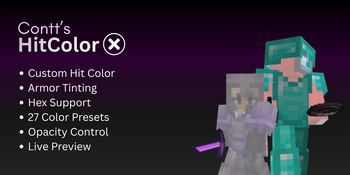
Fully customize the hurt flash color on entities INCLUDING their ARMOR.
Built for PvP players who want clear, personalized visual feedback during combat.
Features
◼️ Custom Hit Color
Set any color you want using:
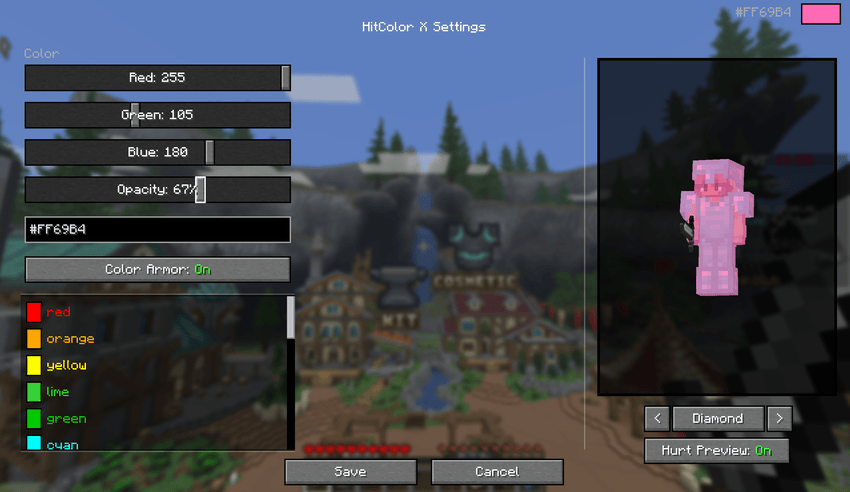
- RGB sliders: precise control over red, green, and blue channels
- Hex Code Input: Paste any hex color directly
- Preset colors: Red, Orange, Yellow, Green, Cyan, Blue, Purple, Pink, Magenta, White, Black
◼️ Armor Tinting
Toggle armor color too. When an entity is hit, their armor flashes the same color as their body. Supports all armor types.
◼️ Opacity Control
Adjust the intensity of the hit flash from 0% (no hit color) to 100% (fully solid). Find the perfect balance.
◼️ In-Game Settings Screen
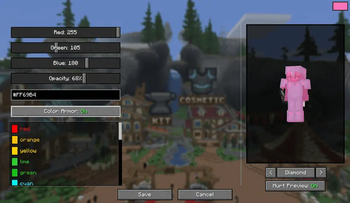
Open the settings screen from Mod Menu to configure everything visually:
- Live player preview with your actual skin (You have to be in a world/server for this feature to function)
- Cycle through armor sets (Current, None, Leather, Gold, Chainmail, Iron, Copper, Diamond, Netherite) with enchantment glint
- Toggle hurt preview on/off to compare with and without the effect
- All changes update in real time

◼️ In-Game Commands
No ModMenu? No problem. Configure everything via chat commands:
| Command | Description |
|---|---|
/hitcolorx rgb <r> <g> <b> |
Set color by RGB values |
/hitcolorx hex <#RRGGBB> |
Set color by hex code |
/hitcolorx color <preset> |
Use a preset color |
/hitcolorx opacity <0-100> |
Adjust opacity |
/hitcolorx armor <on/off> |
Toggle armor recoloring |
/hitcolorx reset |
Reset to vanilla defaults |
/hitcolorx status |
Show current settings |
◼️ Available Preset Colors
| Color | Name | Color | Name | Color | Name |
|---|---|---|---|---|---|
| 🔴 | red |
🟠 | orange |
🟡 | yellow |
| 🟢 | lime |
🟩 | green |
🩵 | cyan |
| 🔵 | lightblue |
💙 | blue |
🌑 | navy |
| 🟣 | purple |
🫐 | darkpurple |
💗 | hotpink |
| 🌸 | pink |
💜 | magenta |
🪻 | lavender |
| ❤️ | crimson |
🩸 | darkred |
🪸 | coral |
| 🏅 | gold |
🩴 | teal |
🩵 | turquoise |
| 🌿 | lightgreen |
🌲 | darkgreen |
🔷 | darkblue |
| 🩶 | silver |
⬜ | white |
⬛ | black |
◼️ Dependencies
- Required: Fabric API
- Optional: Mod Menu (for the config screen)
◼️ Compatibility
- Minecraft 1.21.11-26.1.x
- Fabric Loader 0.18.4+
- Client-side only
Available Versions
How to Install HitColor X on Your Server
Order Server
Order a Minecraft Java server with at least 3 GB RAM (4 GB recommended).
Set fabric Loader
In the panel under "Egg", select the fabric loader and matching Minecraft version (26.1.2).
Install Mod
Open the mod browser in the dashboard and search for "HitColor X". Click "Install" – done! Alternatively, upload the .jar via SFTP to the /mods folder.
Compatibility
Mod Loaders
Minecraft Versions
26.1.2, 26.1.1, 26.1 (+1 more)
Server-side
✗ UnsupportedRecommended RAM
4 GB(min. 3 GB)Frequently Asked Questions
HitColor X server crashes on startup – what to do?
Most common cause: wrong fabric version or insufficient RAM. Check the server log (latest.log) for "OutOfMemoryError" or "Mixin" errors. With Mado Hosting: ensure at least 3 GB RAM is allocated and the loader matches the mod version (26.1.2). You can switch loaders with one click in the panel.
Is HitColor X compatible with fabric?
HitColor X officially supports fabric for Minecraft 26.1.2, 26.1.1, 26.1. The Mado dashboard automatically detects incompatible loader combinations.
Server lagging with HitColor X – how to optimize performance?
Recommended RAM: 4 GB (per 8 players). Use /spark profiler to check if HitColor X consumes the most tick time. Common fixes: reduce server view-distance to 8-10, install "performant" or "starlight" as supplementary mods on Forge. With Mado Hosting, your server runs on NVMe SSDs with dedicated CPU cores for minimal latency.
Similar Mods

![[ETF] Entity Texture Features](https://cdn.modrinth.com/data/BVzZfTc1/af683d206d50b05258d865b0d6e4aa2f2cee12f2_96.webp)
![[EMF] Entity Model Features](https://cdn.modrinth.com/data/4I1XuqiY/6e5bbd0d06b1741bfdab6c0cfab6de8fdaf0064c_96.webp)



Rent Modded Server
Install HitColor X with just one click on your server.