
Hive365
Official Radio Mod playing the Hive365 stream in-game
Screenshots
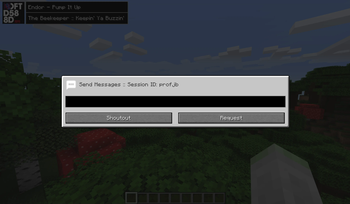
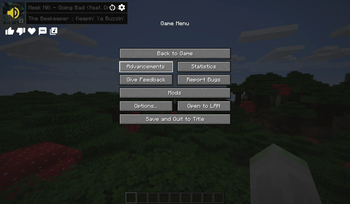
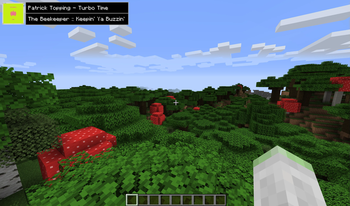
About this Mod

The official Hive365 Radio Mod
Website: https://hive365.radio/
Features
- Tune in and listen to the Hive365 radio stream
- Like/dislike songs through Choons/poons, request a song or shoutout to a live presenter
- Provides song info, including album art and a song url link
- Integrates seamlessly into vanilla minecraft and provides compatibility for popular modpacks like AOF3
Interactions
- All available within the UI or as commands. A full list of commands are listed by typing /hive365
- Choon/Poon - Equates to liking or disliking a song
- DJFtw - You like the presenter
- Request - Request a song
- Shoutout - Send a shoutout to the presenter
- Song URL - Get a universal song URL for the current track if one is available
Terms and conditions
We take the privacy and safety of our listeners very seriously. For this reason by default retrieving album art for songs and all interactions are disabled unless the user reads, agrees to and accepts the conditions using /hive365 accept. For a print of our T&Cs visit: https://hive365.radio/terms
Available Versions
How to Install Hive365 on Your Server
Order Server
Order a Minecraft Java server with at least 3 GB RAM (4 GB recommended).
Set fabric Loader
In the panel under "Egg", select the fabric loader and matching Minecraft version (1.20.6).
Install Mod
Open the mod browser in the dashboard and search for "Hive365". Click "Install" – done! Alternatively, upload the .jar via SFTP to the /mods folder.
Compatibility
Mod Loaders
Minecraft Versions
1.20.6, 1.20.5, 1.20.2 (+5 more)
Server-side
✗ UnsupportedRecommended RAM
4 GB(min. 3 GB)Frequently Asked Questions
Hive365 server crashes on startup – what to do?
Most common cause: wrong fabric version or insufficient RAM. Check the server log (latest.log) for "OutOfMemoryError" or "Mixin" errors. With Mado Hosting: ensure at least 3 GB RAM is allocated and the loader matches the mod version (1.20.6). You can switch loaders with one click in the panel.
Is Hive365 compatible with fabric and quilt?
Hive365 officially supports fabric, quilt for Minecraft 1.20.6, 1.20.5, 1.20.2. The Mado dashboard automatically detects incompatible loader combinations.
Server lagging with Hive365 – how to optimize performance?
Recommended RAM: 4 GB (per 8 players). Use /spark profiler to check if Hive365 consumes the most tick time. Common fixes: reduce server view-distance to 8-10, install "performant" or "starlight" as supplementary mods on Forge. With Mado Hosting, your server runs on NVMe SSDs with dedicated CPU cores for minimal latency.
Similar Mods




![[ETF] Entity Texture Features](https://cdn.modrinth.com/data/BVzZfTc1/af683d206d50b05258d865b0d6e4aa2f2cee12f2_96.webp)
![[EMF] Entity Model Features](https://cdn.modrinth.com/data/4I1XuqiY/6e5bbd0d06b1741bfdab6c0cfab6de8fdaf0064c_96.webp)
Rent Modded Server
Install Hive365 with just one click on your server.
Details
- License
- Creative Commons Attribution Non Commercial No Derivatives 3.0 Unported
- Server-side
- Unsupported