
Hold Your Buttons
Stops accidental crafting of wooden buttons via confirm screen.
Screenshots
About this Mod
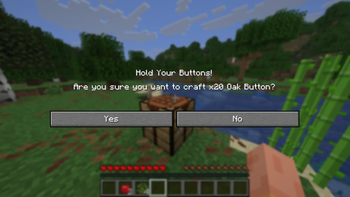
Have you ever accidentally turned all your precious planks into a bunch of wooden buttons instead of sticks or trapdoors? Hold Your Buttons is a client-side quality-of-life mod that intercepts wooden button crafting from your inventory or crafting table and asks: "Are you sure?" before ruining your grand plans.
Overview
Hold Your Buttons is a simple, lightweight client-side mod designed to solve one of Minecraft's most frustrating accidental misclicks: crafting a mountain of wooden buttons by mistake.
We've all been there. You are trying to craft sticks, trapdoors, or pressure plates, your muscle memory fails, and suddenly your inventory is flooded with wooden buttons you will never use.
This mod intercepts any attempt to take or shift-click (quick-move) wooden buttons out of a Crafting Table or your Survival Inventory crafting grid. Instead of instantly giving you the items, it pauses and prompts you.
Features
- Displays a confirmation pop-up before you craft any item tagged as a wooden button.
- Calculates exactly how many buttons you are about to craft based on the ingredients.
- Works flawlessly on multiplayer servers, realms, and single-player worlds.
Planned
- A configuration file to tweak settings, formatting and toggle the confirmation screen.
- Support for custom recipes, allowing you to safeguard any item from crafting disasters.
Available Versions
How to Install Hold Your Buttons on Your Server
Order Server
Order a Minecraft Java server with at least 3 GB RAM (4 GB recommended).
Set fabric Loader
In the panel under "Egg", select the fabric loader and matching Minecraft version (26.2).
Install Mod
Open the mod browser in the dashboard and search for "Hold Your Buttons". Click "Install" – done! Alternatively, upload the .jar via SFTP to the /mods folder.
Compatibility
Mod Loaders
Minecraft Versions
26.2
Server-side
✗ UnsupportedRecommended RAM
4 GB(min. 3 GB)Frequently Asked Questions
Hold Your Buttons server crashes on startup – what to do?
Most common cause: wrong fabric version or insufficient RAM. Check the server log (latest.log) for "OutOfMemoryError" or "Mixin" errors. With Mado Hosting: ensure at least 3 GB RAM is allocated and the loader matches the mod version (26.2). You can switch loaders with one click in the panel.
Is Hold Your Buttons compatible with fabric?
Hold Your Buttons officially supports fabric for Minecraft 26.2. The Mado dashboard automatically detects incompatible loader combinations.
Server lagging with Hold Your Buttons – how to optimize performance?
Recommended RAM: 4 GB (per 8 players). Use /spark profiler to check if Hold Your Buttons consumes the most tick time. Common fixes: reduce server view-distance to 8-10, install "performant" or "starlight" as supplementary mods on Forge. With Mado Hosting, your server runs on NVMe SSDs with dedicated CPU cores for minimal latency.
Similar Mods




Rent Modded Server
Install Hold Your Buttons with just one click on your server.