
Holdmetight
A minecraft size mod that uses pehkui as a backbone to add more interesting and varied ways to interact with other entities and the environment at different sizes
Screenshots


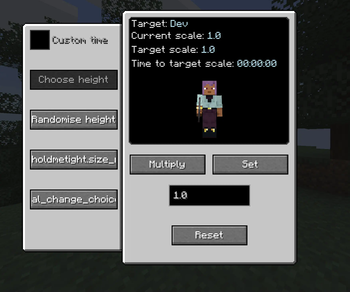
About this Mod
https://www.youtube.com/@ModdingByKaupenjoe
https://www.youtube.com/@TurtyWurty
following tutorials by these two helped a massive amount in actually being able to do this so go check them out!
An addon for pehkui that adds more size interactions as well as new ways to change the size of players and entities!
Features:
- Size Remotes: Change the size of yourself or those around you!
- Carrying: Right clicking on entities who are at most 1/4 of your size will add them to your inventory and let you carry them around!
- Size interactions: Interact in the world in different ways depending on your size, while small climb and stand on blocks that are normally intangible to others or wade through the leaves of a forest while big
A full list of what being big/small does along with all the features this mod implements so far can be found here
If you have enjoyed this mod then that is wonderful and i have achieved my goal! But if you are looking for a way to support me my kofi can be found here. This is in no way expected and you are a darling for even having read this thankyou for enjoying my work!

Known issues/incompatabilities:
- Customisable player models: Works beyond potential visual issues with the positioning of held entites, however custom model scaling does not play well so if your model has them enabled then you are likely to encounter issues and inconsistencies related to actual size changing
Along with the mods listed above it is highly likely that this mod is incompatible with, or at least will have severe errors with, any other mod that allows for the changing of scale with pehkui. however i do try to ensure that it is compatible and will work to fix any incompatibilities i come across. If you encounter any such errors please submit an issue report, thankyou in advance!
Available Versions
How to Install Holdmetight on Your Server
Order Server
Order a Minecraft Java server with at least 3 GB RAM (4 GB recommended).
Set forge Loader
In the panel under "Egg", select the forge loader and matching Minecraft version (1.20.1).
Install Mod
Open the mod browser in the dashboard and search for "Holdmetight". Click "Install" – done! Alternatively, upload the .jar via SFTP to the /mods folder.
Compatibility
Mod Loaders
Minecraft Versions
1.20.1
Server-side
✓ RequiredRecommended RAM
4 GB(min. 3 GB)Frequently Asked Questions
Holdmetight server crashes on startup – what to do?
Most common cause: wrong forge version or insufficient RAM. Check the server log (latest.log) for "OutOfMemoryError" or "Mixin" errors. With Mado Hosting: ensure at least 3 GB RAM is allocated and the loader matches the mod version (1.20.1). You can switch loaders with one click in the panel.
Is Holdmetight compatible with forge?
Holdmetight officially supports forge for Minecraft 1.20.1. The Mado dashboard automatically detects incompatible loader combinations.
Server lagging with Holdmetight – how to optimize performance?
Recommended RAM: 4 GB (per 8 players). Use /spark profiler to check if Holdmetight consumes the most tick time. Common fixes: reduce server view-distance to 8-10, install "performant" or "starlight" as supplementary mods on Forge. With Mado Hosting, your server runs on NVMe SSDs with dedicated CPU cores for minimal latency.
Similar Mods




Rent Modded Server
Install Holdmetight with just one click on your server.