
Hollow Engine
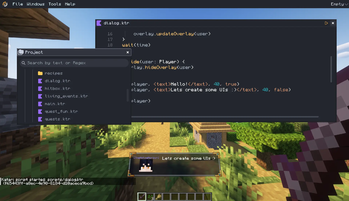
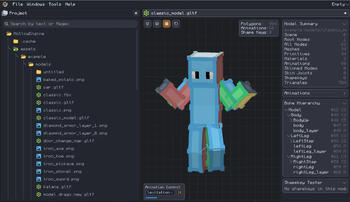
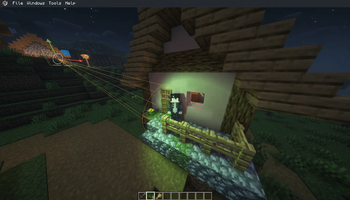
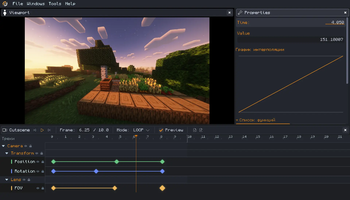
Powerful content creation framework for modpacks maps and servers. Features Kotlin & Katari scripting, in-game scripting IDE, advanced NPCs, dialogues, animations, and cutscenes all in one.
Screenshots
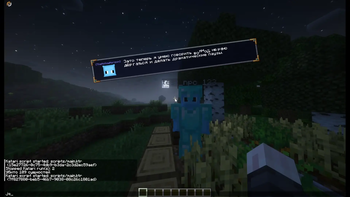
About this Mod

HollowEngine
HollowEngine is a powerful Minecraft modding tool designed to simplify custom game mechanics, event scripting, and storytelling. It provides developers and modpack creators with a easiest and powerful framework to build interactive experiences without the need to compile complex Java code.
What can it do?
| Key Features: |
|---|
| Event-Driven Scripting: Easily trigger actions based on player behavior, world events, or custom conditions. |
| Story & Quest Tools: Built-in systems for creating interactive dialogues, cutscenes, and branching questlines. |
| Performance-First: Lightweight execution engine that handles complex logic with minimal impact on TPS. |
| Developer Friendly: Clear syntax, helpful logging in IDE, and easy integration with existing modpacks. |
Documentation & Wiki
Looking for script examples, API references, or tutorials? Everything you need to build with HollowEngine is available on our official platform.
Visit our documentation hub for complete guides on triggers, actions, and event scripting:
Read the Documentation at 0mods.team
License & Permissions
Can I use this in my modpack?
Yes! Feel free to include HollowEngine in any public or private modpack.
Source Code: Distributed under the Attribution-NonCommercial-ShareAlike 4.0 International License.
Contributions are welcome on GitHub!
Available Versions
How to Install Hollow Engine on Your Server
Order Server
Order a Minecraft Java server with at least 3 GB RAM (4 GB recommended).
Set fabric Loader
In the panel under "Egg", select the fabric loader and matching Minecraft version (1.21.1).
Install Mod
Open the mod browser in the dashboard and search for "Hollow Engine". Click "Install" – done! Alternatively, upload the .jar via SFTP to the /mods folder.
Compatibility
Mod Loaders
Minecraft Versions
1.21.1, 1.19.2, 1.19.1 (+2 more)
Server-side
✓ RequiredRecommended RAM
4 GB(min. 3 GB)Frequently Asked Questions
Hollow Engine server crashes on startup – what to do?
Most common cause: wrong fabric version or insufficient RAM. Check the server log (latest.log) for "OutOfMemoryError" or "Mixin" errors. With Mado Hosting: ensure at least 3 GB RAM is allocated and the loader matches the mod version (1.21.1). You can switch loaders with one click in the panel.
Is Hollow Engine compatible with fabric and forge and neoforge?
Hollow Engine officially supports fabric, forge, neoforge for Minecraft 1.21.1, 1.19.2, 1.19.1. Note: Forge and Fabric mods are NOT cross-compatible – pick one loader and stick with it. The Mado dashboard automatically detects incompatible loader combinations.
Server lagging with Hollow Engine – how to optimize performance?
Recommended RAM: 4 GB (per 8 players). Use /spark profiler to check if Hollow Engine consumes the most tick time. Common fixes: reduce server view-distance to 8-10, install "performant" or "starlight" as supplementary mods on Forge. With Mado Hosting, your server runs on NVMe SSDs with dedicated CPU cores for minimal latency.
Similar Mods




Rent Modded Server
Install Hollow Engine with just one click on your server.
Details
- License
- Creative Commons Attribution Non Commercial Share Alike 4.0 International
- Server-side
- Required