
HoloPath
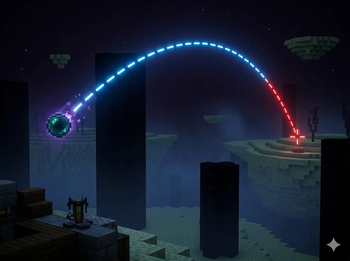
HoloPath - Trajectory Visualizer for Minecraft 1.21.1-1.21.11 Ever wondered exactly where your ender pearl will land HoloPath renders a real-time holographic trajectory line showing the exact path of your throwables and projectiles before you release them
Screenshots
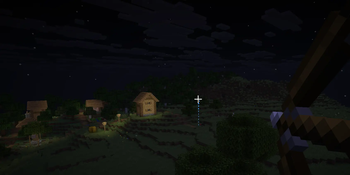
About this Mod
HoloPath — Trajectory Visualizer for Minecraft 1.21.1-1.21.11
Ever wondered exactly where your ender pearl will land? HoloPath renders a real-time holographic trajectory line showing the exact path of your throwables and projectiles before you release them.
Supported Items:
Ender Pearl
Bow (draw strength sensitive — the line updates as you pull back)
Snowball
Features:
Real-time 3D trajectory line that updates as you move and aim
Color changes to red when the path passes through a living entity — so you know if your shot will hit before you throw
Dashed line style for clear visibility without cluttering your screen
Toggle the display on or off at any time with a keybind (default: K)
Keybind is fully rebindable from Options → Controls → HoloPath
A reminder message appears in chat when you join a world, telling you the current keybind
How to Use:
Hold an ender pearl, bow, or snowball
Aim — the trajectory line appears automatically
Pull back your bow to see the arc adjust in real time based on draw strength
If the line turns red, a living entity is in the path
Press K to hide the display when you don't need it
Client-side only — works in singleplayer and on any server without requiring the mod to be installed server-side.
Available Versions
How to Install HoloPath on Your Server
Order Server
Order a Minecraft Java server with at least 3 GB RAM (4 GB recommended).
Set fabric Loader
In the panel under "Egg", select the fabric loader and matching Minecraft version (1.21.11).
Install Mod
Open the mod browser in the dashboard and search for "HoloPath". Click "Install" – done! Alternatively, upload the .jar via SFTP to the /mods folder.
Compatibility
Mod Loaders
Minecraft Versions
1.21.11, 1.21.10, 1.21.9 (+8 more)
Server-side
✗ UnsupportedRecommended RAM
4 GB(min. 3 GB)Frequently Asked Questions
HoloPath server crashes on startup – what to do?
Most common cause: wrong fabric version or insufficient RAM. Check the server log (latest.log) for "OutOfMemoryError" or "Mixin" errors. With Mado Hosting: ensure at least 3 GB RAM is allocated and the loader matches the mod version (1.21.11). You can switch loaders with one click in the panel.
Is HoloPath compatible with fabric?
HoloPath officially supports fabric for Minecraft 1.21.11, 1.21.10, 1.21.9. The Mado dashboard automatically detects incompatible loader combinations.
Server lagging with HoloPath – how to optimize performance?
Recommended RAM: 4 GB (per 8 players). Use /spark profiler to check if HoloPath consumes the most tick time. Common fixes: reduce server view-distance to 8-10, install "performant" or "starlight" as supplementary mods on Forge. With Mado Hosting, your server runs on NVMe SSDs with dedicated CPU cores for minimal latency.
Similar Mods

![[ETF] Entity Texture Features](https://cdn.modrinth.com/data/BVzZfTc1/af683d206d50b05258d865b0d6e4aa2f2cee12f2_96.webp)
![[EMF] Entity Model Features](https://cdn.modrinth.com/data/4I1XuqiY/6e5bbd0d06b1741bfdab6c0cfab6de8fdaf0064c_96.webp)



Rent Modded Server
Install HoloPath with just one click on your server.