
Hopeful: Enchanting
Enchanting overhaul focusin on customizability, determinism, and choice!
Screenshots
About this Mod
Current Features
Tool & Player Levels
Tool Levels
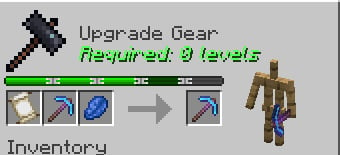
- Each tool has Tool Level that can be seen when placed in a smithing table.
- When they are all used up, it will no longer accept scrolls.
- Some tools can level up when being used like chainmail and bows. Leveling up will allow them to accept more scrolls.
- With Hopeful Unlimited, a built-in datapack you can enable, tools will get virtually infinite tool level, so this mechanic becomes obsolete.
XP Rework
- Now each level is 16 points.
- There are 3 new gamerules to improve XP handling:
xpPerLevel(orhopeful:xp_per_levelon 26.1) defines the number of experience points per level (default: 16)percentageXPLost(orhopeful:percentage_xp_loston 26.1) defines the percentage of XP lost (unrecoverable) on death (default: 0)percentageXPDropped(orhopeful:percentage_xp_droppedon 26.1) defines the percentage of XP dropped on the ground on death (default: 100)
Scrolls
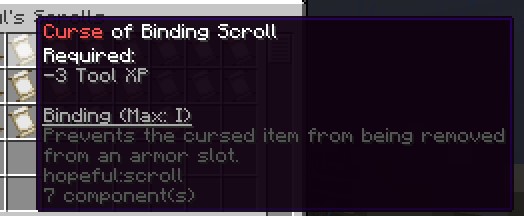
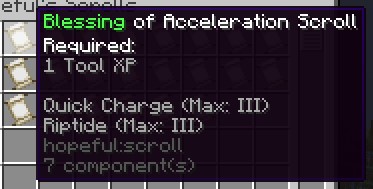
- Scrolls are a package of enchantments, having 2-3 enchants .
- Combine equipment with a scroll and lapis lazuli in a smithing table to upgrade an enchantment's level by one.
- By default, enchantments are normalized to be 1 or 3 levels.
- Scrolls can be blessings (positive enchantments that use up Tool Levels), curses (negative enchantments that free up
Tool Levels), and deals (both). - When getting enchanted books and tools in the wild - They will be stripped to their scrolls.
stripAllEnchantsgamerule would decide if all the enchants will be stripped, or only until valid configuration
(where used tool level is not bigger than default tool level)
Anvil Changes
- Anvils can be mend using iron ingot (or
#hopeful:anvil\_mends) - Anvils will fully repair an item using only one repair material (Thanks Forgery for the code)
- Repairs are data-driven.
Enchanting Table Overhaul
The enchanting table menu is gone Now, clicking on it with a piece of paper has a chance of transforming into a
scroll.
Default chance is quite low though, but you can increase it with catalysts!
These are blocks that have to be in a 5x5x5 (configurable using enchantingTableRange (or hopeful:enchanting_table_range on 26.1) gamerule)
area around the table, and can give different effects.
Currently, we have:
- Bookshelves: increase chance of producing a scroll, but increase xp requirement.
- Lapis Block: decreases xp level requirement, but has a chance of evaporating.
- The following increase chance of a scroll, but increase xp requirement:
- Magma: flame scroll.
- Prismarine: fins and gills scrolls
- Soul blocks & soul fire blocks: undead scroll
- Vault: wind scroll (has a chance of spawning a breeze)
- Carved pumpkins: binding scroll
- Enchanting Table: Endless scroll
- Lightning Rod: channeling scroll
- Pointed Dripstone: extermination scroll.
- Sculk blocks: echoes scroll.
Dev Stuff
Scroll
Scrolls will be placed in datapack_name/hopeful/scroll/scroll_name.json and its format will look like this:
{
  "title":{
    "translate": "scroll.hopeful.acceleration"
  },
  "type": "blessing",
  "tool_levels": 1,
  "player_levels": 5,
  "enchantments": "#hopeful:hopeful/acceleration"
}
It is highly recommended to use tags, because they allow for easier compatibility, but an array of enchantments would
also work.
The tags are located in datapack_name/tags/enchantment/hopeful
Equipment
Tool Level stats can be modified in datapack_name/data/hopeful/data_maps/item/tool_levels.json in
this format:
{
  "values": {
    "minecraft:chainmail_chestplate": {
      "starting_level": 5,
      "level_ups": [10,50,100,0,200,0]
    },
    "minecraft:crossbow": {
      "starting_level": 3,
      "level_ups": [50, 100, 150]
    }
  }
}
Note that the numbers are the uses it takes to level up.
For example, for the crossbow, after reaching level 2, you'd need 100 more uses to get to level 3.
Repairing tools can be modified in datapack_name/data/hopeful/data_maps/item/tool_repairs.
This is the format:
{
  "values": {
    "#minecraft:iron_sword": [
      {
        "material": "minecraft:diamond",
        "level_cost": 1,
        "durability": 100,
        "is_percentage": true
      }
    ]
  }
}
materials can be omitted to use default repair material for the item.
Catalysts
These catalysts are data-driven, and we have 5 effects, with plenty more to come.
The catalysts are of the form: datapack_name/hopeful/hopeful/catalyst/unused_name.json
And look like so: (made up catalyst)
{
  "blocks": "minecraft:bedrock",
  "limit": 2,
  "effects": [
    {
      "type": "hopeful:scroll_weight",
      "scrolls": "hopeful:acceleration",
      "increase_by": 2
    },
    {
      "type": "hopeful:xp_levels_requirement",
      "increase_by": 10000
    },
    {
      "type": "hopeful:success_chance",
      "increase_by": 0.5
    }

  ]
}
Available Versions
How to Install Hopeful: Enchanting on Your Server
Order Server
Order a Minecraft Java server with at least 3 GB RAM (4 GB recommended).
Set neoforge Loader
In the panel under "Egg", select the neoforge loader and matching Minecraft version (26.1.2).
Install Mod
Open the mod browser in the dashboard and search for "Hopeful: Enchanting". Click "Install" – done! Alternatively, upload the .jar via SFTP to the /mods folder.
Compatibility
Mod Loaders
Minecraft Versions
26.1.2, 26.1.1, 26.1 (+2 more)
Server-side
✓ RequiredRecommended RAM
4 GB(min. 3 GB)Frequently Asked Questions
Hopeful: Enchanting server crashes on startup – what to do?
Most common cause: wrong neoforge version or insufficient RAM. Check the server log (latest.log) for "OutOfMemoryError" or "Mixin" errors. With Mado Hosting: ensure at least 3 GB RAM is allocated and the loader matches the mod version (26.1.2). You can switch loaders with one click in the panel.
Is Hopeful: Enchanting compatible with neoforge?
Hopeful: Enchanting officially supports neoforge for Minecraft 26.1.2, 26.1.1, 26.1. The Mado dashboard automatically detects incompatible loader combinations.
Server lagging with Hopeful: Enchanting – how to optimize performance?
Recommended RAM: 4 GB (per 8 players). Use /spark profiler to check if Hopeful: Enchanting consumes the most tick time. Common fixes: reduce server view-distance to 8-10, install "performant" or "starlight" as supplementary mods on Forge. With Mado Hosting, your server runs on NVMe SSDs with dedicated CPU cores for minimal latency.
Similar Mods




Rent Modded Server
Install Hopeful: Enchanting with just one click on your server.