
Hopper Frame
Filter hoppers using item frames.
Screenshots
About this Mod
Hopper Frame
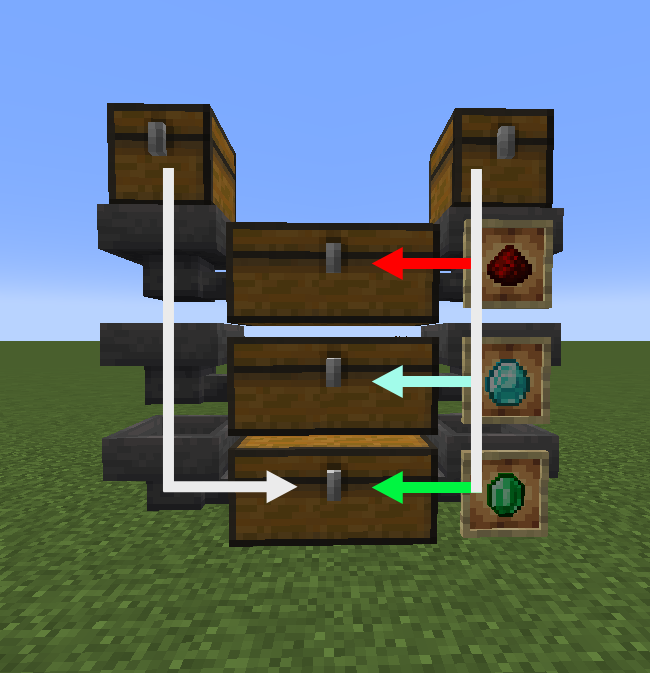
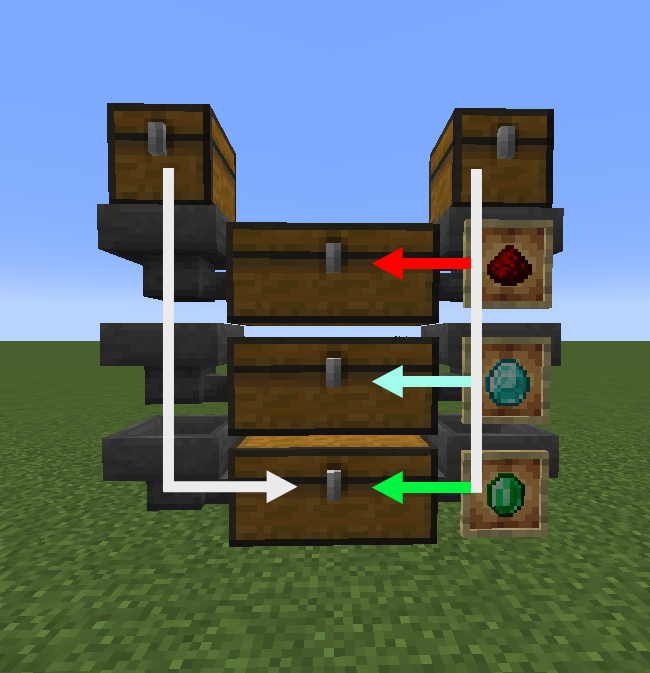
A vanilla friendly mod to help filter items.
When attaching an item frame two things change:
- Filter: Whenever the hopper tries to push an item, it will only push what is in the item frame(s) (if empty it can push anything)
- Push priority: Whenever a hopper tries to pull from a filtered hopper it will avoid items that can still be pushed by the filtered hopper.
Vanilla friendly
I personally think this would be a great addition to vanilla minecraft for a couple of reasons.
Current filters are very bulky and not very intuitive for most players. Every time I need a filter I will have to look them up, causing me to postpone item sorters in new worlds.
Item frames are the perfect fit for filters giving them a good secondary feature, similar to what happened with the decorative pots.
The filtering mechanic is different from the vanilla redstone filter, so this mod is not a drop in replacement. With redstone it filters the pull of a hopper, but this mod filters the push of a hopper.
The main practical difference is that pull hoppers can pull from a horizontal line of hoppers, unlike the hopper frames which also pulls unfiltered items.
This could mean that the normal filters might be better in some scenarios as the hopper frames require item elevators for every column.
Finally it gives the player control of the item flow through vertical hoppers, with an (empty) item frame the hopper will always push items.
Items will only be pulled by the next hopper when it cannot push any more items.
Allowing for storage systems that fill top to bottom.
So tldr:
- Intuitive filters
- Not replace/break existing redstone filters
- Add new mechanic (push/pull prio)
Available Versions
How to Install Hopper Frame on Your Server
Order Server
Order a Minecraft Java server with at least 3 GB RAM (4 GB recommended).
Set fabric Loader
In the panel under "Egg", select the fabric loader and matching Minecraft version (1.21).
Install Mod
Open the mod browser in the dashboard and search for "Hopper Frame". Click "Install" – done! Alternatively, upload the .jar via SFTP to the /mods folder.
Compatibility
Mod Loaders
Minecraft Versions
1.21, 1.20.6, 1.20.5 (+7 more)
Server-side
✓ RequiredRecommended RAM
4 GB(min. 3 GB)Frequently Asked Questions
Hopper Frame server crashes on startup – what to do?
Most common cause: wrong fabric version or insufficient RAM. Check the server log (latest.log) for "OutOfMemoryError" or "Mixin" errors. With Mado Hosting: ensure at least 3 GB RAM is allocated and the loader matches the mod version (1.21). You can switch loaders with one click in the panel.
Is Hopper Frame compatible with fabric?
Hopper Frame officially supports fabric for Minecraft 1.21, 1.20.6, 1.20.5. The Mado dashboard automatically detects incompatible loader combinations.
Server lagging with Hopper Frame – how to optimize performance?
Recommended RAM: 4 GB (per 8 players). Use /spark profiler to check if Hopper Frame consumes the most tick time. Common fixes: reduce server view-distance to 8-10, install "performant" or "starlight" as supplementary mods on Forge. With Mado Hosting, your server runs on NVMe SSDs with dedicated CPU cores for minimal latency.
Similar Mods




Rent Modded Server
Install Hopper Frame with just one click on your server.