
HorseStats
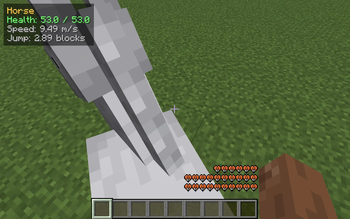
Ride any horse, donkey, mule or llama and a small top-left HUD shows the mount's health, top speed (m/s) and jump height (blocks) live - no need to open its inventory. Toggle with H.
Screenshots
About this Mod
HorseStats puts your mount's real stats on screen the moment you climb on. Get on any horse, donkey, mule or llama and a compact panel appears in the top-left corner:
Horse
Health: 22.0 / 30.0
Speed: 9.42 m/s
Jump: 3.86 blocks
No inventory to open, no guessing - the numbers update live as you ride.
What it shows
- Mount name - Horse, Donkey, Mule or Llama, so you always know what you're on.
- Health - current / max hit points of the animal, colored green / yellow / red as it drops.
- Speed - the mount's top ground speed in blocks per second, derived from its movement-speed attribute.
- Jump - how high the mount can jump, in blocks, derived from its jump-strength attribute.
Why
Two horses that look identical can have wildly different speed and jump. Vanilla only hints at this through feel, and the one existing readout lives buried in the mount's inventory screen. HorseStats shows the numbers that actually matter the instant you mount up, so you can tell a keeper from a dud at a glance while breeding or shopping.
How it works
- Reads health straight from the mount via the standard living-entity API.
- Reads the speed and jump attributes by their stable registry ids, so it stays correct across every supported version.
- Converts jump strength to blocks with the vanilla jump-height curve, and movement speed to blocks/second.
- Renders through Fabric's HudRenderCallback, so F1 (hide HUD) hides it like any vanilla overlay.
- Read-only - never changes the mount, never sends a packet. Safe on any server.
Controls
- H - toggle the HUD on / off (default: on)
Compatibility
Works on Minecraft 1.21.8, 1.21.9, 1.21.10, and 1.21.11 with Fabric Loader 0.16+. One JAR for all four versions - install with Fabric API and drop into your mods/ folder. Pure client-side; safe to install on any server. Zero config files.
Available Versions
How to Install HorseStats on Your Server
Order Server
Order a Minecraft Java server with at least 3 GB RAM (4 GB recommended).
Set fabric Loader
In the panel under "Egg", select the fabric loader and matching Minecraft version (1.21.11).
Install Mod
Open the mod browser in the dashboard and search for "HorseStats". Click "Install" – done! Alternatively, upload the .jar via SFTP to the /mods folder.
Compatibility
Mod Loaders
Minecraft Versions
1.21.11, 1.21.10, 1.21.9 (+1 more)
Server-side
✗ UnsupportedRecommended RAM
4 GB(min. 3 GB)Frequently Asked Questions
HorseStats server crashes on startup – what to do?
Most common cause: wrong fabric version or insufficient RAM. Check the server log (latest.log) for "OutOfMemoryError" or "Mixin" errors. With Mado Hosting: ensure at least 3 GB RAM is allocated and the loader matches the mod version (1.21.11). You can switch loaders with one click in the panel.
Is HorseStats compatible with fabric?
HorseStats officially supports fabric for Minecraft 1.21.11, 1.21.10, 1.21.9. The Mado dashboard automatically detects incompatible loader combinations.
Server lagging with HorseStats – how to optimize performance?
Recommended RAM: 4 GB (per 8 players). Use /spark profiler to check if HorseStats consumes the most tick time. Common fixes: reduce server view-distance to 8-10, install "performant" or "starlight" as supplementary mods on Forge. With Mado Hosting, your server runs on NVMe SSDs with dedicated CPU cores for minimal latency.
Similar Mods




![[ETF] Entity Texture Features](https://cdn.modrinth.com/data/BVzZfTc1/af683d206d50b05258d865b0d6e4aa2f2cee12f2_96.webp)
![[EMF] Entity Model Features](https://cdn.modrinth.com/data/4I1XuqiY/6e5bbd0d06b1741bfdab6c0cfab6de8fdaf0064c_96.webp)
Rent Modded Server
Install HorseStats with just one click on your server.