
Better HUD widgets
Advanced information HUD & interface customizer. Lightweight, draggable, and fully interactive.
Screenshots
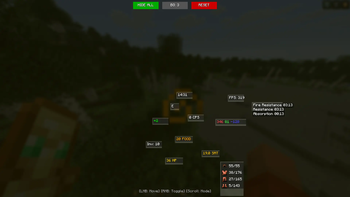

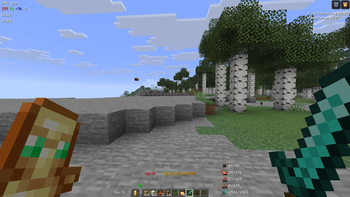

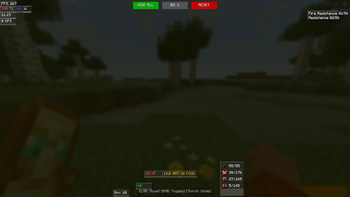
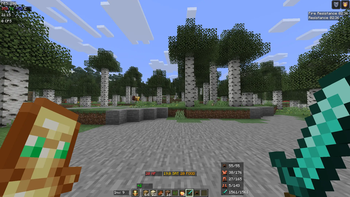
About this Mod
HUD Better Widgets v2.1 - The Ultimate Survival Overlay

HUD BW is a lightweight, highly customizable, and optimized HUD enhancement mod for Minecraft Fabric 1.21.11. It provides essential information in a clean, non-intrusive way, perfect for both technical players and casual survivalists.
Version 2.1 focuses on stability and a clean look, featuring a fully text-based potion display and improved gear tracking.
✨ Features
- In-Game Editor: Press
K(default) to open the editor. - Drag & Drop: Move any element anywhere on your screen.
- Smart Optimization: Disabled widgets consume zero CPU resources.
- Global Toggle: Hide or show all elements with a single button.
- Custom Backgrounds: Toggle widget backdrops for better readability in any biome.
- Built-in Calculator: Fast math in chat via
/calcu <expression>.
🎮 How to Control (Editor Mode)
When the Editor is open (default key: K), use your mouse to customize everything:
| Action | Result |
|---|---|
| Left Click (LMB) | Drag & Move the widget across the screen. |
| Right Click (RMB) | Show / Hide a specific widget (Red = Hidden). |
| Scroll Wheel | Change Display Mode (Cycle through styles). |
📊 Widgets & Modes
Every widget has multiple "Modes" accessible by scrolling over it in the editor:
🛡️ Gear Status (Armor & Mainhand)
Tracking your Helmet, Chestplate, Leggings, Boots, and the item in your Main Hand.
- Mode 1: Current Durability / Max (e.g., 250/365)
- Mode 2: Current Durability only (e.g., 250)
- Mode 3: Percentage (e.g., 68%)
📍 Coordinates (XYZ)
- Mode 1: Colored RGB (Red/Green/Blue values)
- Mode 2: Labeled (X: 100 Y: 64 Z: -500)
- Mode 3: Nether Converter (Shows Overworld coords and Nether equivalents simultaneously)
🧪 Potion Effects
Clean, text-based list with accurate timers.
- Mode 1: Shortened names (e.g., Str. 0:45)
- Mode 2: Full names (e.g., Strength II 0:45)
- Infinite Support: Shows the
∞symbol for Beacon or permanent effects.
⚡ FPS & CPS Counter
- FPS: Simple number, Labeled, or Pro Monitor (FPS, AVG, and 1% Low).
- CPS: Total clicks or Split display (L: 7 R: 4).
⏰ Clock
- Mode 1: Real World Time (System clock)
- Mode 2: In-Game Time (Minecraft world time)
🎒 Additional Widgets
- Inventory Space: Shows remaining free slots in your bags.
- Compass: Displays your current facing direction (N, S, E, W).
- Offhand Counter: Displays total count of the item held in offhand (e.g., Totems or Rockets).
- Enhanced Stats: Accurate numeric values for HP, Food, and Saturation.
🔧 Commands
/calcu <expression>— Simple calculator (e.g.,/calcu (120*8)+500)
📦 Installation
- Install Fabric Loader (1.21.11).
- Drop the HUD BW jar and Fabric API into your
modsfolder. - Launch the game and press K to start customizing!
Created for players who love data but hate clutter.
Available Versions
How to Install Better HUD widgets on Your Server
Order Server
Order a Minecraft Java server with at least 3 GB RAM (4 GB recommended).
Set fabric Loader
In the panel under "Egg", select the fabric loader and matching Minecraft version (1.21.11).
Install Mod
Open the mod browser in the dashboard and search for "Better HUD widgets". Click "Install" – done! Alternatively, upload the .jar via SFTP to the /mods folder.
Compatibility
Mod Loaders
Minecraft Versions
1.21.11
Server-side
✗ UnsupportedRecommended RAM
4 GB(min. 3 GB)Frequently Asked Questions
Better HUD widgets server crashes on startup – what to do?
Most common cause: wrong fabric version or insufficient RAM. Check the server log (latest.log) for "OutOfMemoryError" or "Mixin" errors. With Mado Hosting: ensure at least 3 GB RAM is allocated and the loader matches the mod version (1.21.11). You can switch loaders with one click in the panel.
Is Better HUD widgets compatible with fabric?
Better HUD widgets officially supports fabric for Minecraft 1.21.11. The Mado dashboard automatically detects incompatible loader combinations.
Server lagging with Better HUD widgets – how to optimize performance?
Recommended RAM: 4 GB (per 8 players). Use /spark profiler to check if Better HUD widgets consumes the most tick time. Common fixes: reduce server view-distance to 8-10, install "performant" or "starlight" as supplementary mods on Forge. With Mado Hosting, your server runs on NVMe SSDs with dedicated CPU cores for minimal latency.
Similar Mods




![[ETF] Entity Texture Features](https://cdn.modrinth.com/data/BVzZfTc1/af683d206d50b05258d865b0d6e4aa2f2cee12f2_96.webp)
![[EMF] Entity Model Features](https://cdn.modrinth.com/data/4I1XuqiY/6e5bbd0d06b1741bfdab6c0cfab6de8fdaf0064c_96.webp)
Rent Modded Server
Install Better HUD widgets with just one click on your server.