
Hud Keys
A simple Minecraft Fabric mod that adds MOBA like visible key binds to the hotbar.
Screenshots
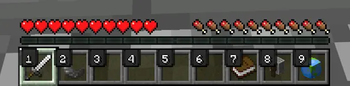
About this Mod
Hud Keys
Hud Keys is a lightweight "Quality of Life" client-side mod for Minecraft Fabric. It displays the keybind associated with each hotbar slot directly on the HUD, making it easier to track your controls and input.
👋 A Note from the Developer
This is my very first Minecraft mod! 🚀 I created this project to learn how to make mods and to solve a simple problem I had: wanting to see my hotbar keybinds clearly without cluttering the screen. Since I am just starting out, I would love to hear your feedback or suggestions. Thank you for checking it out!
✨ Features
Smart Overlays: Automatically reads your keybinds. If you bind Slot 1 to "Q", the HUD will show "Q".
Visual Feedback: The background of the key darkens and simulates a "click" animation when you press the button, giving you instant response.
Clean Design: Uses a minimalist style with rounded corners and outlined text, ensuring it is readable on top of any item (even bright ones like Gold Ingots).
Unobtrusive: The indicators are tucked into the corner of the slot so they never hide your items or durability bars.
Performance: Extremely lightweight and optimized to have zero impact on your FPS.
🛠️ Installation
Download Hud Keys.
Make sure you have Fabric Loader installed.
Make sure you have the Fabric API in your mods folder.
Drag the hud-keys.jar into your .minecraft/mods folder.
Launch the game!
⚙️ Compatibility
Client-Side Only: This mod only affects your visual interface. You can use it on any server (Vanilla or Modded) without needing the server to install it.
📜 License
This mod is open-source and licensed under the GNU GPLv3. You are free to view the code, learn from it, or contribute!
Available Versions
How to Install Hud Keys on Your Server
Order Server
Order a Minecraft Java server with at least 3 GB RAM (4 GB recommended).
Set fabric Loader
In the panel under "Egg", select the fabric loader and matching Minecraft version (1.21.11).
Install Mod
Open the mod browser in the dashboard and search for "Hud Keys". Click "Install" – done! Alternatively, upload the .jar via SFTP to the /mods folder.
Compatibility
Mod Loaders
Minecraft Versions
1.21.11
Server-side
✗ UnsupportedRecommended RAM
4 GB(min. 3 GB)Frequently Asked Questions
Hud Keys server crashes on startup – what to do?
Most common cause: wrong fabric version or insufficient RAM. Check the server log (latest.log) for "OutOfMemoryError" or "Mixin" errors. With Mado Hosting: ensure at least 3 GB RAM is allocated and the loader matches the mod version (1.21.11). You can switch loaders with one click in the panel.
Is Hud Keys compatible with fabric?
Hud Keys officially supports fabric for Minecraft 1.21.11. The Mado dashboard automatically detects incompatible loader combinations.
Server lagging with Hud Keys – how to optimize performance?
Recommended RAM: 4 GB (per 8 players). Use /spark profiler to check if Hud Keys consumes the most tick time. Common fixes: reduce server view-distance to 8-10, install "performant" or "starlight" as supplementary mods on Forge. With Mado Hosting, your server runs on NVMe SSDs with dedicated CPU cores for minimal latency.
Similar Mods




![[ETF] Entity Texture Features](https://cdn.modrinth.com/data/BVzZfTc1/af683d206d50b05258d865b0d6e4aa2f2cee12f2_96.webp)
![[EMF] Entity Model Features](https://cdn.modrinth.com/data/4I1XuqiY/6e5bbd0d06b1741bfdab6c0cfab6de8fdaf0064c_96.webp)
Rent Modded Server
Install Hud Keys with just one click on your server.