
hud mover
HUD Mover is a Fabric mod that lets you move and customize vanilla HUD elements in-game.
Screenshots
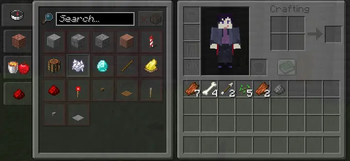
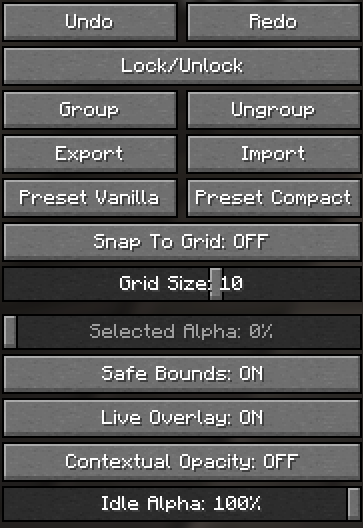
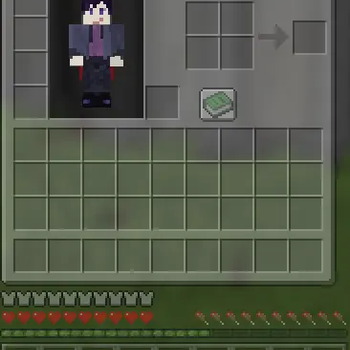
About this Mod
HUD Mover
Full control over your vanilla HUD — directly in-game.
✨ Overview
HUD Mover is a Fabric client-side mod that gives you complete control over the vanilla HUD layout — without resource packs or external tools.
Move, align, lock, group, and fine-tune your HUD with a clean live editor built for real gameplay setups.
🖼 Preview
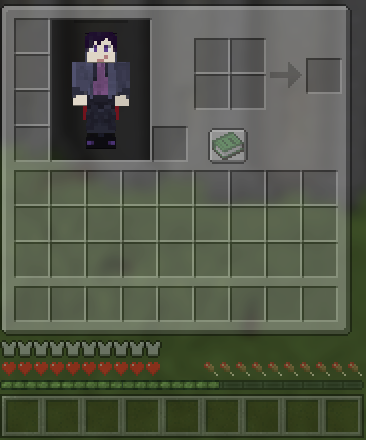
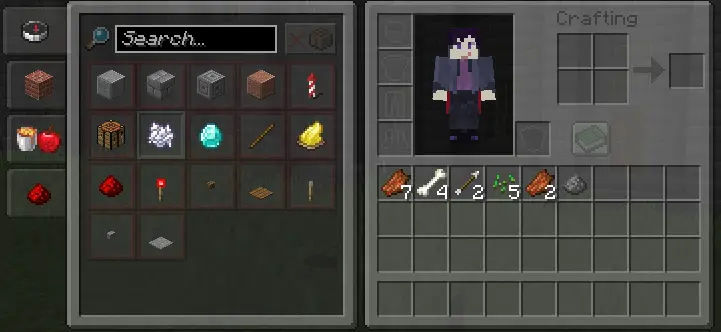
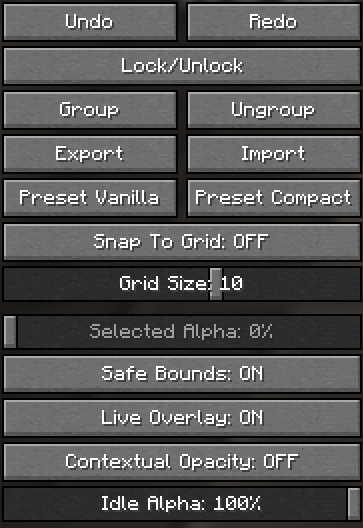
🎯 What This Mod Does
HUD Mover lets you reposition and customize vanilla HUD elements directly in-game with instant visual feedback.
Supported HUD Elements
- Hotbar
- XP Bar
- Inventory
- Health
- Armor
- Hunger
⚙ Core Features
🖱 Live HUD Editor
- Drag real HUD elements in real time
- Instant visual feedback
- Save / Cancel / Reset workflow
🎯 Precision Controls
- Snap to grid
- Adjustable grid size
- Safe bounds (no off-screen mistakes)
- Alignment guides
🧩 Advanced Editing
- Multi-select movement
- Lock / Unlock elements
- Group / Ungroup
- Undo / Redo history
👁 Visibility & Overlay Tools
- Per-element alpha control
- Selected Alpha control
- Contextual opacity
- Live overlay preview toggle
💾 Layout Management
- Presets (Vanilla / Compact)
- Import / Export layout files
- Conflict detector for overlapping regions
📦 Inventory Integration
- Survival & Creative inventory positioning
- Recipe book compatibility handling
🚀 Why HUD Mover?
- Keeps the vanilla look
- Built for real gameplay setups
- Perfect for ultrawide users
- Great for PvP layouts
- Stream-friendly positioning
- Accessibility-focused spacing
🧭 Quick Start
- Open the HUD editor from settings -> keybind
- Select one or more HUD elements
- Drag to position
- Use grid/snap/guides
- Save layout
- Export as backup
📊 Feature Matrix
| Category | Included |
|---|---|
| Live editor | ✅ |
| Multi-select | ✅ |
| Grid snap | ✅ |
| Alignment guides | ✅ |
| Undo / Redo | ✅ |
| Lock / Group | ✅ |
| Presets | ✅ |
| Import / Export | ✅ |
| Conflict detector | ✅ |
| Contextual opacity | ✅ |
| Safe bounds | ✅ |
| Update notice | ✅ |
🔧 Compatibility
- Minecraft:
1.21.11 - Loader: Fabric
- Environment: Client-side
No server installation required.
📝 Notes
- If your HUD breaks after updates, use Reset or apply a preset.
- Always export a backup before major layout changes.
Available Versions
How to Install hud mover on Your Server
Order Server
Order a Minecraft Java server with at least 3 GB RAM (4 GB recommended).
Set fabric Loader
In the panel under "Egg", select the fabric loader and matching Minecraft version (1.21.11).
Install Mod
Open the mod browser in the dashboard and search for "hud mover". Click "Install" – done! Alternatively, upload the .jar via SFTP to the /mods folder.
Compatibility
Mod Loaders
Minecraft Versions
1.21.11
Server-side
✗ UnsupportedRecommended RAM
4 GB(min. 3 GB)Frequently Asked Questions
hud mover server crashes on startup – what to do?
Most common cause: wrong fabric version or insufficient RAM. Check the server log (latest.log) for "OutOfMemoryError" or "Mixin" errors. With Mado Hosting: ensure at least 3 GB RAM is allocated and the loader matches the mod version (1.21.11). You can switch loaders with one click in the panel.
Is hud mover compatible with fabric?
hud mover officially supports fabric for Minecraft 1.21.11. The Mado dashboard automatically detects incompatible loader combinations.
Server lagging with hud mover – how to optimize performance?
Recommended RAM: 4 GB (per 8 players). Use /spark profiler to check if hud mover consumes the most tick time. Common fixes: reduce server view-distance to 8-10, install "performant" or "starlight" as supplementary mods on Forge. With Mado Hosting, your server runs on NVMe SSDs with dedicated CPU cores for minimal latency.
Similar Mods




Rent Modded Server
Install hud mover with just one click on your server.