
Hudifine
Build custom HUD overlays with a simple scripting language. No mod coding knowledge needed.
Screenshots
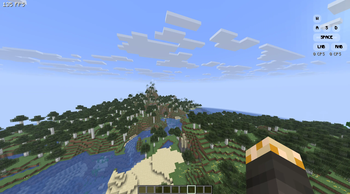
About this Mod
Hudifine is an HUD mod that allows anyone to make HUDs easily via HUD Script, which displays the metrics you choose.
Open the chat up to add and configure them.
Below is a documentation for HUDScript, the scripting language of Hudifine.
HUDScript Documentation
HUD Script Developer Documentation
HUD Script is a safe, sandboxed scripting format for creating fully customizable in-game HUD overlays in Minecraft (Fabric). Scripts are paste-and-run; no mod dev environment required.
Table of Contents
- Overview
- Script Structure
- Screen Budget (30% Rule)
- Data Sources
- Player
- World
- Performance
- Combat
- Inventory
- Input
- Environment
- Game State
- Multiplayer
- Time
- Layout System
- Ordering & Layering
- Styling
- Elements
- Conditionals & Logic
- Events
- Accessibility Toggles
- Player Settings API
- Animations
- CPS Implementation Guide
- Full Examples
Overview
HUD Script is a declarative + event-driven scripting format. Scripts define:
- What data to display (from a fixed set of allowed data sources)
- How to display it (full visual freedom within the screen budget)
- Player-configurable settings (accessibility, toggles, colors, etc.)
Scripts are sandboxed by design. They can only:
- ✅ Read from allowed data sources
- ✅ Render to the HUD overlay
- ✅ React to player input visually
- ❌ Make network requests
- ❌ Access the file system
- ❌ Interact with anything outside the widget
Script Structure
Every script has three optional top-level blocks:
meta {
  name: "My Widget"
  author: "yourname"
  version: "1.0.0"
  description: "A short description of what this widget does."
}

settings {
  // Player-configurable options exposed in the right-click menu
}

widget {
  // Layout, elements, styling, logic
}
Only the widget block is required.
Screen Budget (30% Rule)
A widget may occupy no more than 30% of the player's screen area at any time.
- Screen area is calculated as
screenWidth × screenHeight - Your widget's bounding box (all elements combined) must not exceed
screenWidth × screenHeight × 0.30 - This is enforced at runtime; if your widget exceeds 30%, it will be scaled down automatically and a warning will appear in the widget editor
- Widgets that are toggled off or fully transparent do not count toward the budget
- Multiple widgets each have their own 30% budget independently
Tip: Use the
sizeproperty wisely and test at different resolutions. Design for 1920×1080 as your baseline.
Data Sources
All data sources are read-only. Call them inside element values using get().
Player
| Source | Returns | Description |
|---|---|---|
player.health |
float |
Current health (0.0–20.0) |
player.maxHealth |
float |
Max health including absorption |
player.absorption |
float |
Absorption hearts |
player.hunger |
int |
Food level (0–20) |
player.saturation |
float |
Saturation level (0.0–20.0) |
player.exhaustion |
float |
Exhaustion value (0.0–4.0) |
player.air |
int |
Air supply ticks (0–300) |
player.xp |
int |
Total XP points |
player.xpLevel |
int |
Current XP level |
player.xpProgress |
float |
XP progress to next level (0.0–1.0) |
player.speed |
float |
Current movement speed (blocks/sec) |
player.isSprinting |
bool |
Whether player is sprinting |
player.isSneaking |
bool |
Whether player is sneaking |
player.isSwimming |
bool |
Whether player is swimming |
player.isFlying |
bool |
Whether player is flying (creative/elytra) |
player.isFalling |
bool |
Whether player is falling |
player.isOnGround |
bool |
Whether player is on the ground |
player.isInWater |
bool |
Whether player is in water |
player.isInLava |
bool |
Whether player is in lava |
player.fallDistance |
float |
Current fall distance in blocks |
player.reachDistance |
float |
Current reach distance |
player.name |
string |
Player's username |
player.uuid |
string |
Player UUID |
player.gamemode |
string |
survival, creative, adventure, spectator |
player.score |
int |
Player's current scoreboard score |
player.ping |
int |
Latency in ms (multiplayer only) |
World
| Source | Returns | Description |
|---|---|---|
world.x |
float |
Player X coordinate |
world.y |
float |
Player Y coordinate |
world.z |
float |
Player Z coordinate |
world.blockX |
int |
Player block X (floored) |
world.blockY |
int |
Player block Y (floored) |
world.blockZ |
int |
Player block Z (floored) |
world.chunkX |
int |
Current chunk X |
world.chunkZ |
int |
Current chunk Z |
world.facing |
string |
Cardinal direction: N, NE, E, SE, S, SW, W, NW |
world.facingDegrees |
float |
Yaw in degrees (0–360) |
world.pitch |
float |
Camera pitch (-90 to 90) |
world.yaw |
float |
Camera yaw (0–360) |
world.dimension |
string |
overworld, nether, end, or custom namespace |
world.biome |
string |
Current biome name (e.g. minecraft:plains) |
world.lightLevel |
int |
Block light level at player feet (0–15) |
world.skyLightLevel |
int |
Sky light level at player position (0–15) |
world.moonPhase |
int |
Moon phase (0–7) |
world.isRaining |
bool |
Whether it is raining |
world.isThundering |
bool |
Whether there is a thunderstorm |
world.rainStrength |
float |
Rain intensity (0.0–1.0) |
world.difficulty |
string |
peaceful, easy, normal, hard |
world.name |
string |
World/server name |
world.seed |
string |
World seed (singleplayer only, returns "hidden" on servers) |
world.spawnX |
int |
World spawn X |
world.spawnZ |
int |
World spawn Z |
world.distanceToSpawn |
float |
Distance to world spawn in blocks |
Performance
| Source | Returns | Description |
|---|---|---|
perf.fps |
int |
Current frames per second |
perf.fpsAvg |
float |
Average FPS over last 5 seconds |
perf.fpsMin |
int |
Minimum FPS over last 5 seconds |
perf.fpsMax |
int |
Maximum FPS over last 5 seconds |
perf.frameTime |
float |
Last frame time in milliseconds |
perf.frameTimeAvg |
float |
Average frame time over last 5 seconds |
perf.tps |
float |
Server ticks per second (multiplayer only) |
perf.mspt |
float |
Milliseconds per tick (server, multiplayer only) |
perf.chunkUpdates |
int |
Chunk updates this frame |
perf.renderedChunks |
int |
Number of rendered chunks |
perf.entities |
int |
Entities in render distance |
perf.blockEntities |
int |
Block entities in render distance |
perf.particles |
int |
Active particles |
Combat
| Source | Returns | Description |
|---|---|---|
combat.attackCooldown |
float |
Attack cooldown progress (0.0–1.0) |
combat.attackCooldownMs |
int |
Milliseconds until full attack cooldown |
combat.isAttacking |
bool |
Whether player is currently attacking |
combat.lastDamage |
float |
Last damage received |
combat.lastDamageSource |
string |
Source of last damage (e.g. fire, fall, player) |
combat.killCount |
int |
Player kills this session |
combat.deathCount |
int |
Player deaths this session |
combat.kdr |
float |
Kill/death ratio this session |
combat.targetName |
string |
Name of entity player is looking at (if any) |
combat.targetHealth |
float |
Health of entity player is looking at |
combat.targetMaxHealth |
float |
Max health of entity player is looking at |
combat.targetDistance |
float |
Distance to targeted entity |
combat.targetType |
string |
Type of entity player is looking at |
combat.isInCombat |
bool |
Whether player has been hit/hit something recently |
combat.combatTimer |
int |
Seconds since last combat action |
Inventory
| Source | Returns | Description |
|---|---|---|
inventory.hotbarSlot |
int |
Current hotbar slot (0–8) |
inventory.mainHandItem |
string |
Item ID in main hand |
inventory.mainHandCount |
int |
Stack count in main hand |
inventory.mainHandDurability |
int |
Durability of main hand item |
inventory.mainHandMaxDurability |
int |
Max durability of main hand item |
inventory.mainHandDurabilityPct |
float |
Durability % of main hand item (0.0–1.0) |
inventory.offHandItem |
string |
Item ID in off hand |
inventory.offHandCount |
int |
Stack count in off hand |
inventory.offHandDurability |
int |
Durability of off hand item |
inventory.helmetItem |
string |
Item ID of helmet |
inventory.helmetDurability |
int |
Durability of helmet |
inventory.helmetDurabilityPct |
float |
Durability % of helmet (0.0–1.0) |
inventory.chestplateItem |
string |
Item ID of chestplate |
inventory.chestplateDurability |
int |
Durability of chestplate |
inventory.chestplateDurabilityPct |
float |
Durability % of chestplate (0.0–1.0) |
inventory.leggingsItem |
string |
Item ID of leggings |
inventory.legginsDurability |
int |
Durability of leggings |
inventory.leggingsDurabilityPct |
float |
Durability % of leggings (0.0–1.0) |
inventory.bootsItem |
string |
Item ID of boots |
inventory.bootsDurability |
int |
Durability of boots |
inventory.bootsDurabilityPct |
float |
Durability % of boots (0.0–1.0) |
inventory.arrowCount |
int |
Number of arrows in inventory |
inventory.totalSlots |
int |
Total inventory slots (36) |
inventory.usedSlots |
int |
Number of filled inventory slots |
inventory.emptySlots |
int |
Number of empty inventory slots |
inventory.xpBottleCount |
int |
XP bottles in inventory |
Input
Input sources reflect what the player is physically pressing. They are display-only; you cannot intercept, block, or redirect input.
| Source | Returns | Description |
|---|---|---|
input.forward |
bool |
W key held |
input.backward |
bool |
S key held |
input.left |
bool |
A key held |
input.right |
bool |
D key held |
input.jump |
bool |
Space held |
input.sneak |
bool |
Shift held |
input.sprint |
bool |
Sprint key held |
input.attack |
bool |
Left mouse button held |
input.use |
bool |
Right mouse button held |
input.drop |
bool |
Q key held |
input.inventory |
bool |
Inventory key held |
input.swap |
bool |
F key (swap hands) held |
input.hotbar1–input.hotbar9 |
bool |
Hotbar slot keys held |
input.cps |
int |
Left click CPS (clicks per second) |
input.rcps |
int |
Right click CPS |
input.mouseX |
int |
Mouse X position on screen |
input.mouseY |
int |
Mouse Y position on screen |
input.mouseDeltaX |
float |
Mouse X movement this frame |
input.mouseDeltaY |
float |
Mouse Y movement this frame |
input.sensitivity |
float |
Current mouse sensitivity (0.0–1.0) |
Environment
| Source | Returns | Description |
|---|---|---|
env.timeOfDay |
int |
World ticks (0–24000) |
env.timeString |
string |
Formatted time (e.g. 6:00 AM) |
env.dayCount |
int |
In-game days elapsed |
env.temperature |
float |
Biome temperature at player position |
env.humidity |
float |
Biome humidity at player position |
env.canSeeSky |
bool |
Whether player has line of sight to sky |
env.isUnderground |
bool |
Whether player is underground (no sky access) |
env.nearestVillageDistance |
float |
Distance to nearest detected village (blocks) |
env.isInVillage |
bool |
Whether player is inside a village |
env.nearestPlayerDistance |
float |
Distance to nearest other player (multiplayer) |
env.nearestPlayerName |
string |
Name of nearest other player |
Game State
| Source | Returns | Description |
|---|---|---|
game.isPaused |
bool |
Whether the game is paused |
game.isInGui |
bool |
Whether any GUI is open |
game.isInventoryOpen |
bool |
Whether inventory is open |
game.isInBed |
bool |
Whether player is sleeping |
game.isRiding |
bool |
Whether player is riding an entity |
game.ridingEntityType |
string |
Type of entity being ridden |
game.ridingEntityHealth |
float |
Health of entity being ridden |
game.isElytraFlying |
bool |
Whether player is elytra flying |
game.elytraHealth |
int |
Current elytra durability |
game.elytraSpeed |
float |
Current elytra speed (blocks/sec) |
game.potionEffects |
list<string> |
Active potion effect IDs |
game.potionEffectAmplifiers |
map<string, int> |
Amplifier per active effect |
game.potionEffectDurations |
map<string, int> |
Duration ticks per active effect |
game.scoreboardObjective |
string |
Current sidebar scoreboard objective name |
game.scoreboardScore |
int |
Player's score on current sidebar objective |
game.bossBarName |
string |
Name of active boss bar (if any) |
game.bossBarProgress |
float |
Boss bar progress (0.0–1.0) |
game.isSpectatingEntity |
bool |
Whether player is spectating an entity |
game.spectatingEntityType |
string |
Type of entity being spectated |
Multiplayer
| Source | Returns | Description |
|---|---|---|
server.name |
string |
Server name / IP |
server.motd |
string |
Server MOTD |
server.playerCount |
int |
Current online player count |
server.maxPlayers |
int |
Server max player capacity |
server.ping |
int |
Ping to server in ms |
server.tps |
float |
Server TPS |
server.isLAN |
bool |
Whether connected to LAN server |
server.isSingleplayer |
bool |
Whether in singleplayer |
server.version |
string |
Server Minecraft version |
Time
| Source | Returns | Description |
|---|---|---|
clock.hour |
int |
Real-world hour (0–23) |
clock.minute |
int |
Real-world minute (0–59) |
clock.second |
int |
Real-world second (0–59) |
clock.timeString |
string |
Formatted real time (e.g. 14:32) |
clock.timeString12 |
string |
12-hour format (e.g. 2:32 PM) |
clock.sessionTime |
int |
Seconds in current play session |
clock.sessionTimeString |
string |
Formatted session time (e.g. 1h 23m) |
clock.date |
string |
Real-world date (e.g. 2025-04-26) |
clock.unixTimestamp |
int |
Unix timestamp (seconds) |
Layout System
Widgets use a simple box-based layout anchored to screen positions.
Anchor Points
widget {
  anchor: top-left       // top-left, top-center, top-right
                         // middle-left, center, middle-right
                         // bottom-left, bottom-center, bottom-right
  offsetX: 10            // Pixel offset from anchor X (can be negative)
  offsetY: 10            // Pixel offset from anchor Y (can be negative)
}
Sizing
widget {
  width: 120             // Fixed pixel width
  height: auto           // "auto" sizes to content, or fixed pixels
  padding: 8             // Uniform padding (or padding: 8 4 for vertical/horizontal)
  margin: 4              // Outer margin
}
Direction
widget {
  direction: column      // "column" (vertical stack) or "row" (horizontal stack)
  gap: 4                 // Gap between child elements in pixels
  align: start           // "start", "center", "end" — cross-axis alignment
  justify: start         // "start", "center", "end", "space-between" — main axis
}
Z-Index
widget {
  zIndex: 10             // Higher values render on top of other widgets
}
Ordering & Layering
By default, elements render in the order they are written in the script, top to bottom. You can override this with the order property on any element or group.
widget {
  direction: column

  text { value: "I appear second" order: 2 color: #ffffff fontSize: 12 }
  text { value: "I appear first"  order: 1 color: #aaaaaa fontSize: 10 }
  text { value: "I appear third"  order: 3 color: #555555 fontSize: 9 }
}
order works like CSS order; lower numbers render first (higher up or further left depending on direction). Elements without an order value default to order: 0 and render before explicitly ordered ones.
You can also use order inside a group:
group {
  direction: row

  text { value: "CPS" order: 2 color: #aaaaaa fontSize: 9 }
  keyIndicator { key: input.attack label: "LMB" order: 1 size: 20 borderRadius: 8 activeColor: #ffffff inactiveColor: #ffffff33 }
}
Tip: Use
orderwhen you want your script logic grouped together but the visual layout to differ. If everything has an explicit order, it's cleaner to just rewrite the script in the correct order instead.
Styling
Background
widget {
  background: #00000088        // Hex color with optional alpha (last 2 digits)
  background: transparent      // No background
  borderRadius: 6              // Rounded corners in pixels
  border: 1 #ffffff44          // Border: width color
  backdropBlur: 4              // Blur pixels behind widget (GPU-dependent)
}
Text Styling
text {
  value: get(player.health)
  color: #ffffff
  fontSize: 12               // In pixels (8–32 recommended)
  fontWeight: bold           // "normal", "bold"
  fontStyle: normal          // "normal", "italic"
  shadow: true               // Minecraft-style text shadow
  shadowColor: #00000066
  letterSpacing: 0           // Pixels between characters
  lineHeight: 1.2            // Line height multiplier
  align: left                // "left", "center", "right"
  truncate: 20               // Max characters before truncation (optional)
  uppercase: false           // Force uppercase
}
Colors
Colors are hex strings: #RRGGBB or #RRGGBBAA (with alpha).
color: #ff0000             // Red, fully opaque
color: #ff000088           // Red, 50% transparent
color: #fff                // Shorthand (expands to #ffffff)
Opacity
widget {
  opacity: 0.8             // 0.0 (invisible) to 1.0 (fully opaque)
}
Elements
Elements are the visual building blocks inside a widget block.
text
Displays a string value.
text {
  value: "FPS: {get(perf.fps)}"    // Inline expressions with {}
  color: #ffffff
  fontSize: 12
  shadow: true
}
bar
A fill bar (health, XP, cooldown, etc.)
bar {
  value: get(player.health)
  max: get(player.maxHealth)
  width: 100
  height: 8
  fillColor: #ff4444
  backgroundColor: #00000066
  borderRadius: 4
  direction: left-to-right    // "left-to-right", "right-to-left", "bottom-to-top", "top-to-bottom"
}
icon
Renders a Minecraft item or block icon.
icon {
  item: get(inventory.mainHandItem)    // Item ID string
  size: 16                             // Icon size in pixels
}
circle
A circular progress indicator.
circle {
  value: get(combat.attackCooldown)    // 0.0–1.0
  radius: 12
  strokeWidth: 3
  color: #ffffff
  backgroundColor: #ffffff33
  startAngle: -90                      // Degrees — 0 = right, -90 = top
  direction: clockwise                 // "clockwise" or "counterclockwise"
}
image
Renders a static texture from the resource pack.
image {
  texture: "hud:textures/my_icon.png"    // Namespace:path within resource pack
  width: 16
  height: 16
  tint: #ffffff                          // Optional color tint
}
keyIndicator
Displays a visual key that lights up when pressed.
keyIndicator {
  key: input.forward
  label: "W"
  activeColor: #ffffff
  inactiveColor: #ffffff44
  size: 20              // Width and height of the key in pixels
  width: 20             // Override width only (useful for SPACE, LMB, RMB)
  borderRadius: 8       // Higher = more rounded. Use 999 for a full pill shape
  fontSize: 9           // Label font size inside the key
  shadow: true          // Text shadow on label
}
Tip: For wide keys like SPACE, LMB, and RMB, set
widthlarger thansizeto stretch them horizontally while keeping the same height. AborderRadiusof8–12matches the Lunar Client look.
group
Container to group and nest elements together.
group {
  direction: row
  gap: 4
  background: #00000066
  padding: 6
  borderRadius: 4

  text { value: "Health: " color: #aaaaaa fontSize: 11 }
  text { value: "{get(player.health)}" color: #ff4444 fontSize: 11 }
}
separator
A horizontal or vertical divider line.
separator {
  direction: horizontal    // "horizontal" or "vertical"
  color: #ffffff22
  thickness: 1
  length: 80               // Pixels, or "auto" to fill available space
  margin: 4
}
spacer
Empty space between elements.
spacer {
  size: 8
}
Conditionals & Logic
if / else
Show or hide elements based on conditions.
if get(player.health) < 6 {
  text {
    value: "⚠ LOW HEALTH"
    color: #ff0000
    fontSize: 14
    shadow: true
  }
} else if get(player.health) < 10 {
  text {
    value: "Health is getting low"
    color: #ffaa00
    fontSize: 12
  }
} else {
  // nothing
}
Inline Expressions
Use {} inside string values for inline expressions:
text { value: "You are in the {get(world.dimension)}" }
text { value: "XP Level: {get(player.xpLevel)} ({round(get(player.xpProgress) * 100)}%)" }
Math Helpers
| Function | Description |
|---|---|
round(x) |
Round to nearest integer |
floor(x) |
Round down |
ceil(x) |
Round up |
abs(x) |
Absolute value |
min(x, y) |
Minimum of two values |
max(x, y) |
Maximum of two values |
clamp(x, min, max) |
Clamp value between min and max |
lerp(a, b, t) |
Linear interpolation |
pct(value, max) |
Returns (value / max) * 100 |
format(x, decimals) |
Format number to N decimal places |
String Helpers
| Function | Description |
|---|---|
upper(s) |
Uppercase string |
lower(s) |
Lowercase string |
concat(a, b) |
Concatenate two strings |
trim(s, n) |
Trim string to N characters |
replace(s, from, to) |
Replace substring |
Comparison Operators
==, !=, <, >, <=, >=, &&, ||, !
if get(world.dimension) == "nether" && get(player.health) < 10 {
  text { value: "Danger!" color: #ff0000 }
}
Events
React to events to update the widget visually.
on keypress(input.attack) {
  // Triggered once when key is first pressed
  text {
    value: "Attacking!"
    color: #ff4444
    fadeOut: 500    // Fade out after 500ms
  }
}

on keyhold(input.sneak) {
  // Triggered every tick while key is held
}

on keyrelease(input.jump) {
  // Triggered once when key is released
}

on event(player.health < 5) {
  // Triggered when condition becomes true
  // Re-triggers if condition goes false then true again
}

on tick {
  // Runs every game tick (20 times/sec)
}

on frame {
  // Runs every render frame
}
Accessibility Toggles
Developers can expose toggles and settings for players with specific accessibility needs. These appear in the widget's right-click settings panel.
settings {
  toggle "High Contrast Mode" {
    id: highContrast
    default: false
    description: "Increases color contrast for better visibility."
  }

  toggle "Reduce Motion" {
    id: reduceMotion
    default: false
    description: "Disables animations and transitions."
  }

  toggle "Large Text" {
    id: largeText
    default: false
    description: "Increases all text sizes by 1.5×."
  }

  toggle "Colorblind Mode" {
    id: colorblindMode
    default: false
    description: "Replaces color-coded indicators with shapes/patterns."
  }

  toggle "Screen Reader Hints" {
    id: screenReaderHints
    default: false
    description: "Shows additional text labels on icon-only elements."
  }
}
Then use the setting values in your widget:
widget {
  text {
    value: "HP: {get(player.health)}"
    color: if setting(highContrast) then #ffff00 else #ffffff
    fontSize: if setting(largeText) then 18 else 12
    shadow: true
  }
}
Player Settings API
Beyond accessibility toggles, you can expose fully custom player-configurable settings.
Setting Types
settings {

  // Color picker
  color "Health Bar Color" {
    id: healthColor
    default: #ff4444
    description: "Color of the health bar fill."
  }

  // Slider (numeric range)
  slider "Widget Opacity" {
    id: widgetOpacity
    min: 0.1
    max: 1.0
    step: 0.05
    default: 0.85
    description: "Transparency of the widget background."
  }

  // Dropdown select
  select "Display Mode" {
    id: displayMode
    options: ["compact", "normal", "expanded"]
    default: "normal"
    description: "How much information to show."
  }

  // Text input (display label only)
  text "Custom Label" {
    id: customLabel
    default: "My Widget"
    maxLength: 20
    description: "Custom title displayed at the top."
  }

  // Toggle (boolean)
  toggle "Show Widget" {
    id: showWidget
    default: true
    description: "Toggle the entire widget on or off."
  }

  // Key binding (input display only — shows which key was pressed)
  keybind "Highlight Key" {
    id: highlightKey
    default: input.forward
    description: "Which key to highlight in the keystroke display."
  }

}
Using Settings in Widget
widget {
  opacity: setting(widgetOpacity)
  visible: setting(showWidget)

  text {
    value: setting(customLabel)
    fontSize: 11
    color: #aaaaaa
  }

  bar {
    value: get(player.health)
    max: get(player.maxHealth)
    fillColor: setting(healthColor)
    width: 100
    height: 8
  }
}
Animations
Animations are disabled automatically when the player has reduceMotion enabled (if you defined that toggle). Always check before using animations in accessibility-conscious widgets.
text {
  value: "⚠ LOW HEALTH"
  color: #ff0000

  animate {
    property: opacity
    from: 1.0
    to: 0.3
    duration: 600         // Milliseconds
    easing: ease-in-out   // "linear", "ease-in", "ease-out", "ease-in-out"
    loop: true
    pingpong: true        // Reverse on each loop
    paused: setting(reduceMotion)
  }
}
Transition (on state change)
text {
  value: "{get(perf.fps)}"
  color: #ffffff

  transition {
    property: color
    duration: 200
    easing: ease-out
  }
}
CPS Implementation Guide
This section is for Hudifine mod developers implementing the
input.cpsandinput.rcpsdata sources on the Java side.
CPS (clicks per second) is not a value Minecraft tracks natively. You need to implement a click counter using a sliding time window.
How it works
Track every left click (attack) and right click (use) with a timestamp. To get the current CPS, count how many clicks happened in the last 1000ms.
Recommended Java implementation (Fabric + Mixin)
Step 1 - Store click timestamps
// In your HudifineDataProvider or equivalent class
private static final List<Long> leftClickTimes = new ArrayList<>();
private static final List<Long> rightClickTimes = new ArrayList<>();

public static void registerLeftClick() {
    long now = System.currentTimeMillis();
    leftClickTimes.add(now);
    // Prune old entries older than 1 second
    leftClickTimes.removeIf(t -> now - t > 1000);
}

public static void registerRightClick() {
    long now = System.currentTimeMillis();
    rightClickTimes.add(now);
    rightClickTimes.removeIf(t -> now - t > 1000);
}

public static int getLeftCPS() {
    long now = System.currentTimeMillis();
    leftClickTimes.removeIf(t -> now - t > 1000);
    return leftClickTimes.size();
}

public static int getRightCPS() {
    long now = System.currentTimeMillis();
    rightClickTimes.removeIf(t -> now - t > 1000);
    return rightClickTimes.size();
}
Step 2 - Hook into mouse clicks via Mixin
@Mixin(MinecraftClient.class)
public class MouseClickMixin {

    @Inject(method = "doAttack", at = @At("HEAD"))
    private void onLeftClick(CallbackInfo ci) {
        HudifineDataProvider.registerLeftClick();
    }

    @Inject(method = "doItemUse", at = @At("HEAD"))
    private void onRightClick(CallbackInfo ci) {
        HudifineDataProvider.registerRightClick();
    }
}
Step 3 - Expose to the script engine
Map input.cps → HudifineDataProvider.getLeftCPS() and input.rcps → HudifineDataProvider.getRightCPS() in your data source resolver.
Notes
- The sliding 1000ms window is the standard used by Lunar Client, Badlion, and most PvP clients
doAttackfires on every swing attempt, including misses. This matches how Lunar counts CPSdoItemUsefires on right click regardless of what item is held, which also matches expected behavior- Both lists are pruned on read, so they stay small even during extended sessions
Full Examples
Minimal FPS Counter
meta {
  name: "FPS Counter"
  author: "example"
  version: "1.0.0"
}

widget {
  anchor: top-right
  offsetX: -10
  offsetY: 10
  background: #00000066
  padding: 6
  borderRadius: 4

  text {
    value: "{get(perf.fps)} FPS"
    color: #ffffff
    fontSize: 12
    shadow: true
  }
}
Keystroke Display
meta {
  name: "Keystrokes"
  author: "example"
  version: "1.0.0"
}

settings {
  color "Active Key Color" { id: activeColor default: #ffffff }
  color "Inactive Key Color" { id: inactiveColor default: #ffffff33 }
  toggle "Show CPS" { id: showCps default: true }
}

widget {
  anchor: bottom-right
  offsetX: -10
  offsetY: -10
  direction: column
  gap: 3

  group {
    direction: row
    justify: center
    gap: 3

    keyIndicator { key: input.forward label: "W" activeColor: setting(activeColor) inactiveColor: setting(inactiveColor) size: 20 borderRadius: 8 }
  }

  group {
    direction: row
    gap: 3

    keyIndicator { key: input.left label: "A" activeColor: setting(activeColor) inactiveColor: setting(inactiveColor) size: 20 borderRadius: 8 }
    keyIndicator { key: input.backward label: "S" activeColor: setting(activeColor) inactiveColor: setting(inactiveColor) size: 20 borderRadius: 8 }
    keyIndicator { key: input.right label: "D" activeColor: setting(activeColor) inactiveColor: setting(inactiveColor) size: 20 borderRadius: 8 }
  }

  group {
    direction: row
    justify: center

    keyIndicator { key: input.jump label: "SPACE" activeColor: setting(activeColor) inactiveColor: setting(inactiveColor) size: 20 width: 66 borderRadius: 8 }
  }

  group {
    direction: row
    gap: 3

    keyIndicator { key: input.attack label: "LMB" activeColor: setting(activeColor) inactiveColor: setting(inactiveColor) size: 20 width: 40 borderRadius: 8 }
    keyIndicator { key: input.use label: "RMB" activeColor: setting(activeColor) inactiveColor: setting(inactiveColor) size: 20 width: 40 borderRadius: 8 }
  }

  if setting(showCps) {
    group {
      direction: row
      gap: 6
      justify: center

      text { value: "{get(input.cps)} CPS" color: #aaaaaa fontSize: 10 }
      text { value: "{get(input.rcps)} CPS" color: #aaaaaa fontSize: 10 }
    }
  }
}
Full Status HUD
meta {
  name: "Status HUD"
  author: "example"
  version: "1.0.0"
  description: "Health, hunger, armor, XP and coordinates."
}

settings {
  toggle "Show Coordinates" { id: showCoords default: true }
  toggle "Show Armor" { id: showArmor default: true }
  toggle "Show XP" { id: showXp default: true }
  toggle "High Contrast Mode" { id: highContrast default: false description: "Higher contrast colors." }
  toggle "Large Text" { id: largeText default: false }
  color "Health Color" { id: healthColor default: #ff4444 }
  slider "Opacity" { id: opacity min: 0.2 max: 1.0 step: 0.05 default: 0.85 }
}

widget {
  anchor: bottom-left
  offsetX: 10
  offsetY: -60
  background: #00000066
  padding: 8
  borderRadius: 6
  opacity: setting(opacity)
  direction: column
  gap: 5

  // Health
  group {
    direction: row
    gap: 6
    align: center

    text { value: "❤" color: setting(healthColor) fontSize: if setting(largeText) then 16 else 11 }
    bar {
      value: get(player.health)
      max: get(player.maxHealth)
      width: 80
      height: if setting(largeText) then 10 else 7
      fillColor: setting(healthColor)
      backgroundColor: #ffffff22
      borderRadius: 3
    }
    text {
      value: "{floor(get(player.health))}/{floor(get(player.maxHealth))}"
      color: if setting(highContrast) then #ffff00 else #ffffff
      fontSize: if setting(largeText) then 14 else 10
    }
  }

  // Hunger
  group {
    direction: row
    gap: 6
    align: center

    text { value: "🍗" color: #ffaa44 fontSize: if setting(largeText) then 16 else 11 }
    bar {
      value: get(player.hunger)
      max: 20
      width: 80
      height: if setting(largeText) then 10 else 7
      fillColor: #ffaa44
      backgroundColor: #ffffff22
      borderRadius: 3
    }
    text {
      value: "{get(player.hunger)}/20"
      color: if setting(highContrast) then #ffff00 else #ffffff
      fontSize: if setting(largeText) then 14 else 10
    }
  }

  // XP
  if setting(showXp) {
    group {
      direction: row
      gap: 6
      align: center

      text { value: "✦" color: #55ff55 fontSize: if setting(largeText) then 16 else 11 }
      bar {
        value: get(player.xpProgress)
        max: 1.0
        width: 80
        height: if setting(largeText) then 10 else 7
        fillColor: #55ff55
        backgroundColor: #ffffff22
        borderRadius: 3
      }
      text {
        value: "Lv {get(player.xpLevel)}"
        color: if setting(highContrast) then #ffff00 else #55ff55
        fontSize: if setting(largeText) then 14 else 10
      }
    }
  }

  // Armor
  if setting(showArmor) {
    separator { direction: horizontal color: #ffffff22 thickness: 1 length: auto margin: 2 }

    group {
      direction: row
      gap: 4
      align: center

      icon { item: get(inventory.helmetItem) size: 14 }
      icon { item: get(inventory.chestplateItem) size: 14 }
      icon { item: get(inventory.leggingsItem) size: 14 }
      icon { item: get(inventory.bootsItem) size: 14 }
    }
  }

  // Coordinates
  if setting(showCoords) {
    separator { direction: horizontal color: #ffffff22 thickness: 1 length: auto margin: 2 }

    text {
      value: "X {floor(get(world.x))}  Y {floor(get(world.y))}  Z {floor(get(world.z))}"
      color: if setting(highContrast) then #ffff00 else #aaaaaa
      fontSize: if setting(largeText) then 13 else 10
    }

    text {
      value: "Facing {get(world.facing)} · {get(world.biome)}"
      color: if setting(highContrast) then #ffff00 else #777777
      fontSize: if setting(largeText) then 12 else 9
    }
  }
}
This documentation covers HUD Script v1.0. For questions or contributions, feel free to share your scripts in the community.
Mod Integration Guide
Hudifine - Mod Integration Guide
Hudifine exposes a data provider API that allows any Fabric mod to register custom data sources. Once registered, your data is available inside HUDScript via get(), exactly like built-in sources such as get(perf.fps) or get(player.health).
Requirements
- Fabric Loader
>=0.15.0 - Minecraft
>=26.1.2 - Hudifine installed as a dependency
1. Add Hudifine as a Dependency
In your build.gradle:
repositories {
    maven { url = uri("https://cdn.jsdelivr.net/gh/Pacsy1/hudifine@main/public-maven/") }
}

dependencies {
    modImplementation "dev.hudifine:hudifine-api:1.0.0"
}
In your fabric.mod.json, declare it as a required dependency:
{
  "depends": {
    "hudifine": ">=1.0.0"
  }
}
2. Implement a Data Provider
Hudifine provides typed provider interfaces. Pick the one that matches your data.
Available Provider Types
| Interface | Return Type | Example Use Case |
|---|---|---|
IntDataProvider |
int |
FPS, ping, entity count |
FloatDataProvider |
float |
TPS, speed, temperature |
StringDataProvider |
String |
Biome name, dimension, status |
BooleanDataProvider |
boolean |
Is sprinting, is on ground |
Example: FPS Provider
import dev.hudifine.api.provider.IntDataProvider;

public class FpsProvider implements IntDataProvider {

    @Override
    public String getId() {
        return "mymod.fps"; // dot-separated, matches get() call in HUDScript
    }

    @Override
    public String getDisplayName() {
        return "FPS Counter";
    }

    @Override
    public int getValue() {
        return Minecraft.getInstance().getFps();
    }
}
ID Naming Convention
Provider IDs use dot notation to match how HUDScript data sources are called:
mymod.fps        → get(mymod.fps)
mymod.ping       → get(mymod.ping)
mymod.something  → get(mymod.something)
IDs must be unique. Duplicate IDs are rejected at load time with a warning in the Hudifine log.
3. Register the Provider via Entrypoint
In your fabric.mod.json, register your provider class under the hudifine:provider entrypoint:
{
  "entrypoints": {
    "hudifine:provider": [
      "com.yourmod.FpsProvider"
    ]
  }
}
Multiple providers at once:
{
  "entrypoints": {
    "hudifine:provider": [
      "com.yourmod.FpsProvider",
      "com.yourmod.PingProvider",
      "com.yourmod.BiomeProvider"
    ]
  }
}
Hudifine discovers and loads all registered providers automatically at startup. No additional initialization code is required on your end.
4. Using Your Data in HUDScript
Once registered, your provider is accessible in any HUDScript using get(), identical to built-in sources.
Basic Usage
widget {
  anchor: top-right
  offsetX: -10
  offsetY: 10
  background: #00000066
  padding: 6
  borderRadius: 4

  text {
    value: "{get(mymod.fps)} FPS"
    color: #ffffff
    fontSize: 12
    shadow: true
  }
}
With Conditionals
widget {
  anchor: top-right
  offsetX: -10
  offsetY: 10
  background: #00000066
  padding: 6
  borderRadius: 4

  text {
    value: "{get(mymod.fps)} FPS"
    color: if get(mymod.fps) < 30 then #ff4444 else if get(mymod.fps) < 60 then #ffaa00 else #ffffff
    fontSize: 12
    shadow: true
  }
}
With a Bar
widget {
  anchor: bottom-left
  offsetX: 10
  offsetY: -10
  background: #00000066
  padding: 8
  borderRadius: 6
  direction: column
  gap: 4

  text {
    value: "My Mod Stats"
    color: #aaaaaa
    fontSize: 10
  }

  group {
    direction: row
    gap: 6
    align: center

    text { value: "FPS" color: #aaaaaa fontSize: 10 }
    bar {
      value: get(mymod.fps)
      max: 260
      width: 80
      height: 7
      fillColor: #55ff55
      backgroundColor: #ffffff22
      borderRadius: 3
    }
    text {
      value: "{get(mymod.fps)}"
      color: #ffffff
      fontSize: 10
    }
  }
}
With Player Settings
Your provider's data works with all HUDScript features including the Player Settings API:
settings {
  toggle "Show My Mod Stats" { id: showStats default: true }
  color "Stat Color" { id: statColor default: #55ff55 }
}

widget {
  visible: setting(showStats)

  text {
    value: "{get(mymod.fps)} FPS"
    color: setting(statColor)
    fontSize: 12
    shadow: true
  }
}
5. Optional: Provider Metadata
Implement HudifineProviderMeta to show richer information about your source in Hudifine's in-game provider browser:
import dev.hudifine.api.provider.IntDataProvider;
import dev.hudifine.api.provider.HudifineProviderMeta;

public class FpsProvider implements IntDataProvider, HudifineProviderMeta {

    @Override
    public String getId() { return "mymod.fps"; }

    @Override
    public String getDisplayName() { return "FPS Counter"; }

    @Override
    public int getValue() { return Minecraft.getInstance().getFps(); }

    // Optional metadata
    @Override
    public String getDescription() {
        return "Current rendered frames per second.";
    }

    @Override
    public String getCategory() {
        return "performance"; // Groups it with perf.fps, perf.tps etc. in the browser
    }

    @Override
    public String getUnit() {
        return "fps";
    }
}
6. Performance Guidelines
getValue() is called every frame. Keep it fast:
- Cache expensive calculations, and update them on a tick, not per frame
- Avoid object allocation inside
getValue(), use primitives wherever possible - If your data only changes on certain events, update a field on that event and return the cached field
Good pattern:
public class EntityCountProvider implements IntDataProvider {

    private int cachedCount = 0;

    @SubscribeEvent
    public void onTick(TickEvent event) {
        // Runs 20x/sec instead of every frame
        this.cachedCount = world.getEntities().size();
    }

    @Override
    public String getId() { return "mymod.entityCount"; }

    @Override
    public String getDisplayName() { return "Nearby Entity Count"; }

    @Override
    public int getValue() {
        return cachedCount; // Just a field read — instant
    }
}
7. Marketplace Publishing
You should probably title your mod with the Hudifine title, to do this, simply start your mod's name with 'Hudifine' for better discoverability.
8. Building HUDs with Your Data
This guide only covers the mod integration side. To learn how to actually write HUDScript widgets that use your provider's data, elements, layout, styling, conditionals, animations, settings, and more, refer to the HUDScript Developer Documentation above.
Summary
| Step | What you do |
|---|---|
| 1 | Add Hudifine API as a dependency |
| 2 | Implement a typed provider interface with a dot-notation ID |
| 3 | Register it in fabric.mod.json under hudifine:provider |
| 4 | Users access your data via get(yourid) in HUDScript |
| 5 | (Optional) Implement HudifineProviderMeta for the in-game browser |
| 6 | Keep getValue() fast, it runs every frame |
| 7 | (Optional) Publish your mod on Modrinth with Hudifine included in its name |
| 8 | See the HUDScript Developer Documentation to build actual widgets |
Hudifine Mod Integration Guide - v1.0
Available Versions
How to Install Hudifine on Your Server
Order Server
Order a Minecraft Java server with at least 3 GB RAM (4 GB recommended).
Set fabric Loader
In the panel under "Egg", select the fabric loader and matching Minecraft version (26.1.2).
Install Mod
Open the mod browser in the dashboard and search for "Hudifine". Click "Install" – done! Alternatively, upload the .jar via SFTP to the /mods folder.
Compatibility
Mod Loaders
Minecraft Versions
26.1.2
Server-side
✗ UnsupportedRecommended RAM
4 GB(min. 3 GB)Frequently Asked Questions
Hudifine server crashes on startup – what to do?
Most common cause: wrong fabric version or insufficient RAM. Check the server log (latest.log) for "OutOfMemoryError" or "Mixin" errors. With Mado Hosting: ensure at least 3 GB RAM is allocated and the loader matches the mod version (26.1.2). You can switch loaders with one click in the panel.
Is Hudifine compatible with fabric?
Hudifine officially supports fabric for Minecraft 26.1.2. The Mado dashboard automatically detects incompatible loader combinations.
Server lagging with Hudifine – how to optimize performance?
Recommended RAM: 4 GB (per 8 players). Use /spark profiler to check if Hudifine consumes the most tick time. Common fixes: reduce server view-distance to 8-10, install "performant" or "starlight" as supplementary mods on Forge. With Mado Hosting, your server runs on NVMe SSDs with dedicated CPU cores for minimal latency.
Similar Mods

![[ETF] Entity Texture Features](https://cdn.modrinth.com/data/BVzZfTc1/af683d206d50b05258d865b0d6e4aa2f2cee12f2_96.webp)
![[EMF] Entity Model Features](https://cdn.modrinth.com/data/4I1XuqiY/6e5bbd0d06b1741bfdab6c0cfab6de8fdaf0064c_96.webp)



Rent Modded Server
Install Hudifine with just one click on your server.