
Hudify
Addon for CustomHud to display Spotify info
Screenshots
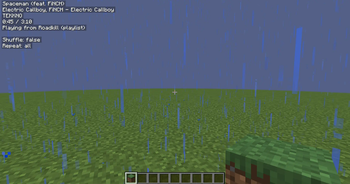
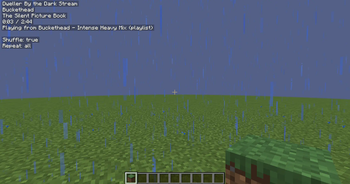
About this Mod
Hudify - A Spotify integration for CustomHud


Display your Spotify info on your hud and control your music using ingame keybinds.
Requires MidnightLib and version 4.0+ of CustomHud. Please read the installation instructions below!
Installation
You'll need to create a Spotify developer app to use this mod.
Why? In short, because it's easier for everyone. Since Spotify's API ratelimits are per app, not per user,
if everyone has their own app, Hudify can poll the API much more frequently without worrying about hitting ratelimits.
This allows Hudify to display far more accurate info, with much less risk of getting desynchronized.
Note: Playback controls are locked behind a Spotify Premium subscription, which is out of my control.
The CustomHud variables work fine without a subscription.
Installation instructions:
- Create a Spotify app according to the "Create an App" section in Spotify's docs.
- Set your app name and description to anything you want
- Set your Redirect URI to
http://localhost:8001/callback. - Get your Client ID from your newly created app
- Put your Client ID in Hudify's config via ModMenu, or by manually editing
.minecraft/config/hudify.json. - Press a Hudify keybind to initialize, and that's it!. No need to request an access token like the docs prompt you to, because Hudify takes care of that for you.
To uninstall, also be sure to also disconnect the app from https://www.spotify.com/us/account/apps
This process is very easy, only takes ~5 minutes, and does not cost any money nor require a Premium subscription. If you're still not interested, I suggest you try the mod Blockify, which doesn't require this process.
See the GitHub page for a list of CustomHud variables added. This is how you display the info on your hud.
Example CustomHud Config
=if: sp_track=
{sp_track}
{sp_album}
{sp_artists}
{sp_progress} / {sp_duration}
{{sp_context_name, "Playing from {sp_context_name} ({sp_context_type})"}}

Shuffle: {sp_shuffle}
Repeat: {sp_repeat}

{{sp_message, "{sp_msg} {sp_msg_dur}"}}
=endif=
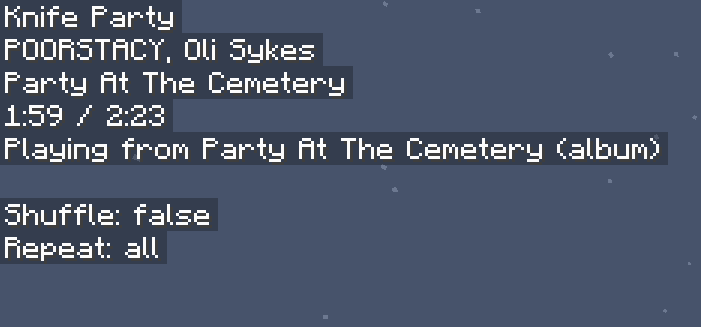
The config above produced this HUD: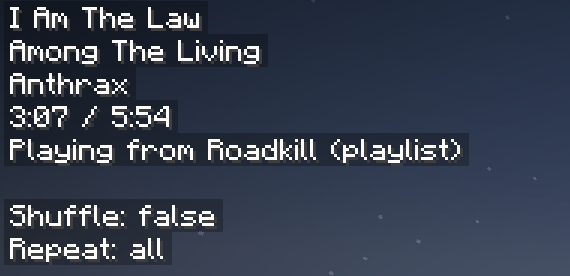
Credit: A huge thank you to erruqie's Blockify and Jakob's CustomHud for their fantastic work, this wouldn't have been possible without them.
Disclaimer: This project is not affiliated with or endorsed by Spotify, Blockify, or CustomHud.
Note about updates
I've been getting burnt from Minecraft, and updating my projects has fallen lower on my priority list. I designed them with forward compatibility in mind, so there's a good chance the old project version will work on newer MC versions. If that doesn't work, and you really want an updated version, poke Lightningtow on the linked discord server, and I'll get it updated for youPro tip: if you like the Hudify playback control keybinds, and want them to work everywhere on your computer, check out Microsoft PowerToys. You can use Keyboard Manager to rebind unused keys to Next Track, Previous Track, and Play/Pause Media.
Available Versions
How to Install Hudify on Your Server
Order Server
Order a Minecraft Java server with at least 3 GB RAM (4 GB recommended).
Set fabric Loader
In the panel under "Egg", select the fabric loader and matching Minecraft version (1.21.10).
Install Mod
Open the mod browser in the dashboard and search for "Hudify". Click "Install" – done! Alternatively, upload the .jar via SFTP to the /mods folder.
Compatibility
Mod Loaders
Minecraft Versions
1.21.10, 1.21.9, 1.21.3 (+4 more)
Server-side
✗ UnsupportedRecommended RAM
4 GB(min. 3 GB)Frequently Asked Questions
Hudify server crashes on startup – what to do?
Most common cause: wrong fabric version or insufficient RAM. Check the server log (latest.log) for "OutOfMemoryError" or "Mixin" errors. With Mado Hosting: ensure at least 3 GB RAM is allocated and the loader matches the mod version (1.21.10). You can switch loaders with one click in the panel.
Is Hudify compatible with fabric?
Hudify officially supports fabric for Minecraft 1.21.10, 1.21.9, 1.21.3. The Mado dashboard automatically detects incompatible loader combinations.
Server lagging with Hudify – how to optimize performance?
Recommended RAM: 4 GB (per 8 players). Use /spark profiler to check if Hudify consumes the most tick time. Common fixes: reduce server view-distance to 8-10, install "performant" or "starlight" as supplementary mods on Forge. With Mado Hosting, your server runs on NVMe SSDs with dedicated CPU cores for minimal latency.
Similar Mods

![[ETF] Entity Texture Features](https://cdn.modrinth.com/data/BVzZfTc1/af683d206d50b05258d865b0d6e4aa2f2cee12f2_96.webp)
![[EMF] Entity Model Features](https://cdn.modrinth.com/data/4I1XuqiY/6e5bbd0d06b1741bfdab6c0cfab6de8fdaf0064c_96.webp)



Rent Modded Server
Install Hudify with just one click on your server.