
Hulis Z-Crystals
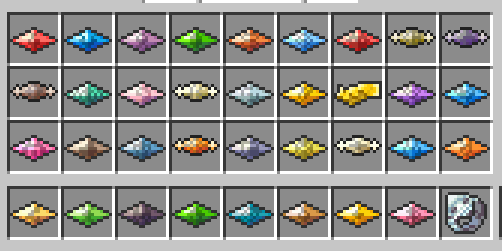
Adds Z-Crystals to Cobblemon
Screenshots
About this Mod
Hulis Z-Crystals
Hulis Z-Crystals is a mod that adds Z-Crystals to Minecraft
If you like my work consider supporting me on Ko-fi
Thanks to Sanji for making the Textures
Configuration
The Configuration file for this mod is located in the
configfolder underzcrystalsCOMMAND_Z_RING_PERMISSION_LEVEL: The Permission Level required to use the
/keyitemcommand
Default:4SERVERSIDE: If the Mod should be launched Serverside only or require it to be installed on clients
Default:false
Getting Started
To get started you need 2 things:
Some Blank Z-Crystals
A Z-Ring
Once you have the Z-Ring you need to right-click in the Air to enable using Z-Moves
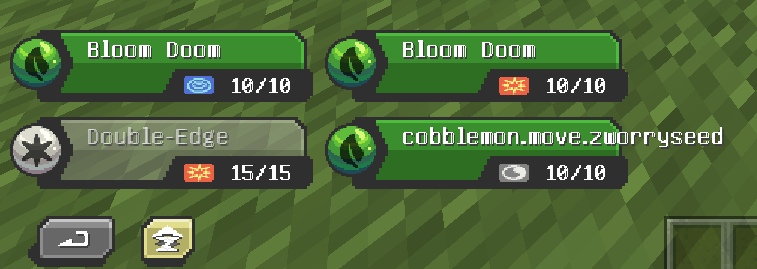
Once you do that you will have a button for Z-Moves in your Battle GUI when
a Pokémon is holding a Z-Crystal that can use a Z-Move.


Obtaining Z-Crystals
Z-Crystals are obtained by right-clicking certain Blocks/Entities with a Blank Z-Crystal
The Z-Crystal will be consumed, and you will get a Z-CrystalNormalium Z
Made by crafting a Blank Z-Crystal with nothing in a shapeless recipe
Fightinium Z
Made by right-clicking a Bamboo Block with a Blank Z-Crystal
Firium Z
Made by right-clicking a Magma Block with a Blank Z-Crystal
Waterium Z
Made by right-clicking a Wet Sponge with a Blank Z-Crystal
Electrium Z
Made by right-clicking a Copper Block with a Blank Z-Crystal
Grassium Z
Made by right-clicking a Wheat Crop with a Blank Z-Crystal
Icium Z
Made by right-clicking Powder Snow with a Blank Z-Crystal
Rockium Z
Made by right-clicking Bedrock with a Blank Z-Crystal
Steelium Z
Made by right-clicking an Iron Golem with a Blank Z-Crystal
Poisonium Z
Made by right-clicking a Potato Crop with a Blank Z-Crystal (Peaceful Mode Only)
Made by right-clicking a Cave Spider with a Blank Z-Crystal (Every Mode except Peaceful)Ghostium Z
Made by right-clicking Soul Sand with a Blank Z-Crystal
Darkinium Z
Made by right-clicking Reinforced Deepslate with a Blank Z-Crystal
Fairium Z
Made by right-clicking an Allay with a Blank Z-Crystal (Peaceful Mode Only)
Made by right-clicking a Vex with a Blank Z-Crystal (Every Mode except Peaceful)
~~~~Dragonium Z
Made by right-clicking an End Portal Frame with a Blank Z-Crystal
Buginium Z
Made by right-clicking a Beehive with a Blank Z-Crystal
Psychium Z
Made by right-clicking an End Gateway with a Blank Z-Crystal
Groundium Z
Made by right-clicking a Mud Block with a Blank Z-Crystal
Flyinium Z
Made by right-clicking a Chicken with a Blank Z-Crystal

Pokémon Specific Z-Crystals
Aloraichium Z
Made by right-clicking an Alolan Raichu with an Electrium Z
Decidium Z
Made by right-clicking a Decidueye with a Grassium Z
Incinium Z
Made by right-clicking an Incineroar with a Firium Z
Primarium Z
Made by right-clicking a Primarina with a Waterium Z
Pikanium Z
Made by right-clicking a Pikachu with an Electrium Z
Pikashunium Z
Made by right-clicking a Hat Pikachu with an Electrium Z
Tapunium Z
Made by right-clicking any Tapu with a Fairium Z
Marshadium Z
Made by right-clicking a Marshadow with a Ghostium Z
Mimikium Z
Made by right-clicking a Mimikyu with a Ghostium Z
Lycanium Z
Made by right-clicking a Lycanroc with a Rockium Z
Kommonium Z
Made by right-clicking a Kommo-o with a Dragonium Z
Solganium Z
Made by right-clicking a Solgaleo with a Psychium Z
Lunalium Z
Made by right-clicking a Lunala with a Psychium Z
Ultranecrozium Z
Made by right-clicking a Necrozma with a Psychium Z (Currently not working in battle)
Eevium Z
Made by right-clicking an Eevee with a Normalium Z
Mewnium Z
Made by right-clicking a Mew with a Psychium Z
Snorlium Z
Made by right-clicking a Snorlax with a Normalium Z
Serverside Resource Pack
The Mod comes with a Serverside Resource Pack that changes the Z-Crystals to look like the ones from the games
You will need to merge the resource pack with your own Server Resource Pack if you have one
You can find the Resource Pack in this GitHub Repository Hulis-Z-Crystals-Resource-Pack.zip
Available Versions
How to Install Hulis Z-Crystals on Your Server
Order Server
Order a Minecraft Java server with at least 3 GB RAM (4 GB recommended).
Set fabric Loader
In the panel under "Egg", select the fabric loader and matching Minecraft version (1.21.1).
Install Mod
Open the mod browser in the dashboard and search for "Hulis Z-Crystals". Click "Install" – done! Alternatively, upload the .jar via SFTP to the /mods folder.
Compatibility
Mod Loaders
Minecraft Versions
1.21.1, 1.20.1
Server-side
✓ RequiredRecommended RAM
4 GB(min. 3 GB)Frequently Asked Questions
Hulis Z-Crystals server crashes on startup – what to do?
Most common cause: wrong fabric version or insufficient RAM. Check the server log (latest.log) for "OutOfMemoryError" or "Mixin" errors. With Mado Hosting: ensure at least 3 GB RAM is allocated and the loader matches the mod version (1.21.1). You can switch loaders with one click in the panel.
Is Hulis Z-Crystals compatible with fabric?
Hulis Z-Crystals officially supports fabric for Minecraft 1.21.1, 1.20.1. The Mado dashboard automatically detects incompatible loader combinations.
Server lagging with Hulis Z-Crystals – how to optimize performance?
Recommended RAM: 4 GB (per 8 players). Use /spark profiler to check if Hulis Z-Crystals consumes the most tick time. Common fixes: reduce server view-distance to 8-10, install "performant" or "starlight" as supplementary mods on Forge. With Mado Hosting, your server runs on NVMe SSDs with dedicated CPU cores for minimal latency.
Similar Mods




Rent Modded Server
Install Hulis Z-Crystals with just one click on your server.