
Hytools
A mod that has useful tools for Hypixel
Screenshots


About this Mod






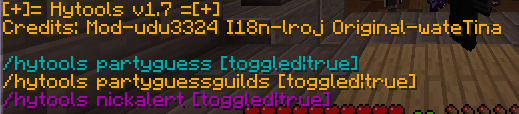
Hytools is a forge mod that adds useful client sided features to make the experience better on Hypixel. It utilizes OneConfig to toggle certain features.
PartyGuess
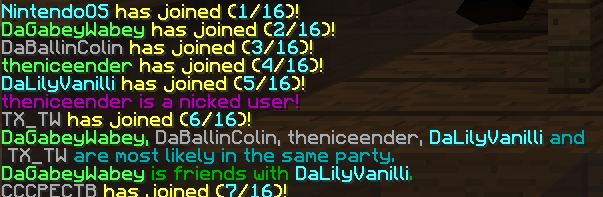
A tool that looks at chat and guesses players that are in a party. PartyGuess also checks if the first player in that party is in a guild with anyone else in the party. This tool works about 73% of the time. This could fail if Hypixel decides to join everyone at the same time.
NickAlert
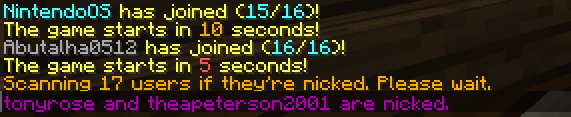
A tool that alerts if someone joined is nicked. This tool will not reveal the person behind the nick, but will just send it in chat. This tool will work half the time. (uses mc api) NickAlertHypixelAPI has been removed due to the api rework.
/scanfornicks
This command takes all the players currently in the game and scans if they are nicked. It is recommended to scan right before the game starts as NPCs in the game will be scanned too.
📜 Translations
We have a Crowdin project for translations. You can also submit translations here on GitHub, but Crowdin is preferred since it makes it much easier to resolve issues.
💾 Installation
Use the mod at your own risk. (this applies to all mods for hypixel) All chat messages from this mod is up to the player's interpretation of it.
- Download Forge 1.8.9 or have a client like Feather/Lunar/etc. that supports forge mods.
- Download the latest version of Hytools here.
- Place the jar file into your mods folder. (.minecraft/mods)
- Tada! Hytools is installed.
🛠️ Build From Source
The instructions to build are here.
❤️ Contribute
You can contribute by starring the repo, reporting issues, creating pull requests, and suggesting ideas.
Available Versions
How to Install Hytools on Your Server
Order Server
Order a Minecraft Java server with at least 3 GB RAM (4 GB recommended).
Set forge Loader
In the panel under "Egg", select the forge loader and matching Minecraft version (1.8.9).
Install Mod
Open the mod browser in the dashboard and search for "Hytools". Click "Install" – done! Alternatively, upload the .jar via SFTP to the /mods folder.
Compatibility
Mod Loaders
Minecraft Versions
1.8.9
Server-side
✗ UnsupportedRecommended RAM
4 GB(min. 3 GB)Frequently Asked Questions
Hytools server crashes on startup – what to do?
Most common cause: wrong forge version or insufficient RAM. Check the server log (latest.log) for "OutOfMemoryError" or "Mixin" errors. With Mado Hosting: ensure at least 3 GB RAM is allocated and the loader matches the mod version (1.8.9). You can switch loaders with one click in the panel.
Is Hytools compatible with forge?
Hytools officially supports forge for Minecraft 1.8.9. The Mado dashboard automatically detects incompatible loader combinations.
Server lagging with Hytools – how to optimize performance?
Recommended RAM: 4 GB (per 8 players). Use /spark profiler to check if Hytools consumes the most tick time. Common fixes: reduce server view-distance to 8-10, install "performant" or "starlight" as supplementary mods on Forge. With Mado Hosting, your server runs on NVMe SSDs with dedicated CPU cores for minimal latency.
Similar Mods




![[ETF] Entity Texture Features](https://cdn.modrinth.com/data/BVzZfTc1/af683d206d50b05258d865b0d6e4aa2f2cee12f2_96.webp)
![[EMF] Entity Model Features](https://cdn.modrinth.com/data/4I1XuqiY/6e5bbd0d06b1741bfdab6c0cfab6de8fdaf0064c_96.webp)
Rent Modded Server
Install Hytools with just one click on your server.