
ICNT
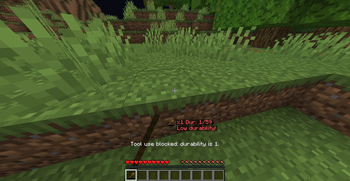
Shows the held item icon, total count of matching items, and durability on the HUD. Configure display position, warnings, sounds, and durability safety options through Mod Menu
Screenshots

About this Mod
ICNT (Inventory Count Tool)
ICNT is a lightweight Fabric client-side HUD mod for Minecraft 1.21.8.
It shows the icon of the currently held item, the total count of matching items in your inventory, and (for damageable tools) remaining durability directly on screen.
This mod is designed for players who want fast, readable inventory awareness during combat, mining, and exploration, without opening inventory screens.
All settings are available in Mod Menu with a GUI, so no commands are required.
Main Features
- Held item icon + live total count display
- Optional durability text for tools
- Configurable HUD layout:
- anchor position
- free-position mode
- X/Y offsets
- drag-based position editor
- Multiple display styles (compact / detailed)
- Warning system:
- caution and warning durability thresholds
- warning text display
- configurable warning sounds (volume/cooldown)
- Safety option to block tool use at durability 1
Smart Item Matching
ICNT counts items using item data-aware matching:
- Different potion effects are not merged
- Different enchantments are not merged
- Items with the same type but different components are counted separately
This means your displayed count reflects the exact variant you are holding, not just the base item ID.
Compatibility
- Loader: Fabric
- Minecraft: 1.21.8
- Environment: Client-side
Notes
- This mod only affects client HUD and local feedback.
- It does not require server-side installation.
Available Versions
How to Install ICNT on Your Server
Order Server
Order a Minecraft Java server with at least 3 GB RAM (4 GB recommended).
Set fabric Loader
In the panel under "Egg", select the fabric loader and matching Minecraft version (1.21.8).
Install Mod
Open the mod browser in the dashboard and search for "ICNT". Click "Install" – done! Alternatively, upload the .jar via SFTP to the /mods folder.
Compatibility
Mod Loaders
Minecraft Versions
1.21.8
Server-side
✗ UnsupportedRecommended RAM
4 GB(min. 3 GB)Frequently Asked Questions
ICNT server crashes on startup – what to do?
Most common cause: wrong fabric version or insufficient RAM. Check the server log (latest.log) for "OutOfMemoryError" or "Mixin" errors. With Mado Hosting: ensure at least 3 GB RAM is allocated and the loader matches the mod version (1.21.8). You can switch loaders with one click in the panel.
Is ICNT compatible with fabric?
ICNT officially supports fabric for Minecraft 1.21.8. The Mado dashboard automatically detects incompatible loader combinations.
Server lagging with ICNT – how to optimize performance?
Recommended RAM: 4 GB (per 8 players). Use /spark profiler to check if ICNT consumes the most tick time. Common fixes: reduce server view-distance to 8-10, install "performant" or "starlight" as supplementary mods on Forge. With Mado Hosting, your server runs on NVMe SSDs with dedicated CPU cores for minimal latency.
Similar Mods




Rent Modded Server
Install ICNT with just one click on your server.