
ICY
A FoxLoader (ReIndev) mod that shows description of block you are looking at!
Screenshots

About this Mod

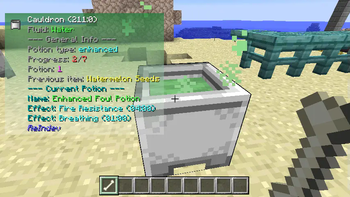
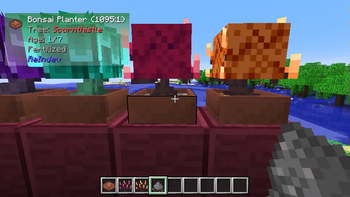
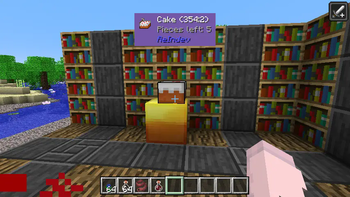
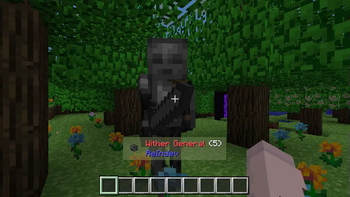
A FoxLoader (ReIndev mod loader) client-side modification that adds a handy tooltip which reveals some info about the block you aim with your cursor.
Basically, the nearest similar mod that come to my mind is WAILA, but this mod is specifically designed for ReIndev mechanics and environment.
At this moment, the mod shows such information:
- Basic information (block name, id/meta if enabled, mod source)
- Specific information for each block individually:
- Honeycomb: empty/filled status
- Pistons (+ sticky variant): enabled/disabled status
- Gears: power value
- Carved Pumpkins and Watermelons: carving type
- Dungeon Chest: loot status
- Cake and Pie blocks: pieces left
- Wait Block: wait delay
- Bonsai Planter: planted tree type and growth information
- Cauldron: potion information
- Jukebox: inserted disc information
- Forge, Refridgifreezer, Furnace, Incinerator: progress and inventory contents
- Specific information for each entity individually:
- Item Frame: hanged item name
- Painting: painting title
- Furnace Minecraft: fuel left status
Attention! For some blocks, such as Bonsai Planter, Cauldron, Forge, Refridgifreezer, Furnace, Incinerator and Jukebox, you need to hold SHIFT key to see the details!
Configuration
The tooltip can be easily configured and has own menu, just follow Mods -> ICY -> Configure mod.
Current tweakable options include:
- Show/hide ID and metadata of a block
- Show/hide harvestability icon
- Use either static color or gradient of two colors (ARGB) for tooltip background
- Change X/Y offset location of the tooltip
- Change the global location (anchor) of the tooltip
Installation
Ensure you have FoxLoader installed. Click at the link and follow instructions (Installation section). Or in a nutshell, grab *-mmc.zip file and export it to MultiMC/PrismLauncher.
Simply download a .jar file and put it inside mods folder. That's all.
Sources & License
The mod's sources are publicly available and licensed under GNU Lesser General Public License Version 2.1. The library HelloGUI it uses for config GUI is licensed under GNU Lesser General Public License v2.1.
Available Versions
How to Install ICY on Your Server
Order Server
Order a Minecraft Java server with at least 3 GB RAM (4 GB recommended).
Set modloader Loader
In the panel under "Egg", select the modloader loader and matching Minecraft version (b1.7.3).
Install Mod
Open the mod browser in the dashboard and search for "ICY". Click "Install" – done! Alternatively, upload the .jar via SFTP to the /mods folder.
Compatibility
Mod Loaders
Minecraft Versions
b1.7.3
Server-side
✗ UnsupportedRecommended RAM
4 GB(min. 3 GB)Frequently Asked Questions
ICY server crashes on startup – what to do?
Most common cause: wrong modloader version or insufficient RAM. Check the server log (latest.log) for "OutOfMemoryError" or "Mixin" errors. With Mado Hosting: ensure at least 3 GB RAM is allocated and the loader matches the mod version (b1.7.3). You can switch loaders with one click in the panel.
Is ICY compatible with modloader?
ICY officially supports modloader for Minecraft b1.7.3. The Mado dashboard automatically detects incompatible loader combinations.
Server lagging with ICY – how to optimize performance?
Recommended RAM: 4 GB (per 8 players). Use /spark profiler to check if ICY consumes the most tick time. Common fixes: reduce server view-distance to 8-10, install "performant" or "starlight" as supplementary mods on Forge. With Mado Hosting, your server runs on NVMe SSDs with dedicated CPU cores for minimal latency.
Similar Mods




Rent Modded Server
Install ICY with just one click on your server.