
IG: Item Clumps
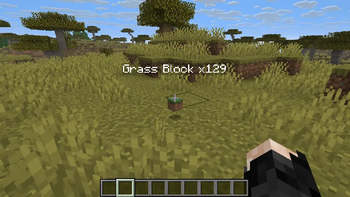
Item Clumps completely redesigns how dropped item entities behave in the world, combining them into lightweight, virtual mega-stacks to maximize both server performance and client-side frame rates.
Screenshots
About this Mod




📦 Item Clumps
No Backports: This mod targets Minecraft 26.1+. Older versions are unsupported.
Aggressive ground item optimization. Combines dropped items into mega-stacks.
Tired of frame drops when mining huge ore veins, detonating large areas, or running high-efficiency mob farms? Item Clumps completely redesigns how dropped item entities behave in the world, combining them into lightweight, virtual mega-stacks to maximize both server performance and client-side frame rates.
[!IMPORTANT]
Environment Requirement: This mod is required on both the client and the server. Mismatched installations will result in connection errors or desynchronization due to the custom data tracker registrations.
Part of the Instant Gratification Collection — mods that refine the vanilla experience with modern standards.
🎥 Showcase Video
Click the image above to watch the mod showcase in action!
✨ Features
- 🚀 Infinite Stack Size Virtualization: Minecraft normally limits ground items to a stack size of 64. When hundreds of items are dropped, the game has to process physics, collision checks, and rendering for each individual entity, causing severe lag. This mod bypasses the 64-stack limit, allowing identical ground items to merge into a single entity tracking a virtual count of up to 9,999 items by default (configurable up to the full 32-bit integer limit of 2,147,483,647 both in the GameRules screen and via commands).
- 🏷️ Real-Time Synced Count Tags: When a clump's count exceeds a normal stack, it renders a floating, client-side custom name tag (e.g.,
Oak Log x450). This tag is synced dynamically using network packet listeners, ensuring that the count changes instantly on your screen when you pick up a portion of the stack. - ⏱️ Vanilla Despawn Timer Rules: To match vanilla merging logic, when two stacks merge, the resulting clump inherits the age of the youngest item in the merge (taking the smaller age value, as age ticks upwards). This extends/resets the despawn window for the combined clump exactly like vanilla, ensuring you don't lose items prematurely.
- 📦 Smart Inventory Integration: Walking over a clump smoothly transfers items to your inventory in max stack chunks. The mod dynamically calculates the exact amount of free space in your inventory and takes only what fits, keeping the remainder safely in the ground clump instead of deleting or de-syncing them.
- ⚙️ Hopper Drip-Feeding: Hoppers extract items from virtual clumps one by one at standard vanilla transfer speeds. This ensures your redstone automation, sorting systems, and item-elevator pipelines function exactly as they did in vanilla, keeping the game balanced.
- 📐 Vanilla Physics Alignment: To match vanilla merging rules and prevent glitches, clumping operates on a configurable horizontal block radius, but respects vertical space. Items will not merge if they are separated vertically by 1 block or more (e.g., items resting on top of a block won't merge with items below it).
⚙️ Configuration (Native Game Rules)
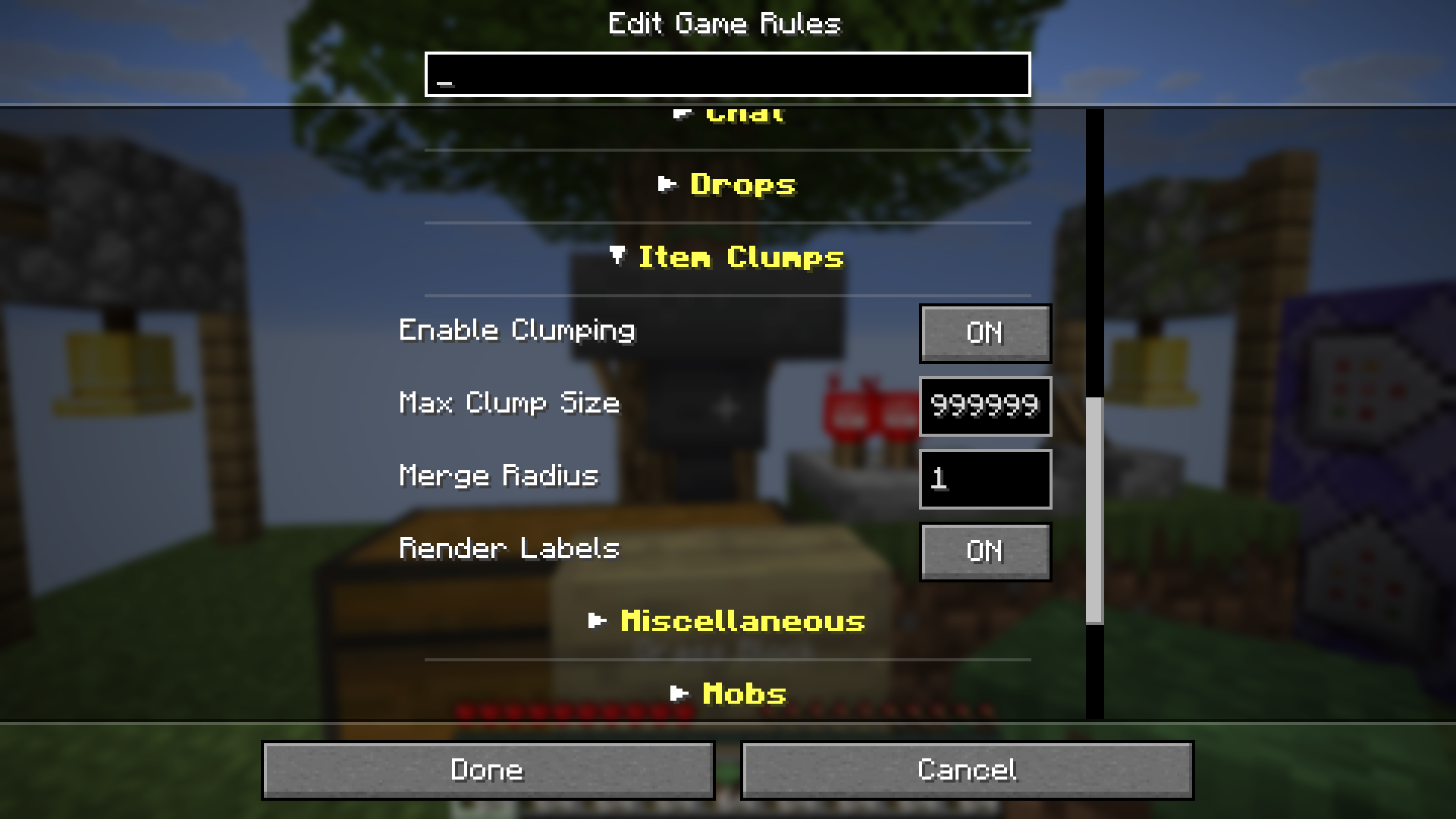
No messy config files. Item Clumps uses the Native Minecraft Game Rules system. All mod parameters are grouped into a dedicated "Item Clumps" category in the official UI.
[!TIP]
Too many rules? If the game rule screen feels cluttered, we highly recommend installing Collapsible Game Rules. It will automatically group the settings into clean, expandable folders!
Registered Rules:
item_clumps:enable_clumping(Default:true) - Toggles the clumping mechanic. When disabled, items behave exactly like vanilla.item_clumps:max_clump_size(Default:9999) - The maximum quantity of items a single clumped entity can contain before spawning a new stack.item_clumps:render_labels(Default:true) - Toggles the rendering of the floating custom count tag above virtual clumps.item_clumps:merge_radius(Default:1) - The horizontal block radius items will search to find matching items to merge.
☕ Support
If you enjoy the Instant Gratification collection, consider fueling the next update!



[!NOTE]
Indonesian Users: SocioBuzz and Saweria support local payment methods (Gopay, OVO, Dana, etc.) if you want to support me without using PayPal/Ko-fi!
📜 Credits
| Role | Author |
|---|---|
| Creator | Rifaditya (Dasik) |
| Collection | Instant Gratification |
| License | GPLv3 |
Made with ❤️ for the Minecraft community
Part of the Instant Gratification Collection
Available Versions
How to Install IG: Item Clumps on Your Server
Order Server
Order a Minecraft Java server with at least 3 GB RAM (4 GB recommended).
Set fabric Loader
In the panel under "Egg", select the fabric loader and matching Minecraft version (26.2-rc-2).
Install Mod
Open the mod browser in the dashboard and search for "IG: Item Clumps". Click "Install" – done! Alternatively, upload the .jar via SFTP to the /mods folder.
Compatibility
Mod Loaders
Minecraft Versions
26.2-rc-2, 26.2-rc-1, 26.2-pre-6 (+7 more)
Server-side
✓ RequiredRecommended RAM
4 GB(min. 3 GB)Frequently Asked Questions
IG: Item Clumps server crashes on startup – what to do?
Most common cause: wrong fabric version or insufficient RAM. Check the server log (latest.log) for "OutOfMemoryError" or "Mixin" errors. With Mado Hosting: ensure at least 3 GB RAM is allocated and the loader matches the mod version (26.2-rc-2). You can switch loaders with one click in the panel.
Is IG: Item Clumps compatible with fabric?
IG: Item Clumps officially supports fabric for Minecraft 26.2-rc-2, 26.2-rc-1, 26.2-pre-6. The Mado dashboard automatically detects incompatible loader combinations.
Server lagging with IG: Item Clumps – how to optimize performance?
Recommended RAM: 4 GB (per 8 players). Use /spark profiler to check if IG: Item Clumps consumes the most tick time. Common fixes: reduce server view-distance to 8-10, install "performant" or "starlight" as supplementary mods on Forge. With Mado Hosting, your server runs on NVMe SSDs with dedicated CPU cores for minimal latency.
Similar Mods




Rent Modded Server
Install IG: Item Clumps with just one click on your server.