
ImageToWorld
A mod for loading images into your world.
Screenshots
About this Mod
ImageToWorld
Image To World is a utility mod for pasting images into your Minecraft world.
Mod must be installed on both the client and the server.
General Info:
This mod gives a variety of ways you can add images to your world:
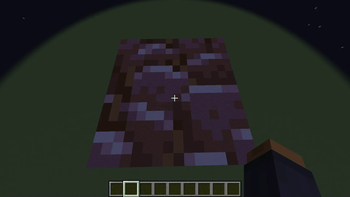
- Paste them directly into the world
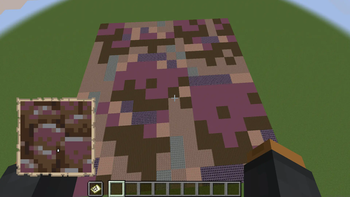
- Paste as map art into the world
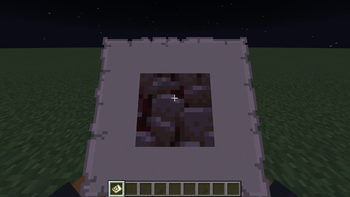
- Paste directly to a map without placing blocks in the world
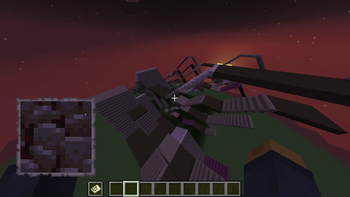
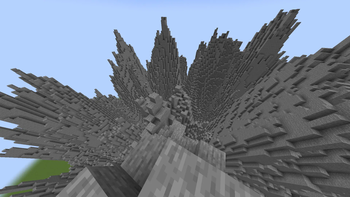
- Paste Images as Heightmaps
Images you want to load into your world should be put in the new images folder in the .minecraft directory so that this mod can access them.
When pasting your images keep in mind that the max size the image can be at full resolution is 1024x1024. Any larger and you will have to scale it down to an appropriate size.
Usage
When pasting images into your world, you are given a few options to configure how your image will generate, such as scale, facing direction, and patterns.
Paste directly into world:
This will paste your image into the world based on which block textures best match the colors in your image.
/image paste <imagePath> <position> [<scaleX>] <scaleZ> [<vertical>|<direction>]
Arguments:
imagePath: The name of your image. (Stored in a new images folder in your .minecraft directory)
position: The center position where the image will be generated.
scaleX: The scale of your image on the X axis, written as a ratio: 1:8.
scaleZ: The scale of your image on the Z axis, written as a ratio: 1:8.
vertical: Boolean determining whether to paste the image vertically.
direction: The horizontal direction your image will face.
Paste as map art:
This will paste your image into the world using blocks with map colors that best match the colors in the image.
/image pasteToMap <imagePath> <position> [<scaleX>] <scaleZ> [<direction>|<useStaircaseHeightmap>]
Arguments:
imagePath: The name of your image. (Stored in a new images folder in your .minecraft directory).
position: The center position where the image will be generated.
scaleX: The scale of your image on the X axis, written as a ratio: 1:8.
scaleZ: The scale of your image on the Z axis, written as a ratio: 1:8.
direction: The horizontal direction your image will face.
useStaircaseHeightmap: Boolean determining whether to generate map art using the Staircasing method.
Paste directly to map:
This will paste your image directly to a map without placing blocks in the world. Unlike the other commands, if your image is too large, it will simply auto-scale it down to a resolution that fits the map
/image give <imagePath> [<scaleX>] <scaleZ>
Arguments:
imagePath: The name of your image. (Stored in a new images folder in your .minecraft directory).
scaleX: The scale of your image on the X axis, written as a ratio: 1:8.
scaleZ: The scale of your image on the Z axis, written as a ratio: 1:8.
Paste as Heightmap:
This will paste your image as a heightmap, this is intended to work with heightmap images for terrain building
/image heightmap <imagePath> <block> <position> [<scaleX>] <scaleZ> [<scaleY>] [<direction>]
Arguments:
imagePath: The name of your image. (Stored in a new images folder in your .minecraft directory).
block: The block to build the heightmap out of.
position: The center position where the image will be generated.
scaleX: The scale of your image on the X axis, written as a ratio: 1:8.
scaleZ: The scale of your image on the Z axis, written as a ratio: 1:8.
scaleY: The scale of your image on the Y axis, written as a ratio: 1:8.
direction: The horizontal direction your image will face.
Available Versions
How to Install ImageToWorld on Your Server
Order Server
Order a Minecraft Java server with at least 3 GB RAM (4 GB recommended).
Set fabric Loader
In the panel under "Egg", select the fabric loader and matching Minecraft version (1.21).
Install Mod
Open the mod browser in the dashboard and search for "ImageToWorld". Click "Install" – done! Alternatively, upload the .jar via SFTP to the /mods folder.
Compatibility
Mod Loaders
Minecraft Versions
1.21, 1.20.6, 1.20.5 (+10 more)
Server-side
✓ RequiredRecommended RAM
4 GB(min. 3 GB)Frequently Asked Questions
ImageToWorld server crashes on startup – what to do?
Most common cause: wrong fabric version or insufficient RAM. Check the server log (latest.log) for "OutOfMemoryError" or "Mixin" errors. With Mado Hosting: ensure at least 3 GB RAM is allocated and the loader matches the mod version (1.21). You can switch loaders with one click in the panel.
Is ImageToWorld compatible with fabric?
ImageToWorld officially supports fabric for Minecraft 1.21, 1.20.6, 1.20.5. The Mado dashboard automatically detects incompatible loader combinations.
Server lagging with ImageToWorld – how to optimize performance?
Recommended RAM: 4 GB (per 8 players). Use /spark profiler to check if ImageToWorld consumes the most tick time. Common fixes: reduce server view-distance to 8-10, install "performant" or "starlight" as supplementary mods on Forge. With Mado Hosting, your server runs on NVMe SSDs with dedicated CPU cores for minimal latency.
Similar Mods

![[ETF] Entity Texture Features](https://cdn.modrinth.com/data/BVzZfTc1/af683d206d50b05258d865b0d6e4aa2f2cee12f2_96.webp)
![[EMF] Entity Model Features](https://cdn.modrinth.com/data/4I1XuqiY/6e5bbd0d06b1741bfdab6c0cfab6de8fdaf0064c_96.webp)



Rent Modded Server
Install ImageToWorld with just one click on your server.