
Improved Map Colors
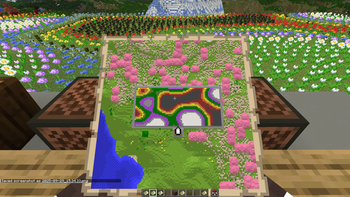
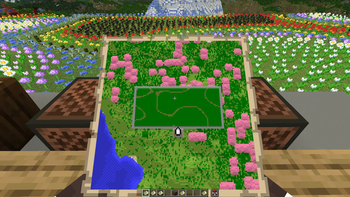
Small project aimed at improving the customizability of Minecraft maps through datapacks, made for Gneiss Name's video
Screenshots
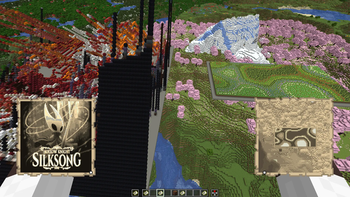
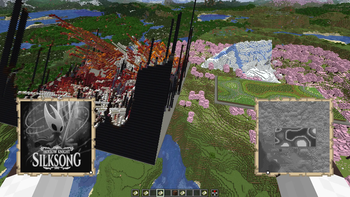
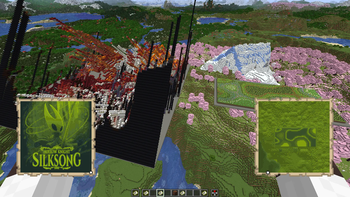
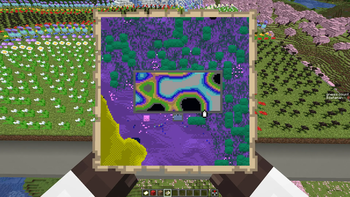
About this Mod
Improved Map Colors
Improved Map Colors is a Minecraft mod made for Gneiss Name's video that improves Minecraft's default map colors, including making them configurable by the user or by datapacks on a server or singleplayer world. Because of that server functionality, this mod must be installed on both the dedicated server and the client distributions.
There are also several pre-configured options for Minecraft map colors, including sepia tones, grayscale, and inverted colors.
Gneiss Name's channel: https://www.youtube.com/@gneissname
Video this mod was made for
Usage
The mod allows you to configure both the color palette Minecraft uses as well as which blocks and blockstates show up as which colors. This is achieved through two main ways: Mod config files and datapacks.
Config
The config file provides two fields that can be used to directly modify the palette and state list: colorlist and state_list.
colorlist, as the name and description suggest, allows you to modify the color palette Minecraft uses. This is set to vanilla by default, to illustrate the format that the mod expects, which is a list containing up to 63 colors specified by their hexadecimal color code.
state_list allows you to modify the color ID that a BlockState or a Block shows up as on a map. The format the mod expects is also illustrated by the default entries, graciously provided by Gneiss: blockid[blockstate information]:colorID. The blockstate information is specified in the same way as vanilla blockstate data, [name=value,name1=value1]. The mod will do its best to guess what you intend with a specified state, but it can be a bit finicky.
Also included is something like a debug method of overriding everything in the form of a CSV file. This must be specified in the provided config fields, color_file and blockstate_file. The format for each is described and shown below.
CSV format
Color CSV should be in the format: |hex color|[optional id]|, like:"#000000","0"
"#00ff00","3"
"#ff00ff"
Block State CSV should be in the format:
|BlockID[statedata]|colorID
"minecraft:grass_block","1"
"minecraft:black_bed[part=foot]","3"
"minecraft:grass_block","[snowy=true]","2"
Datapacks
These allow per-world map settings and are how the included presets work. The format for them is provided in the presets, but in short the mod will scan the mapcolors/colors and mapcolors/states subdirectories in any datapack.
Colors: The format for the color list files is a "colorlist" JSON object for colors in the /colors directory, mapping from a numerical colorID string to a hex color code, like "id":"hex color", where id is in a range from 0 to 63 inclusive.
States: The format for the blockstate file is an array called "stateColorIDList", which contains JSON objects in the format below.
State Holder Format
{
  "state": {
    "Name": "<minecraft block id>",
    "Properties": {
      "name": "value",
      "name1": "value1",
      "name2": "value2"
    }
  },
  "colorID": <id>,
  [optional] "trackedProperties": [
    "name",
    "name1"
  ]
}
Big thanks to Gneiss for inspiring the project and Grassy for translating it into Russian!
Available Versions
How to Install Improved Map Colors on Your Server
Order Server
Order a Minecraft Java server with at least 3 GB RAM (4 GB recommended).
Set fabric Loader
In the panel under "Egg", select the fabric loader and matching Minecraft version (1.21.8).
Install Mod
Open the mod browser in the dashboard and search for "Improved Map Colors". Click "Install" – done! Alternatively, upload the .jar via SFTP to the /mods folder.
Compatibility
Mod Loaders
Minecraft Versions
1.21.8, 1.21.7, 1.21.6 (+4 more)
Server-side
✓ RequiredRecommended RAM
4 GB(min. 3 GB)Frequently Asked Questions
Improved Map Colors server crashes on startup – what to do?
Most common cause: wrong fabric version or insufficient RAM. Check the server log (latest.log) for "OutOfMemoryError" or "Mixin" errors. With Mado Hosting: ensure at least 3 GB RAM is allocated and the loader matches the mod version (1.21.8). You can switch loaders with one click in the panel.
Is Improved Map Colors compatible with fabric and neoforge and quilt?
Improved Map Colors officially supports fabric, neoforge, quilt for Minecraft 1.21.8, 1.21.7, 1.21.6. The Mado dashboard automatically detects incompatible loader combinations.
Server lagging with Improved Map Colors – how to optimize performance?
Recommended RAM: 4 GB (per 8 players). Use /spark profiler to check if Improved Map Colors consumes the most tick time. Common fixes: reduce server view-distance to 8-10, install "performant" or "starlight" as supplementary mods on Forge. With Mado Hosting, your server runs on NVMe SSDs with dedicated CPU cores for minimal latency.
Similar Mods




Rent Modded Server
Install Improved Map Colors with just one click on your server.