
Improved F3
This project is an improved F3 Menu with different translations and toggles in the config.
Screenshots
About this Mod

What is ImprovedF3?
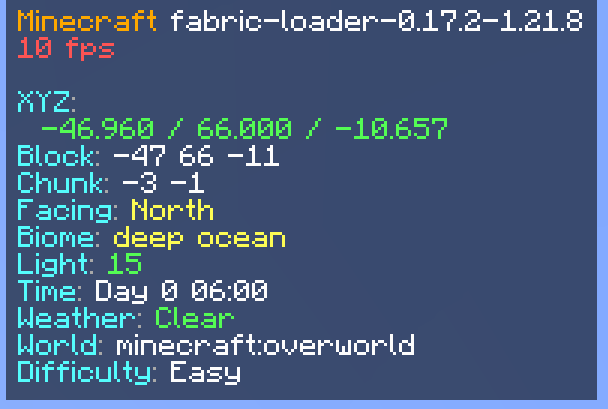
ImprovedF3 is a Fabric mod that completely transforms Minecraft's F3 debug screen into a beautiful, organized, and highly customizable information display. Say goodbye to the cluttered vanilla F3 screen!
✨ Key Features
🎨 Visual Improvements
- Semi-transparent backgrounds for better readability
- Smart color coding for instant information recognition:
- 🟢 Green for high FPS (60+) and safe light levels
- 🟡 Yellow for medium FPS (30-59) and moderate values
- 🔴 Red for low FPS (<30) and dangerous light levels
- 🟣 Purple for memory information
- 🔵 Cyan for labels and system info
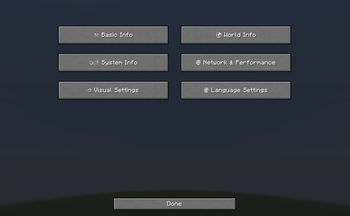
⚙️ Full Customization (Press B!)
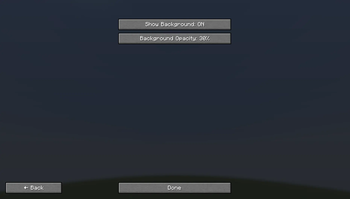
- Toggle Background - Show/hide the semi-transparent panels
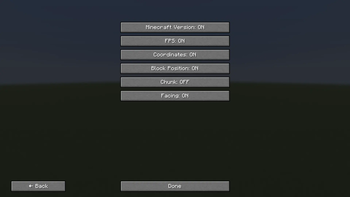
- Toggle Any Module - Show/hide individual information pieces
- Many Languages Supported with full translations
- Auto-saving configuration - Your settings persist between sessions
📊 Available Information Modules
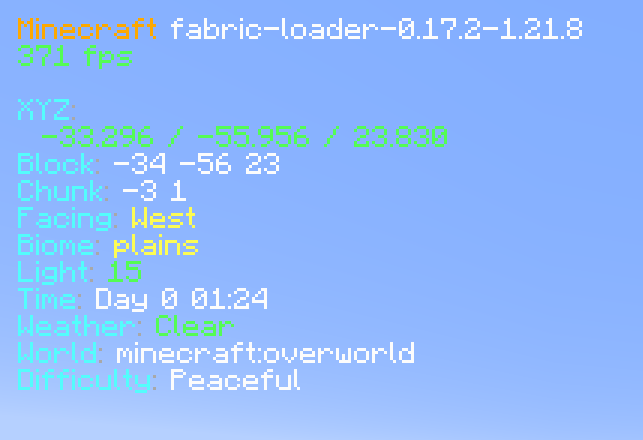
🎮 Basic Info
- Minecraft Version
- FPS (with color coding)
- Coordinates (X, Y, Z)
- Block Position
- Chunk coordinates
- Facing direction
🌍 World Info
- Biome (translated)
- Light Level (with safety colors)
- Time & Day
- Weather conditions
- World/Dimension name
- Difficulty setting
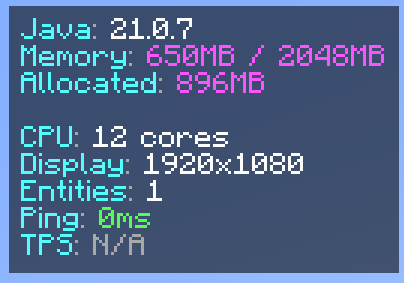
⚙️ System Info
- Java Version
- Memory usage
- Allocated memory
- CPU cores
- Display resolution
🌐 Network & Performance
- Entity count
- Ping (in multiplayer)
- TPS (server performance)
🎛️ Configuration Options
Organized Submenus:
- 🎮 Basic Info - Core game information
- 🌍 World Info - World and environment data
- ⚙️ System Info - Hardware and performance
- 🌐 Network & Performance - Multiplayer and server info
- 🎨 Visual Settings - Background and display options
- 🌐 Language Settings - Multi-language support
Supported Languages:
- English, Deutsch, Polski, Українська, Русский
- Türkçe, हिन्दी, 中文, Español, Português
- Français, اردو, Bahasa Indonesia, తెలుగు
🚀 How to Use
- Press F3 - Toggle the enhanced debug screen
- Press B - Open the configuration menu
- Navigate submenus - Choose what information to display
- Toggle modules - Show/hide specific information
- Change language - Full translation support
🎯 Perfect For
- Content Creaters - Clean, professional debug display
- Technical Players - Comprehensive system information
- Multiplayer - Network performance monitoring
- Mod Developers - Detailed debugging information
- Anyone who wants a better F3 experience!
Transform your F3 screen from cluttered chaos to organized beauty! 🎨✨
Available Versions
How to Install Improved F3 on Your Server
Order Server
Order a Minecraft Java server with at least 3 GB RAM (4 GB recommended).
Set fabric Loader
In the panel under "Egg", select the fabric loader and matching Minecraft version (1.21.10).
Install Mod
Open the mod browser in the dashboard and search for "Improved F3". Click "Install" – done! Alternatively, upload the .jar via SFTP to the /mods folder.
Compatibility
Mod Loaders
Minecraft Versions
1.21.10, 1.21.9, 1.21.8 (+2 more)
Server-side
✗ UnsupportedRecommended RAM
4 GB(min. 3 GB)Frequently Asked Questions
Improved F3 server crashes on startup – what to do?
Most common cause: wrong fabric version or insufficient RAM. Check the server log (latest.log) for "OutOfMemoryError" or "Mixin" errors. With Mado Hosting: ensure at least 3 GB RAM is allocated and the loader matches the mod version (1.21.10). You can switch loaders with one click in the panel.
Is Improved F3 compatible with fabric?
Improved F3 officially supports fabric for Minecraft 1.21.10, 1.21.9, 1.21.8. The Mado dashboard automatically detects incompatible loader combinations.
Server lagging with Improved F3 – how to optimize performance?
Recommended RAM: 4 GB (per 8 players). Use /spark profiler to check if Improved F3 consumes the most tick time. Common fixes: reduce server view-distance to 8-10, install "performant" or "starlight" as supplementary mods on Forge. With Mado Hosting, your server runs on NVMe SSDs with dedicated CPU cores for minimal latency.
Similar Mods


Rent Modded Server
Install Improved F3 with just one click on your server.